Baofeng UV-5RA : ExpertPower XP-771 Elite 14.5-Inch Dual Band Antenna for the Baofeng UV5 Radio

I am a huge Baofeng UV-5RA handheld radio fan! Yes, it is a Ham Radio, but it is also much, much more and I love the little radio. It is a dynamo! The radio is a great size, packed full of features, reliable, and more than anything else EXTREMELY affordable. You can read more about my review of the Baofeng UV-5R radio here < UV-5RA review >. This post is dedicated to the ExpertPower XP-771 Elite 14.5-Inch Dual Band Antenna Baofeng UV-5R antenna : ExpertPower XP-771 Elite 14.5-Inch Dual Band Antenna (144/430Mhz U/V SMA-F)(144/430Mhz U/V SMA-F).
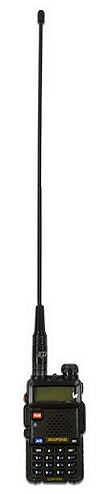
The antenna that comes with the unit is the typical “stubby” but works just fine. It is solid, sturdy and will do the job. However, for the frequency ranges of the UV-5R radio I wanted an appropriate sized antenna for better overall operation (range of reception and transmission). To fit that requirement I chose the ExpertPower® 14.5″ Dual Band Two-way Radio Antenna SMA-Female.

The improved gain performance results are noteworthy for a little handheld: 2.15dBi (144-146 MHz), 3.5dBi (430-440 MHz).

This antenna is very sturdy and works as advertised. And for $8.55 at the time I originally purchased it, it is hard to beat. It will run you about $10 – $12 now up on Amazon. Search hard, you might find a better deal, especially for a “quantity” purchase or group buy.

I will only use the stubby antenna when the longer antenna would get in the way, or when I purposely want very short ranges. Yes, there are times when I would want to keep operational range to a minimum. Think OpSec (Operational Security). Some folks (purists) might correctly refer to that as ComSec (Communications Security).  But when the extra range is needed (reception and transmission) I will use the 14.5” antenna. Also, there is a marked improvement in the quality of reception at any range when using this longer antenna. I am not sure if it is the additional length or simply a better quality antenna, maybe both.

Some Tech Specs:

  • ExpertPower XP-771 Elite 14.5-Inch Dual Band Antenna (144/430Mhz U/V SMA-F) Boafeng UV-5RFrequency Range: 144-146, 430-440 MHz
  • VSWR: less than 1.5
  • Gain: 2.15dBi (144-146 MHz), 3.5dBi (430-440 MHz)
  • Maximum Power Input-watts: 50 W
  • Height: 14.4 inches
  • Connector: SMA-Female


Antenna Flaw –

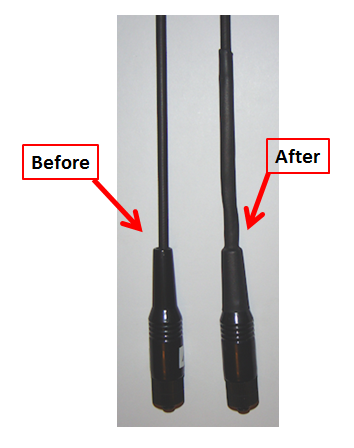
There is an inherent flaw to this antenna. However, the flaw is not unique to this particular antenna, it is present in all of the 14.5″ antennas I researched. If you look at the picture to the right, see the red arrow? It points to the area Baofeng-UV5R-antenna4where the antenna itself (stick) goes into the antenna base. There is a very small gap around the antenna in that spot. OK, maybe “flaw” is a little excessive, but, there is a problem with all antennas like this that could turn into a larger problem down the line. But, not to worry…I have a fix for it. I will explain how to correct this problem and strengthen the antenna at the same time.
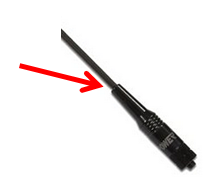
Le t me explain the problem first. If it were raining, rain could roll down the antenna and get into the antenna base and then make its way to the point where the antenna connects to the radio. The moisture itself could enter the radio or just collect in the base itself and eventually corrode the metal potentially causing a connection/operations problem.

But it is a relatively easy fix in my opinion. And there is a “bonus feature” when you are done with with very minor fix, a stronger antenna less prone to fail at that inherent weak point.

To implement the “fix” do the following…Performix Liquid Tape - Electrical

Step #1 – Go to your local hardware store and buy:

  • Performix Liquid Tape – Electrical
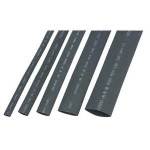
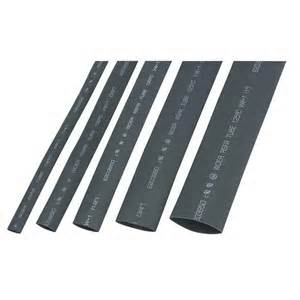
  • 1/2″ electrical shrink wrap, 3″ lengths are fine.shrink wrap for electrical wire
  • 5/8″ electrical shrink wrap, at least 3″ long but preferably 4″ – 5″ in length. Fastenall carries longer lengths of shrink wrap at very good prices.
  • Option, buy only 1/2″ electrical shrink wrap, but in 5″ lengths. This won’t work with a single piece of 5/8″ shrink wrap, it simply won’t shrink down enough.
  • If you don’t already own one, buy a long-handled Bic lighter.
Step #2 – With a toothpick apply a very small amount of liquid tape to the gap between the antenna “stick” and the antenna base. ExpertPower XP-771 Elite 14.5-Inch Dual Band Antenna for the Baofeng UV-5R(see the read arrow in the above picture pointing at that gap.) Use the toothpick to get the liquid tape AntennaFix2from the can and then use it to push a small amount of the liquid into the gap all the way around. You are not trying to fill up the gap all the way to the base. Just put enough to create a “gasket effect” in the gap.
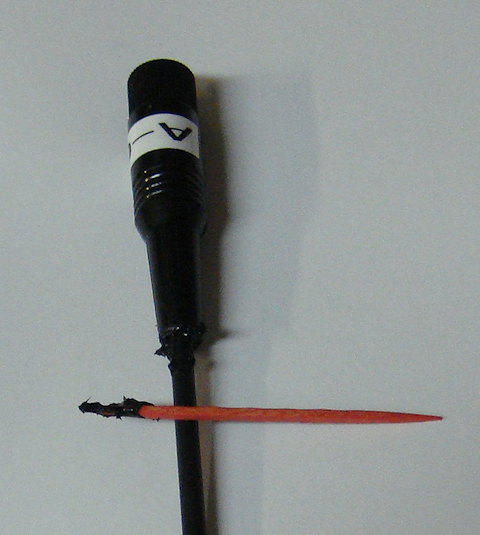
 

Clean up the excess Liquid Tape off the antenna. Only worry about it being “reasonably” cleaned up. This will get covered up with shrink wrap and no one will see it when you’re done.

ExpertPower XP-771 Elite 14.5-Inch Dual Band Antenna for the Baofeng UV-5R


Now, put the antenna down and leave it alone for a day. This will allow it to dry completely. Don’t get impatient, allow it to thoroughly dry. And do yourself a favor…don’t set it where your dog or toddler will find it and chew it to pieces.
option #2

option #1

Step #3 –You now have two options, choose the one that fits the parts you have on-hand.

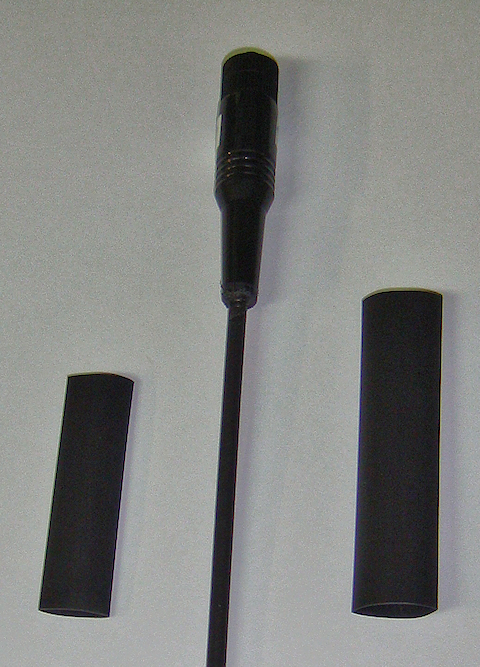
Option #1 : While you are waiting for the liquid tape to dry, get your shrink wrap out. Cut one piece of the 1/2″ shrink wrap to a length of 2″ – 2-1/2″. Leave the 5/8″ piece at least 3″ in length.

Option #2 : You will use a single piece of 1/2″ electrical shrink wrap that is 5″ – 6″ in length. You don’t need to do anything to prep this option.


Step #4 – You’ve allowed the liquid tape to dry for a day. You also have prepped your shrink wrap based on your “option” choice and you are ready to go. You kept the Bic lighter out of the hands of your 4-year old, so your house is still standing. You are now ready to put the shrink wrap on.

Step #5 – OPTION #1 :Take the 1/2″ piece of shrink wrap that you cut to 2″ – 2-1/2″ in length and slide it over the ExpertPower XP-771 Elite 14.5-Inch Dual Band Antenna for the Baofeng UV-5Rknob of the antenna. Move it all the way to the base of the antenna. Push it, and work it down, so the shrink wrap goes slightly over the expanding base of the antenna. Using the long handled Bic lighter heat the shrink wrap in-place and allow it to cool. DO NOT OVER HEAT THE SHRINK WRAP! If you do, you can damage the antenna. You want to heat the shrink wrap just enough to shrink it up solidly in contact with the base and the antenna stick itself, especially where the antenna enters the base.

Once the first piece of shrink wrap is cooled down take the longer 5/8″ piece of shrink wrap and ExpertPower XP-771 Elite 14.5-Inch Dual Band Antenna for the Baofeng UV-5Rslide it over the antenna knob as well. When you get to the antenna base keep sliding the shrink wrap over the expanding base until it won’t go any further. It should slide on well past (or lower) than the first piece of shrink wrap that you put on. There are small ridges on the antenna base; you should be able to work the shrink wrap over the first ridge line (see the picture to the right).

You will now heat this piece of shrink wrap as well. But, you may have to hold the shrink wrap in-place with one hand to ensure that it stays as low on the antenna base as possible. Make sure it continues to cover the first piece of shrink wrap while you heat it.You want the double-layer of shrink wrap for bet protection.

Make sure you have a nice “snug” shrink against the antenna stick towards the top of the antenna. DO NOT OVER HEAT THE SHRINK WRAP! If you do, you can damage the antenna. You want to heat the shrink wrap just enough to shrink up solidly in contact with the base and antenna stick.

OPTION #2 : If you are using a single piece of 1/2″ electrical shrink wrap that is 4″ – 5″ in length, you will slide it over the knob of the antenna. Move it all the way to the base of the antenna. Push it, and work it down, so the shrink wrap goes as much over the over the expanding base of the antenna as possible. Using the long-handled Bic lighter heat the shrink wrap in-place and allow it to cool.

DO NOT OVER HEAT THE SHRINK WRAP! If you do, you can damage the antenna. You want to heat the shrink wrap just enough to shrink it up solidly in contact with the base and the antenna itself, especially where the antenna stick enters the base. Pay particular attention to “rolling” the shrink wrap onto the antenna stick to make a really good tight wrap. You don’t want gaps at the top where the shrink wrap ends on the antenna stick. Roll it around while it is hot to ensure it is in solid, gap-free, contact with the antenna stick. (see picture below) Yes, I roll it with my fingers, but it may be too hot for you. Use gloves if you need to.

Step #6 – If the end of the shrink wrap, opposite of the antenna base, still appears a little “loose” allow it to cool completely. Once it is cool, then try applying some more heat to it to finish the shrinking process. But remember DO NOT overheat the shrink wrap or antenna while doing this. I found after doing three antennas, that once the heat shrink is sufficiently heated and close to completely shrunk up against the antenna stick and base, that I roll in between my fingers tightly pressing it to the antenna stick. Yes, it is a little warm but not uncomfortable or painful. Disclaimer: Yes, its hot. So be careful not to burn yourself. Use gloves if you need to protect your fingers.
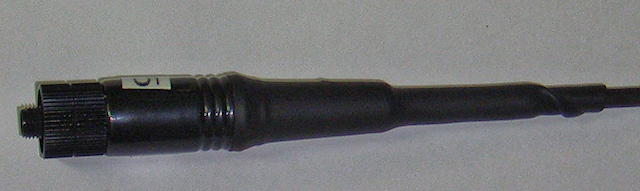
completed option #1 view
completed option #1 view

completed option 2 view

completed option #2 view


Now that you have completed the “fix” you have a virtually waterproof antenna abse. And remember the “bonus” I spoke of? By adding this fix you also have a much stronger antenna that is far less likely to fail at the point where the antenna stick enters the antenna base. It is at that point where most antennas fail during their lifetime.


2009 - 2020 Copyright © AHTrimble.com ~ All rights reserved
No reproduction or other use of this content 
without expressed written permission from AHTrimble.com
See Content Use Policy for more information.
Retevis Universal Rapid Charger

Retevis Universal Charger reviewnote: article first appeared in 2015.

You know me…I can’t ever leave well enough alone. And once again I am going to prove that to be true. But maybe, just maybe, it will be a good thing for you that I let my ADD/ADHD run rampant on this one. I think you will like what you read…if you have Boafeng radios.

Some time ago I told ya’ll that I have a radio cache for my church’s disaster response folks. I have eight radios in total plus two additional radios for leadership personnel for a total of ten radios. If you read the article you would know that each kit has its own charger base, a spare battery as well, plus an 12vDC adapter cable to use the charger base with any 12vDC power outlet. The idea was to make each radio kit a stand-alone kit that was capable of supporting its user independently of the other users…even in rather remote/primitive situations.

But, is that the best idea? Should that be the only idea? Did I sufficiently play out different scenarios that could affect that? Bottom line…is there a better option…or at least another option?

Sorry about that…too many questions to be sure. However, the more experience I gained with the radio cache and as the different scenarios came to light I had to re-evaluate my thinking.

Have you been in an airport lately? One of the things I’ve noticed are all the people congregating around electric power outlets. They have various brands and styles of phones plugged in wall power outlets along with laptops and tablets. They all want their power fix to keep their device up and running. Could there be a similar problem on the horizon with radios during emergencies, disasters, or grid-down? Of course. What if there were only two electric power outlets available but we needed to charge ten radios? What? The only answer could be take your turn!

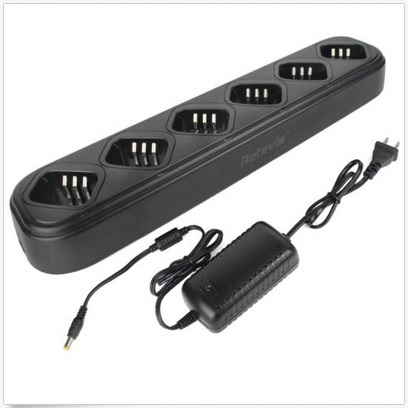
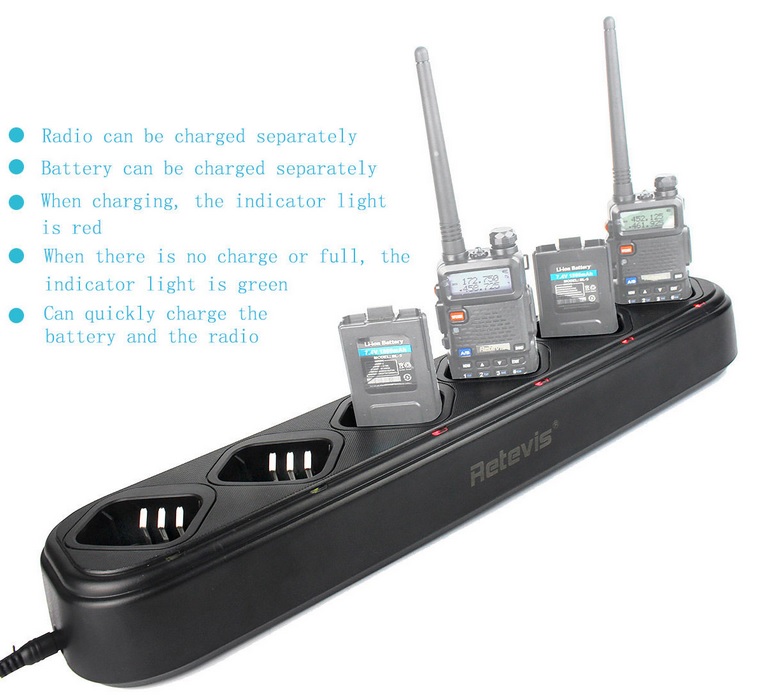
So, a couple of months ago I was doing some general browsing of different kinds of power equipment for radios. Retevis Universal Charger charges baofeng radiosLow and behold I see this picture of the Retevis Universal charger. Bingo! I flashed back to my fire department days and remembered chargers that we had that could charge multiple radios at one time in one charger base. I loved the idea, poured over all the specs, read the reviews, read the questions that had been asked, and I thought this could be a real answer. As a bonus that I will write about in a couple of minutes, was the way this charger connected to its power supply. Many manufactures, especially from China, make their “widget” to run off of an electric power standard such as 13vDC (input). But, they will have that power requirement internal to the “widget” itself. The power supply can be something like 110vAC or 220vAC, and either power supply can be used with the “widget” because the power supply is a separate piece of equipment. When they put the “widget” in the box for shipping, if it goes to America they throw in the 110vAC power supply, if it is going to Europe then they throw in the 220vAC power supply. That saves the manufacturer from making two completely different “widgets” because of different power source availability, they simply make a different power supply unit for each geographic area.

Technical Specs –
  • Weight: 28.29oz(802g)
  • Dimension: 18.89 x 4.34 x 2.56inch(480 x 110 x 66mm)
  • AC/DC Adapter
  • Weight: 6.77oz/192g
  • Input: 100-240V~50/60Hz 0.8A
  • Output: 13.2V-3.0A
  • Input: 12vDC
  • Output(Li-lon 2xCells): 8.7V-500mA
  • Output(Ni-MH 6xCells): 9.4V-500mA
  • Output(Li-lon 1xCells): 4.2V-500mA
  • Heavy duty durable design of poly-carbonate plastic.
  • The charger can be hung on the wall to save space.
  • Capable of controlling the charging process to ensure high efficiency.
  • Securing the charging process with multiple protection solutions.
Retevis Universal Charger dimensionsRetevis Universal Charger charges radios and batteries
My Observations –

I was looking closely at the pictures in the ad. I noticed that the power supply had a label that read “Input: 110v” and “Output: 13.2v” and a thought struck me. I crossed my fingers and pressed “buy.”

RetevisMultiCharger-006aYeah, so here’s the deal…I didn’t have a problem that needed a solution. I was just looking around, saw a solution, and realized that I could have had a problem all along and it just hadn’t manifested itself up to that point. What I am trying to say is this…I don’t have a mission statement for this piece of equipment. I don’t because I didn’t have the problem that I had to develop a solution to “cure.” I just got really lucky and found the solution before I realized I had a problem.

I ordered one of these charger units, it was straight from China. It took about three weeks for it to arrive on my doorstep. No big deal, I was in no hurry, and there was no pressing need. I pulled this bad boy out of the box and was immediately impressed with it. It appeared to be a solid piece of equipment and I liked what I saw. Of course it was immediately time to plug this puppy in.RetevisMultiCharger-006

As I plugged in the power supply I looked at the bottom and sure enough there was that label, big as life, “Input 110vAC – Output 13.2vDC.” I was even more hopeful!

As a side note…I always plug in the power supply to the wall outlet, and then I plug in the power supply to the piece of equipment. Why in that particular order? One day a couple of years ago I plugged in a power supply (yes, from China) and it “popped” really loud and began to smoke. If the equipment had been plugged in at the time, I am sure I would have burned out not just the power supply but the equipment also. So, I try to ere on the side of caution…the power supply gets plugged in to the power source, then the equipment gets connected to the power supply. I don’t want any fried electronic gear if I can help it.

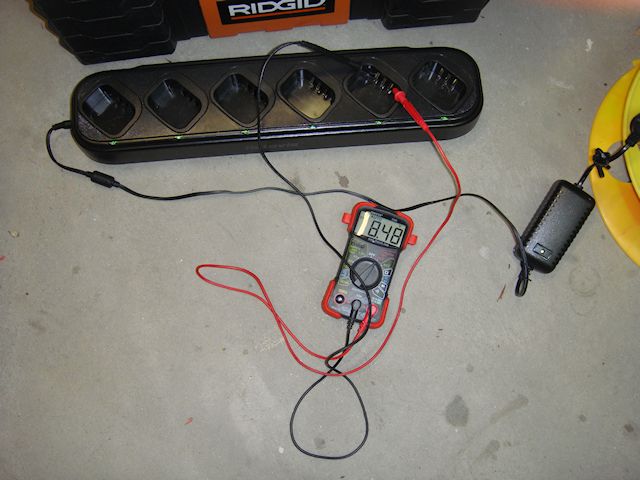
OK, I have the charger unit plugged in and I get out the trusty multi-meter and test the power supply’s output.

Power supply outputting the right voltage.

Power supply output voltage within the acceptable range for the charger unit

Then I tested each set of contacts in each of the charger ports. They test out at the right voltage range and within a couple of hundredths of a volt of each other. Perfect! Now I have a base line for comparison in my brilliant idea.

Charger ports testing out at the correct charging voltage.

Charger ports tested out at the correct charging voltage.

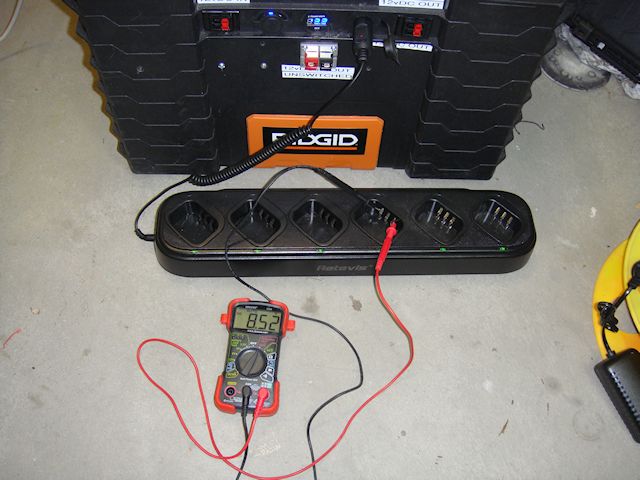
Next I hooked up a power cord to the vehicle power adapter of my portable power box. And it is showing virtually the same voltage as the AC->DC power supply that I just tested.

Power coming from my power box through the adapter cable is right on the money!

Power coming from my power box through the adapter cable is right on the money for the acceptable power range for the charger (13.27vDC). Less than 2/10ths of a volt difference.

And then came the testing to make sure that the charger ports were throwing the right voltage as well.

Using DC power directly from my power box showing the right voltage coming from the charging ports. Less than 4/100ths of a volt difference.

Using DC power directly from my power box showing the right voltage coming from the charging ports. Less than 4/100ths of a volt difference.

Now the acid test…

Bonus! –

As you can see I was able to use my portable power box to charge my radios using the Retevis Universal multi-charger unit. I wrote about my portable power box a while back. It is basically a 12vDC deep cycle 100Ah battery with various in/out ports and the ability to be charged through standard 110vAC power supply or charged via solar panels with a charge controller.

When I plugged the 12vDC power cable from the portable power box into the charger base. No smoke, no pop, no tripped circuit breakers…it was looking really good. All the lights on the charger base were on just like they were when I was running the charger base off regular house current.

So here is the bonus, maybe the best aspect of this charger, it works off of a 12vDC power source without any problems. Now, instead of having six 12vDC charger/adapter cables spider-webbed off my portable power box I can have a single charging station with a single cable handling all of it. That means you can run this charger unit off any vehicle’s cigarette lighter outlet. Sweet!

Charging batteries and radios from a 12vDC power source using the Retevis Universal Charger.

Charging batteries and radios from a 12vDC power source using the Retevis Universal Charger.

Summary –

If you are running multiple radios for your family, group, church, etc. you might want to take a serious look at the Retivis Universal Charger for Baofeng radios. This is a great solution for the right application. I love it!

Where to buy –


<click here to buy>


2009 - 2020 Copyright © AHTrimble.com ~ All rights reserved
No reproduction or other use of this content
without expressed written permission from AHTrimble.com
See Content Use Policy for more information.

RIGrunner 4005H Power Distribution Unit

note: article first appeared in May 2016

Sometimes you just stumble onto a great piece of equipment. Sometimes you do it completely unaware of you needing that piece of equipment. Sometimes you are pleasantly surprised at the quality of that piece of equipment.

“Yes!” to all three of those when it comes to the West Mountain RIGrunner 4005H.

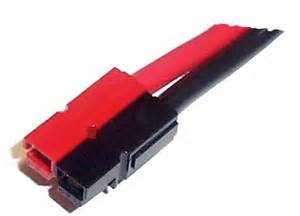
Over the last year and a half I have been working a whole lot on some great power projects. Correction, sometimes they have been radio projects but those too needed power. Years ago I standardized on Anderson Powerpoles for connecting all things power when it came to my radios. It seemed that every mobile radio I purchased had a different way to connect to a power source. And as you know, I like standardization…a lot.

Why? Because it makes things more inter-operable. And that applies to MOLLE tactical vests and pouches or radio rigs and power supplies. The solution became obvious to me early on that Anderson Powerpoles made the most sense.

Especially considering it makes it virtually impossible to cross-polarize your power. I like “dummy-proof” systems!

Using Anderson Powerpoles gives me a solid connection every time and makes it clear when connecting positive to positive and negative to negative. Gone! Were the scrambling around to figure out how to connect this or that radio to this or that power? They all had Anderson Powerpoles and naturally connected effortlessly.

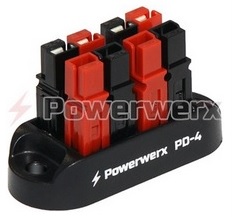
To generically distribute power in my Power-Box project I used a simple Powerwerx PD-4 unit. Any one set of the Anderson Powerpoles going in supplies the power, three sets distribute the power to whatever device needs it.

Two drawbacks –

  1. There are only three outlets for devices to hook to for a power supply.
  2. There are no fuses to protect the devices from any power problems.

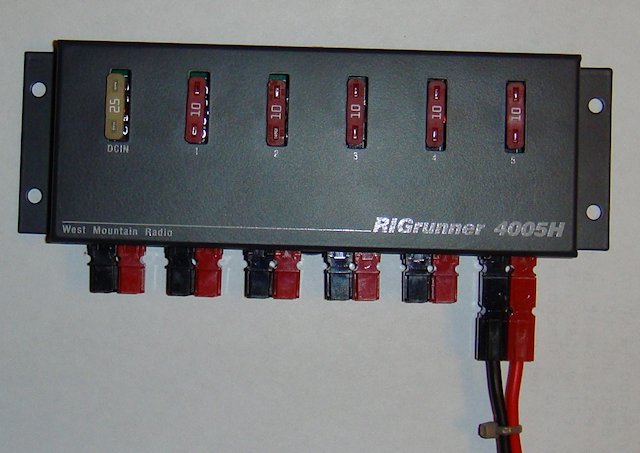
The West Mountain RIGrunner 4005H solves that problem very easily and rather gracefully. Yeah, I just used the term “gracefully” when talking about electronics. But, I am serious, this sweet little unit just matches that terminology to me. It is simple, clean, effective, efficient, and looks great.

But, notice I have yet to state the mission? Almost criminal on my part based on my long-standing advocacy of always having a mission for any piece of gear or equipment. So here it is –

“A cost effective method of distributing fuse protect 12vDC power to a variety of electronic devices using standard Anderson Powerpoles.”

Once again, I did my background research pretty well. I looked at available options, their features, and reputation. It was clear from the get-go that the RIGrunner was the choice.

This is the second product I’ve purchased from West Mountain Radio. I purchased the PWRgate PG40S Auto-Switch previously so I had a good feel for the overall quality of West Mountain Radio products. West Mountain didn’t disappoint me.

Let’s look at some information directly from their website…

Manufacturer Description –

RIGrunner is the most convenient and safest way to connect all of your DC equipment to a power source. It uses the excellent Anderson Powerpole® connectors, standardizing all of your DC connections. This RIGrunner can deliver up to 40 amps total through 5 outlets and is available with side mounted Powerpole® connectors. Side mounted connectors enable horizontal mounting. Works equally well for 6V, 12V, 24V and 48V systems. Operates at 40 amp continuous duty with 5 outlets in operation. 

Specifications –

Overall Dimensions (maximum, w/o cables):  1.4″ H x 7″ W x 3.0″ D
Weight:                                                             6 3/4 oz.
Voltage:                                                            Positive up to 48 VDC
Maximum total current:                                    40 amps
Maximum single individual outlet current:        40 amps (fuse protected)

Construction

  1. Built in USA to IPC-610 commercial manufacturing standards by an ISO9002 facility.
  2. Printed circuit board .062 FR4 material, extra heavy 3oz. copper, with greater than 1″ wide high current traces.
  3. Double sided, plated through holes, solder mask over bare copper, silk screened commercial grade printed circuit board.
  4. Enclosure: .062 aluminum, with attractive and extremely durable powder coat painting and clear silk screen labels.
  5. Power connectors: exclusively Anderson Power Products®Powerpole®.
  6. Connectors are arranged according to the ARES/RACES standard (see our links).
  7. Fuses installed are standard ATC/ATO automotive fuses available in 10 values from 1 to 40 Amps.
  8. Stainless steel hardware with PEM™ threaded mounting standoffs.

So, since the real meat of this unit is on the inside…naturally I had to open it up.

This puppy was a clean and graceful on the inside as it was on the outside. But, let me give some details –

  1. The case is solid and of a sufficient weight/strength/thickness to protect the sides from damage under any reasonable conditions.
  2. Two screws hold the case in place and can be easily removed to access the inside.
  3. Once inside the first thing I noticed was the quality look to the board. By quality I mean the board was clean, obviously well made, and the solder was first rate.
  4. I started poking around at the various components and they were all tight and securely soldered to the board.
  5. The Anderson Powerpoles themselves were tight and solidly connected to the board.

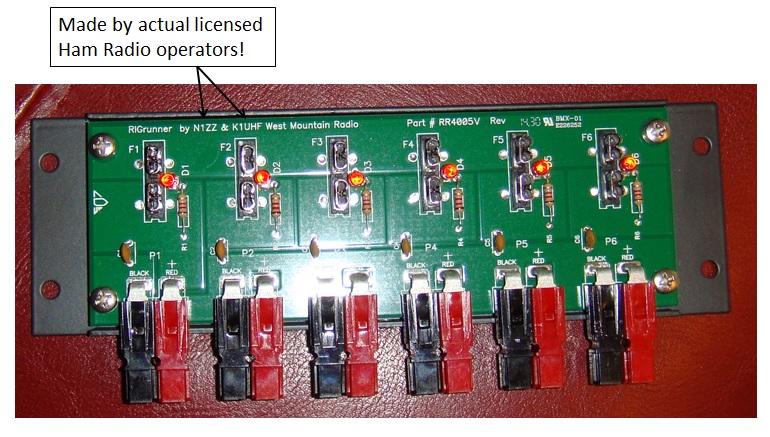
And then I noticed this…

The folks at West Mountain put their actual call signs on the board to show who it was made by. Now, that may not be a big thing to you, but to me knowing that Hammers were behind the design and manufacture of this unit just gave me a sense that it was done right by people who know.

The unit was easy to put back together and gave me that quality “feel” once again. This unit is made for real-life field operations.

So, was there anything that could be better about this unit? You know…the “Cons” side of things. Yes, two –

  1. The unit is not weather proof, not even weather resistant. This unit must be installed where it is protected from the elements. Rain, dust, snow, etc. can relatively easily enter the case and reach the board. I suppose you could silicone seal around the blade fuses and the Anderson Powerpoles to make it almost weather tight. So that is something to take into consideration. However, my applications do not require “weather-proof” or “weather-resistant” ratings so this is no big deal to me.
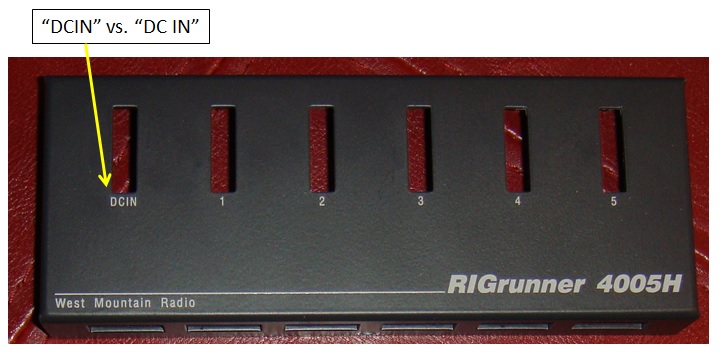
  2. Let me show you how picky I can be. The power outlets are clearly marked “1” – “5” with no problem correlating the fuse to the outlet. But, then I noticed the “DCIN” label. I was not really paying attention and trying to figure out what “DCIN” meant. About a second later, and a darkening red face, I realized that was the DC power inlet fuse. Yeah, sorry, mini-bran fart on my part. So I would rather see “DC IN” vs. “DCIN” and yes, I know it is extremely picky.

Occasional Issue –

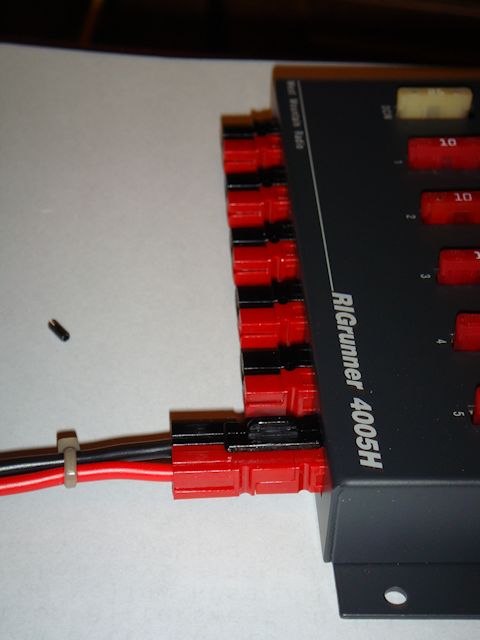
I never have experienced this myself but I did read where a couple of folks made the comment that on the rare occasion the Anderson Powerpoles separated from the unit. Not the ones mounted to the board, but the Powerpole (from the cable) plugged into the unit’s Powerpole seperated from the box connection. I tried like heck to get mine to separate by pulling on them and no success. OK, well that isn’t entirely true. They did separate but only as designed after apply considerable separating force to do so.

However, I wanted to make sure I included a “fix” just in case you might worry about that occurring in your set-up. So step-by-step…

Standard Anderson Powerpole connection example.


Used my punch and removed the roll pin from the connectors.


Got out one of my retention clips to stabilize and reinforce the connection.


The final product with the retention clip securely holding the connectors together.

Now, if you were still really worried about (i.e. obsessed) the connection, you could put a spot of Superglue on the retention clip. That would hold those puppies together through anything! Alternatively, you could wrap a piece of electrical tape around the retention clip a couple of times and that would hold the clip in-place as well. Problem (if there ever was one) solved!

Summary –

This is a great piece of equipment that functions flawlessly. On top of all that, it is solid, and will do the job for you. This product is an unquestioned

                          “BUY!”                              

< click here to go to West Moiuntain website RigRunner page >


Related Articles –

  1. Super PWRgate PG40S Auto-Switch


2009 - 2020 Copyright © AHTrimble.com ~ All rights reserved
No reproduction or other use of this content 
without expressed written permission from AHTrimble.com
See Content Use Policy for more information.
PDF Files: Baofeng Radio Information

For you Baofeng UV-5 owners and users…here are some great information and user manuals/guides that I created.

The Baofeng radio is a great little radio and RT Systems programming software is the best. But, documentation…easy to read/understand documentation…is hard to come by. These might help.


AHTrimble – Baofeng UV-5RA RadioUserGuide – 1.31.2016

AHTrimble – Baofeng UV-5RA Radio QuickStart (New)

AHTrimble Baofeng UV-5RA General Radio Menu Settings

AH Trimble RT Systems Software – UV-5R User Guide (20160515)

Please feel free to use the form below to request a specific subject/topic to be converted into a PDF file.

Request a topic/subject…

← Back

Thank you for your response. ✨


2009 - 2020 Copyright © AHTrimble.com ~ All rights reserved
No reproduction or other use of this content 
without expressed written permission from AHTrimble.com
See Content Use Policy for more information.

Pofung/Baofeng UV-6R Handheld Radio

note: article first appeared in March 2016

I love the Baofeng UV-5RA handheld Ham radio as you well know. I think it is just the most awesome prepper piece of gear that you can find…especially at that price of about $ 25 – $27 each. But, I have been on a long search to see if any other version of that radio is a better value or performs better than the UV-5RA. The BaofengUV-6R is the target of this review.

Just to make sure you are aware of the demands I place on a radio to be used in the world of emergency preparedness, here is the mission –

“Provide reliable radio communication in a variety of emergency, disaster, and grid-down situations at the individual level.”

 Restrictions & Requirements –

  • Must be easy to use.
  • Must be programmable.
  • Must be battery powered and batteries must be easily recharged.
  • Should be capable of UHF/VHF frequencies as well as FRS/GMRS/MURS frequencies.
  • Should be lightweight and easily concealed.

First Impressions –

It looked like a toy radio as soon as I took it out of the box. The flap that protects the accessory jack was loose and rather than protect the jacks…well, it would funnel water, dirt, and dust directly into the jacks. The yellow highlights on the radio furthered the impression that it was more of a “toy” than a real radio.

The keys are different shapes and not evenly spaced. The back-lighting started out to look like a nice feature till I realized that there a lot of white light coming from around each key. That would make you a sitting duck if you were trying to keep a low profile at night. The keys are poorly laid out, poorly labeled, and some keys are not even marked with any indication of what they do.

My opinion changed a little bit when I saw the nice big volume knob that you can easily grab hold of. The knob also has a seriously high-quality feel to it.

The battery is much larger than the battery on the UV-5RA battery, but only in size, not in capacity. Both are rated at 1800mAh. The battery installs easy enough and is just as easy to remove. A serious bad note though…I had no luck finding any replacement batteries or any longer life battery such as a 3800mAh battery option for the UV-5RA. That is itself is a deal killer!

The channel scan speed is slower than the UV-5RA and I can’t figure out any way to improve the scan speed.

I had no luck programming the radio. It doesn’t come with a programming cable and CHIRP users regularly complain that the software doesn’t work with the UV-6R. RT Systems does make a programming software version but I didn’t buy it just to test and review one radio that I already didn’t like. FYI…all of RT Systems software is the best out there…period!  But, I have read where there are quite a few users having problems with their computer actually not being able to communicate with the radio.

The antenna is the standard SMA connection and all UV5 compatible antennas fit the UV6 radio. That is a nice relief knowing all the antenna options that are available out there.

So, as of now what is my overall feeling about this radio? It sucks!

I got so frustrated trying to work with this radio I had to stop and go eat lunch. When I got back I tried to figure out why I was still reviewing the stupid thing when I already didn’t like it, it was poorly designed, hard to program, software problems, and the extremely poor jack protection. So why go on when I already know the radio just isn’t worth buying…or using?

This is huge step backwards for the Pofung/Baofeng line of radios!

So, am I giving the UV-6R a HUGE do not buy recommendation!!!!

Do not buy!


2009 - 2020 Copyright © AHTrimble.com ~ All rights reserved
No reproduction or other use of this content 
without expressed written permission from AHTrimble.com
See Content Use Policy for more information.

Antenna stand and ground plane for the Baofeng UV-5RA

Browning BR-180 Amateur Dual-Band Mobile AntennaOne of the best Ham (can also handle GMRS, FRMS, MURS) radios on the market today is a Baofeng UV-5RA. It is without a doubt one of the best little Ham radios out there today. It is extremely compact, easy to use, and incredibly cost effective for any prepper, emergency response team, new Ham operator, etc. It just can’t be beat for its price and capability…and available acessories.

To improve its capabilities I purchased a Browning BR-180 Amateur Dual Band Mobile Antenna. I already have a NMO (New Motorola) mount on my truck’s roof. FYI – NMO is the defacto standard for professional vehicle antenna mounting. So, I have this really great handheld radio, a matching high quality antenna and no real way to use both in a ground-based application. Yes, I believe I am far more likely to use the radio away from my truck during times of need. So what antenna would I use?

The question is valid since the Browning BR-180 requires a ground plane that is provided by the TRAM 1465 Land Mobile Base Ground Plane Kittruck roof. A ground-based (not mounted on my truck) use would have no such metal roof as a ground plane. So I purchased a ground plane kit.

I bought the TRAM 1465 Land Mobile Base Ground Plane Kit. Cost was $32 through Amazon. The kit solved that issue but I was still undecided on how to set-up the antenna itself. So I went back to basics and defined the “mission” I was trying to accomplish.

Mission –

A highly portable and versatile dual-band antenna supporting my Baofeng UV-5RA operating in almost any environment.

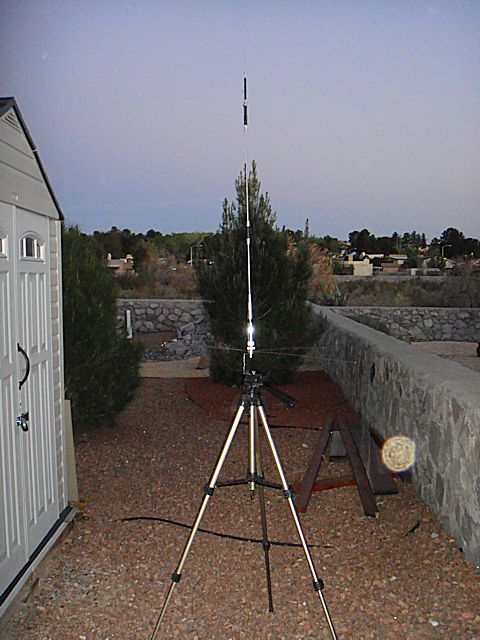
TRAM 1465 Land Mobile Base Ground Plane KitThen it dawned on me, I already had a support structure for dual UHF/VHF antenna – a camera tripod.

I put an additional bend in the bracket, drilled the appropriate sized hole in the “foot” of the bracket, and then went to Lowe’s to buy a wingnut to match the threaded post on the camera tripod. The camera tripod has a hook in between TRAM 1465 Land Mobile Base Ground Plane Kitthe legs in the center that I can attach a weight to hold the tripod steady to the ground. Because the tripod is adjustable I can have significant flexibility with the height of the antenna.

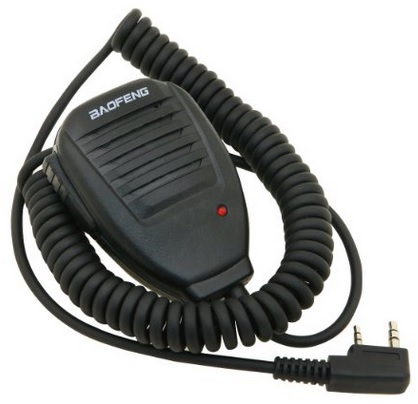
When connecting the radio to the antenna I use the MPD cable (RF coaxial RF coaxial cable SMA female to UHF SO239 PL259 female RG58cable SMA female to UHF SO239 PL259 female RG58 20inches). I also use the speaker/mic to reduce the stress on the cable/radio connection point.


Total time to build: less than 1/2 hour


2009 - 2020 Copyright © AHTrimble.com ~ All rights reserved
No reproduction or other use of this content 
without expressed written permission from AHTrimble.com
See Content Use Policy for more information.

Super PWRgate PG40S Auto-Switch

Ham In The Box - Super PWRgate PG40S by West Mountain RadioSometimes you just need that right piece of gear, that one need that is weird to fill, but you need it…you really, really need the right piece of equipment..

Well, the West Mountain Super PWRgate PG40S Auto-Switch is one of those pieces of equipment. And then some! Yeah, it’s that flipping good.

Let me share a little background first. For several years now I’ve been working on putting together radio and power equipment to keep communications going during emergencies, disasters, especially during a grid-down. Why? Other than the obvious answer, during my 30+ years of responding to emergencies and disasters I’ve learned that stable and reliable communications is a top priority. How much so? In every single incident where a firefighter was injured or killed, communications (poor or lack of) played a major role. Communication problems were the single common thread through all of these incidents.

Now, let me change to something completely different for a minute. I’ve been around long enough to remember the first personal computers. You know, the kind that didn’t even have a hard drive. I remember several times I would be working on these early computers and the power would flicker…everything lost! Yup, all the work that I had been doing was gone into some special “data zone” never to be seen again.

Finally after that happened a couple of times I learned about uninterruptible power supplies (UPS). Through pure magic it kept your computer going even when the power, not just flickered, but went out completely. It was as if the computer gods decided to smile down on us mere mortals. Yeah, I didn’t know at the time is was just a battery, auto-switch, and a battery charger built into that wonderful, magical UPS box.

Now, fast-forward to today…during times when communications are needed most I don’t want them to fail just because the power suddenly, unexpectedly flickers or goes out altogether. Because…DUH…during emergencies, disasters, and grid-down the power should be expected to go out! Yeah, no-brainer right?

Well, to meet the uninterruptible power supply needs that I foresaw, it would take a whole lot of money to buy the right UPS. And even then it wouldn’t have all the options and features that I wanted. So naturally I decided I was going to build my own solution. No, I am not a masochist, I just like to use my brain, to be challenged, and work with my hands. So, another great adventure was headed my way!

As I began to layout my first power box I had written down my “mission statement” for the box itself. Then I listed the “restrictions and requirements” that went into great detail. One of the biggest needs was the ability to automatically switch from the AC to DC power supply to the battery supplied DC power. The quest began!

Here is the mission statement for this piece of equipment –

“Provides clean DC power from an AC power source and automatically switches to battery back-up providing DC power when the AC power fails.”

I gotta tell you…it wasn’t hard to figure out. As usual I started doing some serious research into the options available out there on the market. And it became clear real quick that there was a pack leader, a unit that simply stood out among the others in terms of reliability and quality…West Mountain Radio’s Super PWRgate PG40s.

Here is the technical story from their website –

  • A Super PWRgate is a 12 volt backup power system rated at 40 amperes continuous from either a Power Supply or a Battery.
  • The Super PWRgate has a built-in four-stage battery charger with selectable current rates of 1, 4, 7 or 10 amperes.
  • Connected equipment will instantly switch to battery during a power blackout or power supply failure.
  • Uses two 80 ampere Schottky diodes as an OR-Gate to isolate the battery and power supply from each other.
  • Low loss PWRgate provides forward voltage drop of less than 0.3 volts at 20 A and 0.37 volts at 40 A.
  • Optimized for use with GELLED & AGM type batteries, but will keep flooded lead acid and marine type batteries near full charge as well.
  • Solid, durable construction in an aluminum case with heat sink. Includes mounting holes for convenient and secure use in mobile units.
  • Uses Anderson Powerpole®connectors
  • Dimensions: 1.65″ H x 5.25″ W x 3.9″ D

Specifications –

Maximum Voltage: ·                     18 Volts DC
Maximum Current: ·                     40 Amperes
Circuit: ·                     Diode OR-Gate
Diodes: ·                     Two Schottky 80 Ampere, 20 Volt
Voltage Drop: ·                     0.25 VDC at 1 Ampere

·                     0.37 VDC at 40 Ampere

Charging Circuit: ·                     Smart, linear charger

·                     Fuse switched for 1,4,7 or 10 Amperes (±5%) maximum

·                     Peak voltage limit: 13.8 (Gelled), 14.2 (AGM), (±2%)

·                     Peak voltage limit set via internal jumper to GELLED or AGM

·                     Peak voltage terminate point: 0.1 Maximum current

·                     Float Voltage: 13.5 volts (±2%)

LEDs: ·                     Green – Indicates charger is “ON”

·                     Red – Indicates peak “PK” charge voltage

·                     Yellow – Indicates Float “FL” voltage

Connectors: ·                     Anderson Powerpole, 40A
Dimensions: ·                     1.65″ H x 5.25″ W x 3.9″ D
Weight: ·                     0.9 lbs, 0.4 kg (aluminum enclosure with heat sink)
Mounting Holes: ·                     Two, 0.175 in. d, at a distance 4.875 in., for #8 hardware


Typical application –

Findings –

  1. I couldn’t get the unit to fail when switching from the power supply to the battery. No matter what I tried it performed the power switching perfectly. There wasn’t even a flicker in any of the equipment I tested it with.
  2. It really does a great job of keeping a battery charged. Technically that makes it a battery “maintainer” and not so much a charger. But, I ran my big 100Ah battery kind of low, then let the PWRgate go into charge mode. Yup, performed flawlessly; the unit didn’t even get hot.

 Summary –

This is a high-quality product that does exactly what they say it is supposed to do…and what it needs to do. For my radio set-up it is an essential piece of equipment and I am 110% satisfied with it. Awesome job West Mountain!


2009 - 2020 Copyright © AHTrimble.com ~ All rights reserved
No reproduction or other use of this content 
without expressed written permission from AHTrimble.com
See Content Use Policy for more information.
AIMS Power (PWRI60012S) 600W Pure Sine Power Inverter

note: article first appear April 2016

I hope by now you are familiar with the “power box” that I built. Some might call it a “solar generator” but it is way more than that. Since this power inverter review will tie directly into the power box, it might be a good idea to read the power box article first.

< Click here to read about the power box >

The whole concept of this “power” thing is to make sure that during emergencies, disasters, and grid-down that you have enough electrical power to accomplish your essential mission(s). For me, “essential mission” is basically recharging batteries to keep my radios operational and my tactical lights running. No, it is not to keep the air conditioning running or the freezer on. I don’t consider those two things as essential.

The mission statement –

“To provide sufficient ‘clean’ power to run, or charge batteries for, essential sensitive electronic gear that requires 120vAC power.”

Requirements & Restrictions –

  • Must be “clean power” to not damage or destroy sensitive electronic equipment.
  • Must be able to handle surges of at least 50 – 150% of the unit’s continuous rating.

As always I did considerable amount of research before I identified the units I would be testing. This Aims unit really looked good from all the details and information I could gather. I also tried something different this time. I contacted the company and told them I was doing an evaluation of power inverter units under emergency preparedness conditions. I asked them if they would like their unit included. I figured if they didn’t think their unit could handle the testing and subsequent review that they would back away. They didn’t…the unit tested showed up about two weeks later. I think that showed considerable confidence in their products.

When I pulled the unit out of the box the first thing I noticed is the unit outer housing is a giant heat sink. That is important to see that their engineers understand the necessity to move heat away from any power inverter. Then I turned it over a couple of times in my hands and saw that the unit was very well built with attention to detail. After all these years I can often tell by the “feel” of a product if it is junk or quality. The Aims unit felt like quality in every aspect. My testing proved me right.

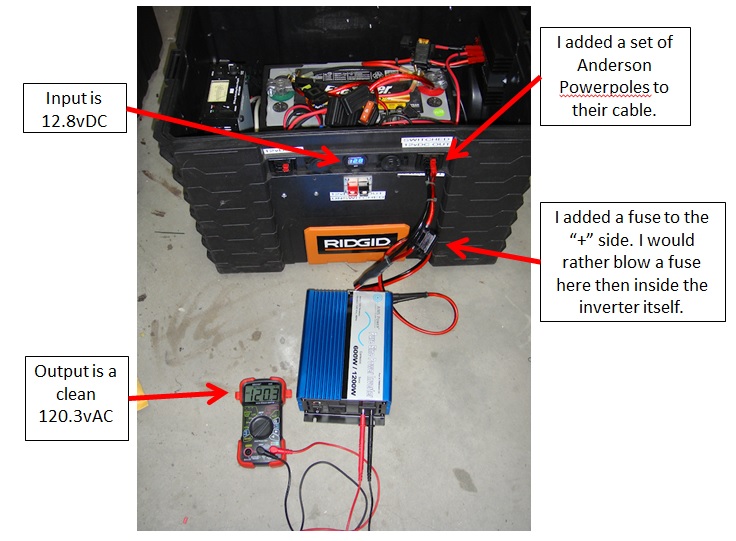
The + / – battery connections on the back of the unit weren’t Anderson Powerpoles and that was kind of a drag, but I didn’t really expect them to have Powerpoles as a connection option. The unit’s connectors were solid and the connection faces were exactly flush with each other which will ensure a good connection with the “eyes” on the power wires coming from the 12vDC power supply. The plan is I will make my own using #10 wire and high-quality ring connectors, along with in-line fuses. Yes, the unit has fuses built in, but I would rather protect the unit well before the unit’s fuses themselves.

The fan located on the rear of the unit is meant to keep the unit cool when under load. However, it isn’t always running. The fan will start up when the unit is outputting about 100w. That is a nice feature because the fan does take power to run…precious battery power. If you are using a low consumption device that doesn’t exceed 100w then you are draining additional power with the fan running. But the fan is there when you need it. Sweet! They designed this thing to be very stingy using power from the battery.

I also noticed that there is separate ground connection. No, not the negative terminal connection, but an actual ground connection. I am no electrical engineer but I know enough that grounding an inverter is a good piece of advice. Having the inverter unit itself grounded (PE) provides protection from a number of “faults” and protects your electrical devices running off the inverter.

Basic Hook-Up Diagram –

Dang…there are so many things I could talk about in regards to this unit. There are so many features and protections that I am almost overwhelmed with how much to write about. Let me give some technical details from their website about this unit first…

Features –

  • 600W continuous power, 1200w surge
  • Pure sine wave
  • USB Port, 5v, 1a
  • Dual 120vAC receptacles (3-prong)
  • On/off rocker switch
  • Over temperature indicator
  • Overload protection via fuses and automatic shutdown
  • Low battery voltage warning/shutdown
  • Alligator clips included on 28″ of heavy-duty wire
  • High input voltage protection with automatic shutdown
  • Over load indicator
  • Short circuit protection
  • Load based fan – only runs when an inverter senses a load over 100w

Technical Specifications –

  • Continuous output power: 600 Watts
  • Surge power capability (peak power): 1200 Watts
  • DC input / operating voltage: 9.7 to 15 Volts
  • Output voltage: 120 Volts AC
  • Output voltage regulation: +/- 3%
  • Output wave form: pure sine wave
  • Output frequency: 60 Hz
  • Battery low voltage shutdown: 10.0 +/- 0.5 Volts
  • Low battery voltage warning/shutdown
  • No load power consumption: < .6amps DC
  • DC amps: 50
  • AC amps: 5
  • Full load efficiency: 90%
  • 1/3 load efficiency: >85%
  • No load minimum operating temperature: 50 degrees
  • Full load maximum operating temperature: 145 degrees F (automatic shutdown)
  • AC Output Sockets: dual Type 2 -3 prong and single USB Output
  • High input voltage protection: 15V
  • Low input voltage shutdown: 10V
  • Internal blade fuse protection
  • Product size (L x W x H): 9″ x 6″ x 3″
  • Weight: Unit: 4.4

Voltage Handling –

  • When your battery drops to about 10 – 10.4vDC a low voltage alarm will sound. No, it won’t blow your ear out, it is subtle but clearly noticeable.
  • When the voltage then drops to 9.7 – 10vDC the unit will automatically shut down. This feature operates exactly as a LVD (Low Voltage Disconnect), and that saves your battery from over-discharging and being damaged. Actually, 9.7vDC is really a pretty low level to draw your battery down to. You don’t want to do it very many times.
  • The unit also has a shutdown feature for the high end as well, 17vDC. But, if you are running 17vDC into the unit you have much bigger problems with your 12vDC battery powered system. However, the transformer that I use in “My Power Box” can push out up to 16vDC (variable control). So, it is nice to see that the Aims inverter can handle up to that voltage rating. I guess the real purpose high-voltage shutdown feature is to prevent the unit being damaged by being accidentally hooked up to a 24vDC battery system.

Operating Environment –

  • This unit is not meant to run in all conditions and locations that exposes it to certain environmental elements. This unit is meant to be protected from those elements.
  • The temperature should be between 32 – 104°F. Yup, that means not below freezing and not desert SW June daytime direct sun temps. I am not understanding why the low temperature restriction and I have contacted Aims for an explanation. Aims AnswerThe reason it is rated at 32F is  there is silica and ceramic based components inside when those components run below freezing and warm up during operating they tend to crack and will cause failure.  Another point is that you lose efficiency, a lot of efficiency, at these temps, everything is working harder.  
  • The unit has to be ventilated under all circumstances. This is a piece of electronic equipment that generates heat, you have to be able to move that heat away from the unit. That just means to allow enough room around the unit to make sure air can circulate.

Uses –

Here is what Aims is listing as potential uses for this inverter –

  • Laptops,
  • YVs,
  • DVD players,
  • CPAP machines,
  • Satellite TV systems,
  • O2 concentrators and generators,
  • Mobile office set ups,
  • Fast charging power tool batteries (like my Ryobi 18v power tool chargers)
  • Other small hand held electronics

I am using the Aims power inverter for charging my handheld radios, electronic gear (computer), small appliances, etc. From DC power generated either from my truck or from my power box. For heavier AC loads (i.e. power tools) I use my Honda i2000EU generator. Aims does have much larger pure sine wave inverter units, up to 4000watts. I would love to test one of those higher wattage units but I just don’t have that requirement at this time.

NOTE: One thing I really want to point out…Customer Service. When dealing with Aims I was really impressed with their fast responses to any question I had. They appear to be very solid people, dedicated to both their products and their customers.

For my potential needs this unit exceeds all my expectations! I am giving this sweet little unit a “Buy!

600 watt version


1000 watt version


1500 watt version


2000 watt version


3000 watt version


4000 watt version


2009 - 2020 Copyright © AHTrimble.com ~ All rights reserved
No reproduction or other use of this content 
without expressed written permission from AHTrimble.com
See Content Use Policy for more information.

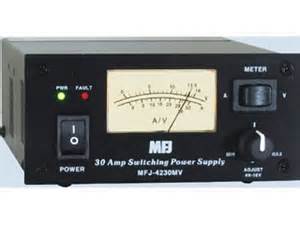
MFJ 4230MV Compact 25a Power Supply

MFJ-4230MV COMPACT SWITCHarticle first appeared in June 2016

I love mobile radios! So far I have –

  • Yaseu FT-8800R
  • Yaesu FT-8900R
  • Yaesu FT-897D
  • Yaesu FT-2900R

Told you I like mobile radios! And yes…I like Yaesu brand mobile radios the most.

But, having all these mobile radios I need to be able to power them when I am outside of the truck. And the only commonsense way to do that is with stable and readily available AC power from the utility company. But, a little tiny bit of a problem…the radios all run off of 12vDC power.

OK, so it is really no problem at all…you just use a power supply. Technically it is a “transformer” if my memory serves me right. You are taking 120vAC voltage -and through the magic of electronics- transforming it into 12vDC power. And that DC power can be used to run your mobile radios without a vehicle battery.

As always…my mission statement –

“Provide clean, stable, reliable DC power from an AC power source to run one or more mobile radios.”

Requirements and Restrictions –

  • Must not induce “noise” into the radio on any band above an acceptable (minimal) level.
  • Must be able to work continuously for years at a time without being turned off.
  • Should generate minimal heat when in stand-by mode.
  • Should generate manageable heat when being used continuously.

Well, here is the deal…I had already been using an MFJ SWR meter and I liked it a lot. My first power supply was from Radio Shack and it performed really well and I had no complaints. However, it just didn’t push enough amps (power) for my new usage requirements. So I naturally looked to MFJ for a power supply option. I did my research and the 4230MV unit appeared to meet all my needs/demands. Then it was time to do my research.

I carefully read all the reviews I could get my hands on. I really dug into it. What became obvious to me from the beginning was a couple things:

  1. The overall price point was excellent. Same could be said for the “price to amp” cost.
  2. Users were reporting no real “noise” on the HF or any other bands.
  3. It was one of the most compact units on the market.

Here is some technical information –

  • 30 Amps Surge (up to 5 minutes), 25 Amps Continuous.
  • 4 to 16 VDC adjustable output, detent at 13.8VDC.
  • Light weight, only 3.4 lbs/1.35kg
  • Compact, only 5″ x 2 ½” x 6″ (W x H x D).
  • Backlit meter that displays amps or volts.
  • Five-Way binding post for high current radios
  • Over Voltage protection.
  • Over Current protection with “FAULT” LED.
  • QUIET Internal Cooling Fan with “FAN” LED
  • Super Regulation, works with AC input from 85 to 135 VAC (115VAC model) or from 170 to 260 VAC (230VAC model), 47-63Hz
  • Noise <100mV. AC Line Fuse( 6.3 Amps)

Findings –

I purchased my first unit several years ago and began my testing. Let’s not make this difficult…it performed exactly as it was advertised and met 110% of my expectations. Yup…a great little unit. But, let me give you a few more details –

  1. The unit will warm up a bit when using it continuously. There is a cooling fan that will spin up initially when you turn on the unit, then shut-down. Then it will come back on at about 70 degrees. It seems to spin faster as the temp rises. There was minimal sound from the fan, no problem at all.
  2. I could detect no noise on the HF side or any other band.
  3. While the unit is rated at 25amp, it can handle 30amp surges with no problem. But, it won’t operate continuously at 30amp.
  4. I’ve seen folks who have been running this unit for 3 – 4 years with ZERO problems.
  5. I like the adjustable vDC output, gives you some nice operating capability options.
  6. I really like the clean face of the unit. It may sound silly, but it looks very professional. And I like that look sitting there on the shelf while it is working away for me.

Summary –

A great power supply unit!!

Yeah, there are some folks who like to poke fun at MFJ from time-to-time…but don’t buy into that. MFJ has a 1-year “no matter what” warranty. And that is very reassuring and tells you how confident they are in their equipment. Think about it…if a piece of electronic equipment it going to breakdown to poor quality it will probably do so in the first 30 days, undoubtedly within the first 120 days. MFJ has your back!


2009 - 2020 Copyright © AHTrimble.com ~ All rights reserved
No reproduction or other use of this content 
without expressed written permission from AHTrimble.com
See Content Use Policy for more information.
My “Ham-In-The-Box” Project – Yaesu FT-8900R Go-Box – Part #3

Ham in the box, ham-in-the-box, field deployable ham radio, ham radio in teh fieldnote: This article first appeared in May 2015.

In Part #1 (posted day before yesterday) of this series I covered the mission of this Ham-In-The-Box project, requirements and limitations, and the initial challenges that I faced. I also outlined each piece of equipment that would make up the final product.

In Part #2 (posted yesterday) of this series I started relating the actual step-by-step build process. I went from prepping the box itself, building the internal frame and getting all the way through installing the remote head to the radio.

In this post I will finish out the building of this project. It was a great project, took much longer than I expected, I picked up some valuable experience and knowledge, and I learned another great lesson along the way. But when it was all over, the project functioned exactly as designed!

Just a reminder of the mission of this project –

To be able to rapidly field deploy a Ham radio, for which I am licensed to use, in the event of any emergency while maintaining a secure and protective storage environment.

~ The “Build” (continued) ~

Step 9 –

This was one of the weirdest parts that I fabricated, the front panel frame. I wanted the frame sturdy, rigid but not heavy. And I couldn’t have it too large or it would get in the way of the fan and other accessories. So I went with 3/4” angle aluminum. While I was measuring the different pieces I found there was a small “notch” or pocket in toolbox’s corner that a piece of the aluminum fit into perfectly. So I took advantage of that and used it to hold the frame in-place and semi-attached to the toolbox. The side benefit was making the whole structural frame kind of like a part of the toolbox without really attaching it. So that is the reason for the one slightly longer side to the frame. If you are looking at the box with the lid opening towards you, the longer leg would go into the notch on the front left side right under the “lip” of the toolbox. I used rivets to secure the pieces.

front view of frame


Then I was working on the solution to attaching the front panel to the frame. I really wanted to be able to remove the front panel to access the components underneath. But exactly how to do that securely while maintaining convenience was a bit difficult to figure out. Then it dawned on me to use JB Weld to bond the bolt heads to the frame. Then it was a matter of drilling out the holes in the front panel to match the bolts.

rear view of frame


Note: The 2″ notch in the front panel frame was not intentional. When I was laying out the frame and the front panel I forgot the “offset” from the left side of the box and didn’t line-up the fan to the frame correctly. I had to cut the notch so the fan wouldn’t interfere with the frame, or visa-versa.

Step 10 –

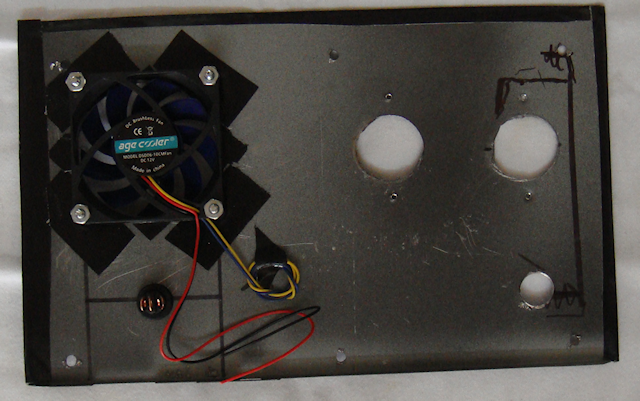
I really wanted the front panel to look sharp as well as be functional and lightweight. I went shopping for possible materials and found everything expensive. Then a moment of inspiration! I headed off to the local Goodwill and purchased a used VCR with a metal case. The metal that the case was made of was sturdy steel, thin, and a nicely painted black with a bit of texture to it. Perfect!

front


rear


Note: I used masking tape place over the metal to help prevent damage while drilling the hole. I also used a good hole-punch and gave it a sharp whack with a hammer to make a serious starter hole so the drill wouldn’t “wander” when I was starting the hole.

I used Gorilla Tape to finish off the edges and give it a slightly cleaner look than rough-cut exposed edges. Yes, I like Gorilla Tape better than Duct Tape.

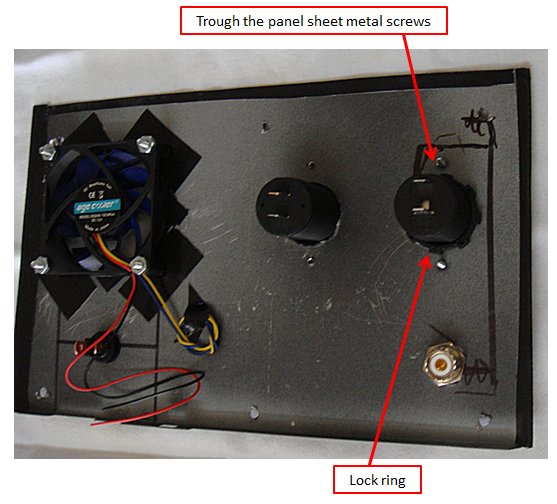
The fan had to be positioned directly over the PWRgate to blow air directly at its heat sink, so I had little choice to its location on the front panel. Then I mounted a switch next to it. I figured there would be times when the air movement might not be required so why not have the capability to turn the fan off. When I attached the fan to the back of the panel I used Gorilla Tape around the hole to create a bit of a “stand-off” from the metal panel to make sure the fan blades didn’t come into contact with the metal. The tape also works a little like a rubber washer absorbing vibration from the fan. To cut the hole for the fan I used a hole saw with the correct diameter cutter. Using a hole saw made a much cleaner hole than other methods. The switch hole was drilled out with a regular drill bit as per the instructions that came with the switch.

The next requirement was the “through the case” antenna lead connector. I thought at first about just having it loose and connect it. But then I thought I wanted the box to look as professional as possible so I mounted it on the front panel. The hole for the male-to-male connector was drilled out with a regular drill bit.

Then I positioned my remaining two accessories; the cigarette lighter socket and the USB charging port. I decided to mount cigarette lighter socket lowest on the front panel thinking it might have the heavier item plugged into it. Mounting it lower on the panel might make less weight/torque on panel. The other socket would be for charging USB devices. I figured they would be lighter weight and less of a Wight/torque problem. The larger holes for the cases were cut using a hole saw which made a much cleaner hole than other methods. I use my hole punch to punch a hole through the case and then screwed in the sheet metal screws through the panel.

Step 11 –

Front panel wiring. This is where I struggled just a bit. I am not particularly good with making Anderson Powerpole connections with heavy or real lightweight wire. And my fears proved to be true. I also had to figure out how to distribute the power as well.

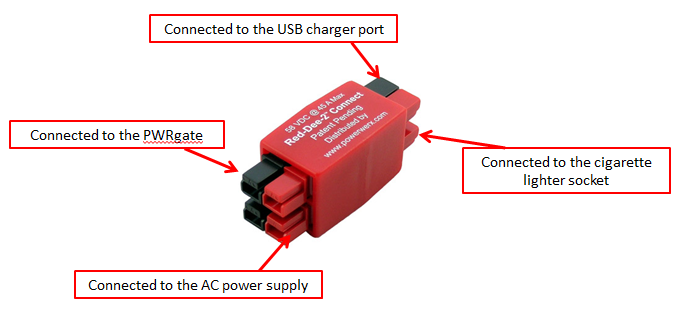
I wanted the cigarette lighter socket and the USB charger ports to only be available when working off of shore power not battery power. When on battery power I only want to use valuable battery amps for the radio and cooling fan. So the power to those two accessories had to be “distributed” before sending the power to the PWRgate. For that job I originally choose a Powerwerx Red-Dee-2 Connector 4-way (PS4) connector in a star pattern.

But when I installed it in the box the wires just were a mess and it was difficult to get them into place. So I looked again and saw the same identification for a different part that made a lot more sense. It worked just fine.

I used fuses for each of the cigarette lighter socket and the USB charger port to make sure I protected any devices that I might be using/charging. I chose a simple 15amp glass fuse.

I took this picture to make it easier to see how the front panel was wired. I swapped out the Powerwerx distribution part after the picture was taken. The two heavy 10gauge wires carry the power from the PWRgate to the battery booster. That ensures that the fan will always have power, even if on battery power.

Note: The red tape on the fuse wires is just a visual reminder that they are “hot” wires. I did that since the fuse wires are black.

This is what it looks liked when I put the heavier wires together with their Powerpoles connected. I put zip ties on them to make the wires easier to manage and reduce tension and torque as the wires were being handled.  Don’t get confused, the red/black pair doesn’t attach to the distribution device, it goes from the PWRgate to the batter booster so it always has power. The wires going to the cigarette lighter socket and the USB charger port only have power with on shore power.

Step 12 –

So with all the wiring done it was time to get the multimeter out and check it. When it comes to something like this I check things in stages, only hooking one device up at a time to power. So the only thing that I turned on initially was the AC power supply. I checked its output with the multimeter and it was fine.

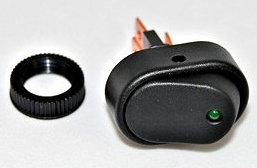
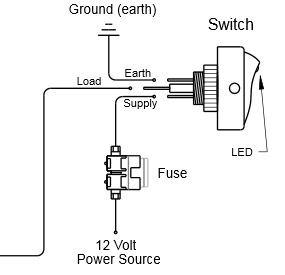
Then I plugged in the power supply to the Powerwerx 4-way. Each output worked fine. Then hooked up each of the accessory ports (cigarette & USB), they worked fine. Then the big test, I hooked up the PWRgate. It came on, the right lights were on so all was good. Then the fan test, hit the switch and the fan didn’t work. Turns out I had the wires hooked up wrong. Here is the switch and the wiring diagram.

KC HiLiTES Oval Rocker Switch with Red LED Indicator 30 Amp – Black – KC #3116

KC HiLiTES Oval Rocker Switch with Green LED Indicator 30 Amp - Black - KC #3116KC HiLiTES Oval Rocker Switch with Green LED Indicator 30 Amp - Black - KC #3116 wiring diagramNext to get hooked up and tested was the battery booster. All was fine, the right lights were on and all was good. I had to laugh though, when I turned on the AC power supply to make the next connection the battery boost gave the “low voltage” warning signal. Surprised me.

Now the big test, the radio. But before I tested the radio I had to hook up an antenna. You must do that or risk burning up your radio. So I got out my rig. You might remember that rig from my article Antenna Stand and Ground Plane for the Yaesu FT-8900R <click here to read article>

TRAM 1465 Land Mobile Base Ground Plane KitI ensured that the fuse in the radio “hot” wire was good, it was. I hooked the radio up to the battery booster, then turned on the AC power supply. All was good, no smell of burnt wiring. Then I hit the button on the Yaesu FT-8900R to power it up. Nothing, dead as a door nail. I turned off the power, turned it back on, hit the button the radio…nothing.

One time before I had screwed-up the remote head cable which made it not power up. I figured I had done the same thing here. But to get to the cable I had to remove the radio. So I took out the radio and checked the cable, all seemed fine. So I thought I would test the radio before installing it back in the box. Same thing, still dead. I was beginning to worry that I had fried my radio somehow. No………..just me being and idiot. I was pushing the wrong button. I pushed the correct button and the radio powered on. I installed it back in the box, hooked everything back up and right the right button. Bingo! Up it comes and I started scanning and listened to folks having a conversation.

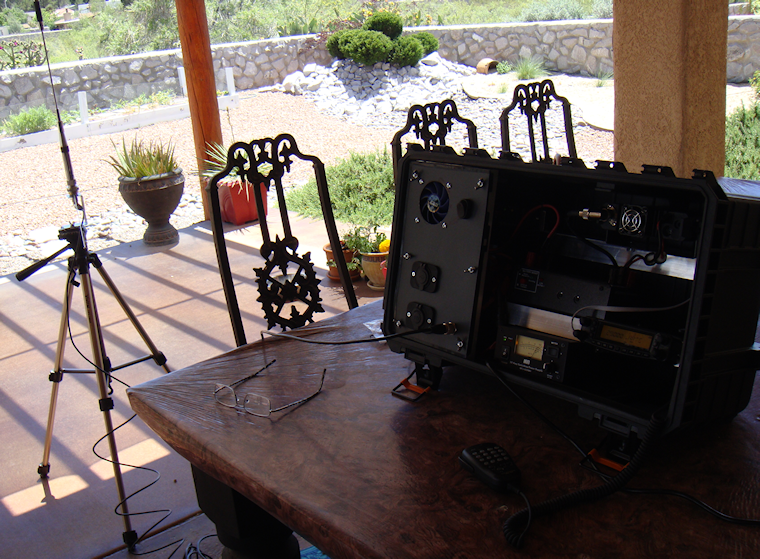
Here is the completed product –

This………

Rigid Professional Tool Storage System 22" Too Box

To this………

Ham-in-the-box mobile ham radio set-up with Yaesu FT-8900rHam-in-the-box mobile ham radio set-up with Yaesu FT-8900r Diamond CR8900A Quad-Band FM Mobile Antenna with ground plane

Note: An additional bonus is finding out that the lid latches act as box “feet” and cants the box up at a desirable angle.

Wiring Diagram –

Ham-in-the-box wiring diagram for mobile radio set-up using a Yaesu FT-8900R

click to enlarge to full size

I hope the diagram makes sense, I’m not an electrical engineer or anything but I did try to use standards symbols for diagramming it. If you have any questions on the wiring just let me know and I will try and explain it.

Summary –

For me this was the most ambitious Ham radio project I have undertaken since I built the cross-band repeater a couple years ago. And from a “power” perspective it was a little daunting. But I worked through it and figured it out after doing a whole lot of research.

And just so you know, there is a reason that I used this line of Rigid toolboxes. But the exact “why” will have to wait till I get some more time and money. I am always thinking….


2009 - 2020 Copyright © AHTrimble.com ~ All rights reserved
No reproduction or other use of this content 
without expressed written permission from AHTrimble.com
See Content Use Policy for more information.