Not all goes well on the glamstead, sometimes I make mistakes…sometimes BIG mistakes. Last month was one of those BIG mistakes. I cured it last week.
Back in JanuaryI got a call from my wife. She pleasantly, and without panic, asked me why the power went out in the house.
Let me explain…I have what is called a very boring solar system. It powers the house nicely and provides us all the luxuries and stability of a relatively normal life…without a utility bill or dependence on a power company. And it is boring! Meaning…I really don’t have to pay attention to the operation of the system…it just does it thing day in and day out…no issues,, no problems. Nice. But that all changed that day…
Fortunately I was on my way home and was only about 10 mins or so away. I asked her is there was any wire burning smell in the house. No. Then I asked if she would check for smoke or fire in the utility room where the solar equipment is located. Fortunately, she knows my humor and checked. Nothing. I’m glad I didn’t tell her I wasn’t joking.
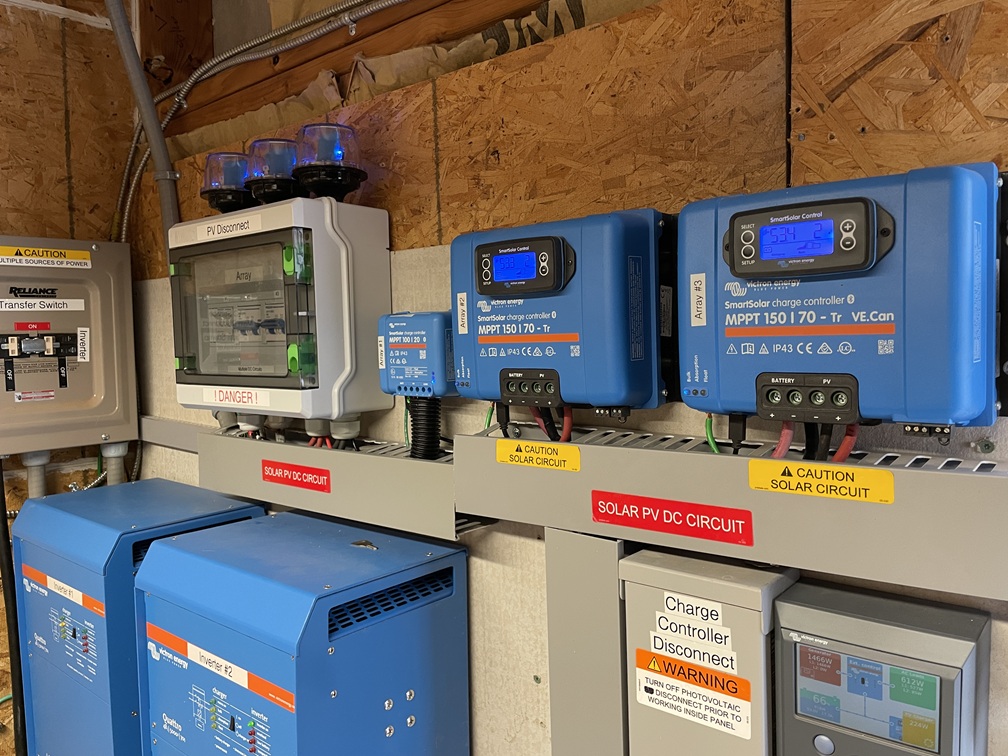
I got home, verified the power was completely out in the entire house and headed to the utility room. In there I found the inverters off, the batteries offline, the computer brain showing an “alarm”, the charge controllers off, the system shutdown, no AC power at all.
The Victron CCGX “brain” or “computer” that controls/coordinates the system had an alarm “LVD Error”. Yeah, that means the system shut down due to low voltage coming from the batteries. I checked the SOC (State of Charge) lights on the batteries and it was showing about 75% of full capacity. That is not a low voltage problem at all. It simply made no sense.
I tried to troubleshoot what the problem was…or rather what the “real” problem was. I just couldn’t figure it out at all. Remember, I built the system, programmed the inverters, programmed the CCGX, programmed the charge controllers, made all the settings myself…I know my system pretty well. But, I still couldn’t figure it out.
Back about 400 years ago while I was also a firefighter, during my days off, I programmed computers. Okay, it was back in the late 80’s till about 2001. One of the things we had to do regularly in the early days was troubleshoot computer hardware along with the software. Sometimes with the computers themselves the only thing we could do to get it back up and running was the “BRB”…Big Red Button. On the early desktop computers there was a big red lever on the side of the case…the on/off button. Turn the computer off, wait a minute, turn the computer back on…problem solved, issue fixed…back up and running. Almost always worked for hardware problems.
Yup, I decided to shut down the entire system and restart it. Fortunately for me I’ve done it countless times and was no big deal…just think it through step-by-step. About 5 minutes later the system was up and running just fine, power to the house…and me left confused at what might have happened. The only thing I could figure out was some kind of “hiccup” occurred between the master battery computer management system (BMS) and the CCGX (the solar system computer/controller). And the system shut itself down to protect itself. Obviously since it came right back up without an issue, it had to be some false alarm/issue.
But…it exposed a much larger problem!!!
What if I had been out of town, or a couple of hours away? What if my wife hadn’t been able to get a hold of me? What if…
Yeah, even if my wife had gotten me on the phone but a couple hours away…could I have talked her through a system shutdown and restart? Maybe…but it would have been ugly trying to get her through each step in correct order to shut it down…then trying to get her through each step in correct order to do a restart.
Then my mind drifted to a couple other issues…using the generator with the system…and what about when eventually/if we sell the place. Yup, my OCD kicked in.
I have a document for the solar system that describes each piece of equipment and why I use it. It has a complete wiring diagram for each part of the system as well. That document is for anyone who has to work on the system besides me…they will understand how it is wired and what each piece of equipment is for. It’s like a technical manual. But, I don’t have an actual “operations guide”. Yeah it was obvious, that had to change.
So, over the course of several days I wrote, then edited, then edited it some more until I had a pretty dang good step-by-step manual that described:
How to completely shutdown the system,
How to start-up the system from a complete shutdown status,
How to hook-up the generator to by-pass the solar system,
How to hook-up the generator to supply power to the solar system,
How to remove the generator and remove it from the system, and shut down generator power.
Along the way I gave pretty good descriptions of solar system’s operations, including the “why” aspect. I used copious amounts of pictures with descriptions of lights, buttons, and levers. I had my wife look it over and she felt she could do any of the operations outlined in the manual…with just the manual.
Now, anyone…my wife, other technicians, a potential buyer, or a new owner can look at the operations guide and get a pretty good idea of how to run it. Also, combine that manual with the other “technical manual” I wrote, anyone could work on the system…or at least understand the how and why it was built, and how to operate it.
I sleep better at night now.
In case you want to see what the final product looks like I have attached it as a download. If you have a solar system, especially a DIY system, you might want to think about writing something to help others run your system safely.
So why was this “no manual” my biggest mistake so far? Simple, the safe operation, or any fixes, depended solely on me; avoiding a potential disaster for my wife if I wasn’t around to resolve the issue(s). Maybe preventing something worse.
You can download my Operations Guide (PDF file) by < clicking here > It might be helpful if you want to create one of your own.
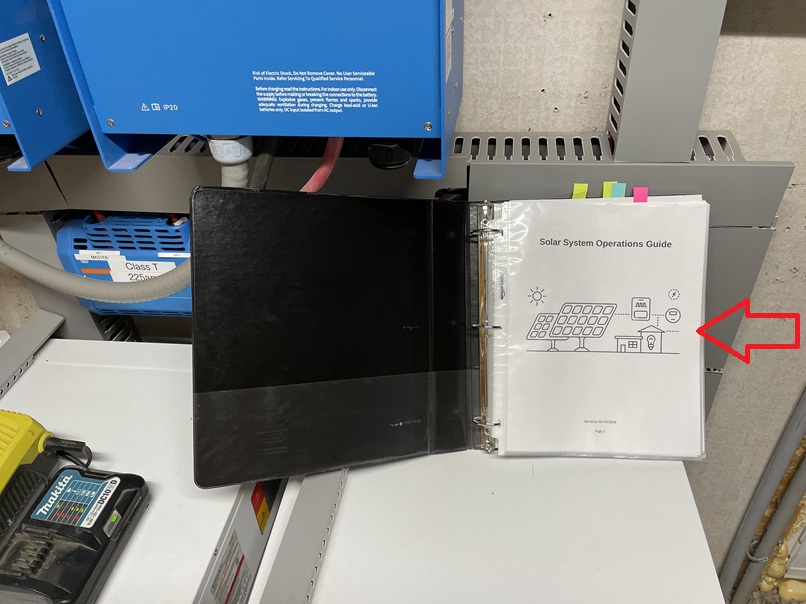
I keep the guide book right smack dab in the middle of everything. Anyone can instantly know right where it is. Ah, no…there is no “red arrow” painted on the wall and equipment pointing to the manual.
The “tabs” are different manual parts; battery manual, inverter troubleshooting pages, &charge controller troubleshooting pages.
My experience with an MCB Interlock device has been a total success so far.
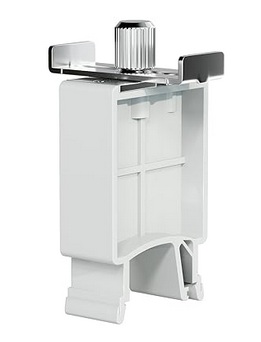
I needed to build a control box for my solar well. My solar well pump can directly accept AC or DC power. Part of the box build included an AC inlet for my genset and the incoming DC power from the PV array. I needed to make it easy to switch between power sources quickly and safely. And ensure that power could not come from both sources at once. Although highly unlikely that would ever be attempted, I wanted to ensure it as an impossibility. Hence, the “interlock” concept.
I first heard about their existence here on the forum, I don’t remember which thread. I purchased an interlock device off Amazon along with two Mollum MCBs; 20aAC and 25aDC. They arrived, and it didn’t work.
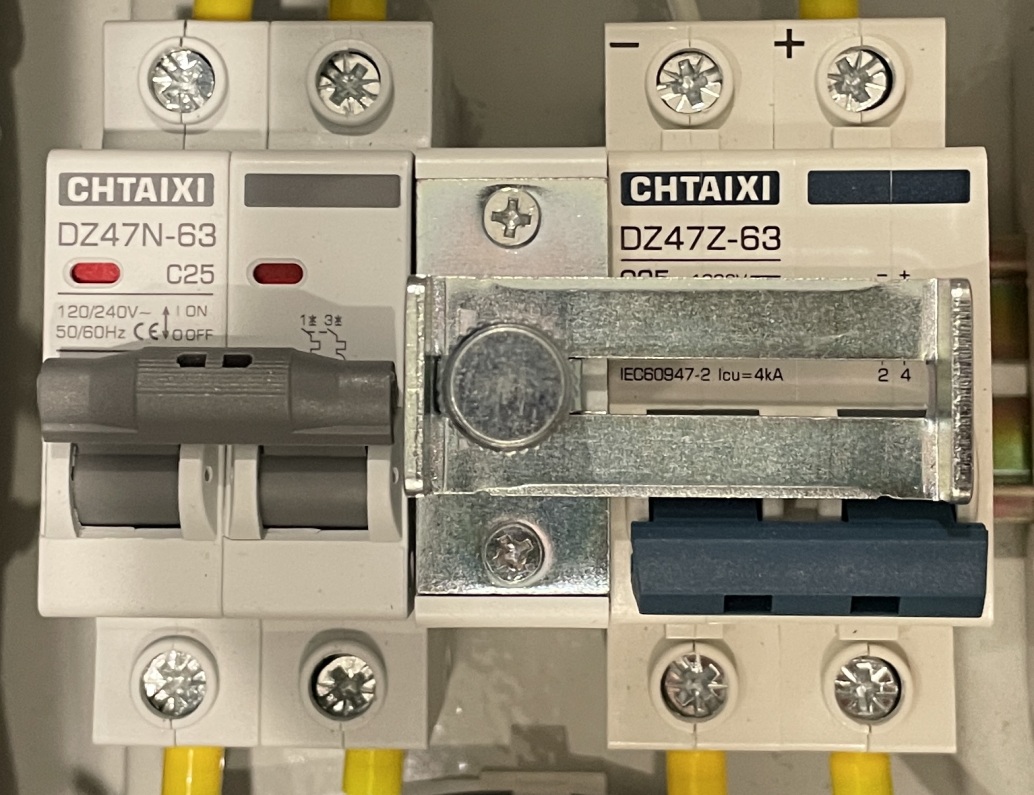
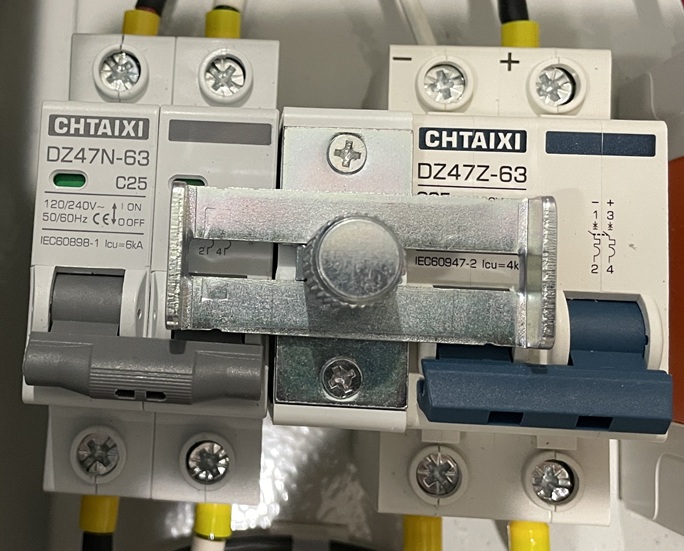
Problem:Mollum MCBs are not compatible with the interlock I purchased. Mollum breakers have the flip lever in the vertical middle of the unit. The interlock won’t slide with that configuration. So I purchased two Chtaixi MCBs after doing a bit of research (i.e. opening my eyes); its flip lever is located towards the bottom of the unit.
I Slid everything onto a DIN rail and it worked just as advertised. So let me show you how it looks in my control box build…
AC power…
DC power…
But, here is a cool feature that I just stumbled upon…Yup, when you want to lock out all incoming power from the genset or the PV array it turns into a “lock out”. Yeah, yeah…I know there is no place for a true padlock or even a tag to prevent sliding the interlock into operational capability. But, for me it is just a cool feature for added safety…not ultimate safety.
So, for a total of $48 I have the circuit breakers I need to disconnect power and protect the wire AND I have a device to safely and easily switch between power sources. Not a bad deal in my book.
And yes, you can use two AC breakers or two DC breakers for switch between power sources.
Okay, I’ve written a whole lot about our solar well and lightening problems; some here, some on a DIY solar website/forum. Bottom line…twice in 4 years we were hit with lightening transient voltage that blew up our control module for the solar powered well. Yeah, $600 for the first one $500 for the second control module. Simply put…unacceptable!
Yes, I installed all the appropriate grounding and surge devices but it turns out that it was the 700’ of signal wire between the water storage tanks and the wellhead that was acting like a giant antenna absorbing very small amounts of voltage (in the ground, from lightening) and sending it into the control module’s computer circuit board. Zap!
AND!!!! Along the way I found out that I didn’t need the control module to begin with!! Yup, that really ticked me off…$1,100 down the drain. So much for retailers selling customers what they need vs higher profit.
The “fix” turned out to be 2-stages; 1) get rid of the signal wire problem, 2) replace the control module including the very sensitive electronic circuit board with something more stable and safer. This review/article will be only about the signal wire issue.
I first tried to figure out how to protect the signal wire from the transient voltage. Long story…very long story…made short, I couldn’t do it in a manner that I felt was safe, reliable, and realistic. Plan B turned out to be simple…eliminate the signal wire altogether. And that turned out to be a wireless float switch system.
The float switch itself is a simple device that monitors the water level in the storage tank. When the water level drops it sends a signal to the well pump to turn on. When the tank is filled it sends a signal to the well pump to turn off. My problem was the 700’ of buried signal wire between tanks and well. A wireless system is just that…wireless…no wire buried in the ground to pick-up the transient voltage.
The signal is transmitted via a radio signal between a transmitter and a receiver. Everything else pretty much operates the same. Problem solved…installed it last week.
Summary –
Let’s make this easy for you. I will give you the bottom line right here and then you can read the rest if you want to…or if you need some reading material to fall asleep by.
After weeks of research and searching there was only one real option: RPS Solar Pumps’ Wireless Water Tank Sensor for Remote Pump Shutoff, the 24-hour version. Price $729 (on sale), about $800 all in with shipping and tax.
So here is the bottom, bottom line…It Works!
Unpacking & Problem –
You know, after getting sold the wrong pump by a retailer that didn’t really know what they were doing, and getting sold a control module that was 100% not needed…and then buying another control module that was 100% not needed I was very skeptical about the actual ability of this unit to do what it was advertised to do…and the price it was being sold for…and the ease of installation that the company was touting. I think you can understand that.
So the box arrives in decent time and apparently undamaged. I set-up for a video to show the unboxing as the first step in a longer video covering the install. “Action!” The box was packed well with plenty of protection around each solar panel and the attached transmitter/receiver units. Out comes the transmitter unit…nice. Next comes the receiver unit…nice. Ahhhhhh…that’s it…nothing else in the box. First thought that ran through my head…here we go…scammed again!
I double checked what was supposed to be in the box vs what was actually in the box. I was missing the float sensor, the antennas, the hardware, etc. More defeatist thoughts start rolling around in my head.
I checked to make sure I saved the video, pulled up the company website, and called customer support. Now this is where it could have been the end of the last of my faith in humanity. Thankfully I couldn’t have been more wrong. The CS rep was incredibly friendly and helpful. She listened and verified the missing equipment. She said she would get an order placed immediately for the missing parts. Then the other shoe dropped…”Do you have any pictures of what was in the box?”
Yup, first thought…they want verification that stuff was actually missing, thinking I was scamming them. But, thankfully, “Mam I took a video from the time I set the unopened box down on the deck through pulling out each piece that was there and then showing the empty box.” I guess that sealed the deal…order placed.
So on with the results of the unpacking…
Issue #1 – Safety : Exposed terminals on both batteries. Yeah, not a good thing. On both solar panels there was an attached battery. The battery had both the positive and negative terminals fully and completely exposed. Meaning…had a piece of metal touched both terminals it would cause a dead short in the battery…and that cold cause a fire. Very, very bad thing when shipping. All rechargeable batteries come with terminal protection when shipped. Someone at the RPS plant didn’t put the terminal protectors back on after assembly. And, the folks in the shipping department missed it as well. Not a good thing at all.
Issue #1.5 – Incompetence : Yeah, kinda harsh but factual. The order should never have left the warehouse without all the parts in the box. It is not hard to ensure all the parts are there in the box…not hard at all. But, RPS does get a compliment for their customer service and quick response to get the missing parts to me.
Received Missing Parts –
About 4-days later the missing parts showed up. Yes, I was skeptical all over again. Video rolling, box opened, all missing parts were no longer missing…all was good. Too bad they weren’t in the original box in the original shipment. The shipping department seems to have a bit of a problem. Solution: Have a pre-printed list for each different unit, the shipping guy goes down the list, the part goes in the box, it gets checked off the list, when complete, take a picture of the signed-off list, put the original list in the box, seal & ship. Problem solved.
Installation –
The installation was straight up and pretty simple. However, the installation video put out by the company is completely unrealistic in terms of time it takes to do the installation. Plan on 20 – 30 minutes per each unit, potentially more depending on your situation.
Issue #2 – Installation : The battery is located poorly. The battery adds weight in the wrong place, it is unbalanced. The battery should be closer to the base of the mounting bracket lowering its center of balance and gravity.
Issue #3 – Installation : The battery is located poorly #2. The battery is located too closely to the plastic box containing the circuit board. It makes it difficult for a person with large hands to get the antenna screwed in. Locating the battery closer to the mounting base would give more room to attach the antenna.
Issue #4 – Installation : The battery is semi-permanently attached to the mounting bracket. Trying to fix issues #3 & #4 I attempted to move the battery. Ah, no. It appears there is a large zip-tie holding the battery to the mounting bracket making it simple…slid the battery closer to the base of the mounting bracket…two problems solved. It did dawn on me that it seemed pretty lame to have the battery held on by nothing more than a zip-tie. When the battery wouldn’t slid down I noticed a double-sided foam piece of tape between the battery and the mounting bracket frame. No moving it. So, it is nice to have a little better mounting system for the battery…too bad the battery is located in a poor location and can’t be moved without major effort.
Issue #5 – Installation : There is a signal wire “pig tail” on both the transmitter and receiver units. RPS also includes a splice kit to attach the float switch signal wire to the transmitter unit and a signal wire between the receiver unit and the well pump. Why? Any splice is a potential point of failure of the system. Also, adds considerable time to the installation process. I simply opened the circuit board box, removed the pigtail wire, and then place the signal wire directly into the connection ports on the circuit board. Poof! Problem/issue solved…no more potential source of failure and time saved.
Issue #6 – Battery : Yeah, this is a fairly minor issue, but one that should not exist. Attaching the wire terminals to the battery “blade” style terminals wasn’t any fun. The first couple of attempts by hand were unsuccessful. And the battery being so close to the circuit board box didn’t help any. I finally had to use my pocket knife, separate the wire terminals a little bit, then use needle nose pliers to get a solid connection on the battery. Seems a bit unneeded and easily addressed at the factory. And, to make matters worse, the battery terminals and wire connections/terminals are open to the weather.
Overall –
Pros –
The float switch is not a mechanical float switch at all, it is a sensor. That fact makes it much more useful and functional…and I am thinking it will also last longer.
Solar panel appears to be of good quality and plenty large enough to do the job.
Battery appears to be of more than sufficient capacity to do its job.
The plastic box holding the circuit board is top notch and appears to be plenty weather proof.
The circuit board itself looks to be quality and well built.
There are 3 status lights in each unit. “Tank Full”, “Power”, and “Com”. The last one shows the unit is transmitting or receiving a signal to ill the tank.
The angle of the mounting bracket places the solar panel at a good compromise angle for winter or summer sun.
The mounting bracket itself is stout enough to do the job pretty dang well. The base holes are sufficiently large enough to do the job accommodating lag screws/bolts.
The antenna appears to do the job. Good thing is, if the antenna is too short, the circuit board box has a universal antenna connection…simply buy a better/longer antenna and connect it if needed.
The signal wire on the tank float probe/switch is long…and I mean long. Supposedly 100′, but I didn’t measure it. Great to have so much wire to work with.
Overall, it was easy to get up and running within a reasonable amount of time.
2-year warranty and lifetime support.
Cons –
The wires connecting the circuit board box to the battery are really, really lame. While they are of sufficient size for volts/amps, their quality appears to be used on an interior space, not sufficient quality to be exposed to weather. It would have been very simple to use a weather rated wire.
The terminals on the wires that connect to the battery are even more lame than the wires themselves. The wires, while crimped, are not sealed against weather, dust, etc. A simple solution would be to use a heat-shrink terminal. Or, use a short piece of heat shrink after crimping the terminal.
The terminal on the battery and the terminal connections on the wire are completely exposed to the weather. Any weather can easily infiltrate the connection…potential point of failure.
The magnetic base on the antenna sucks. Yeah, meaning the magnet used is super weak. I mounted the antenna base on a 1-1/4” wide piece of steel…we’ll see how long it lasts once the windy season starts.
The included screws for the mounting bracket base appear to be adequate for mounting on metal. But, if mounting it on a the top of a post, such as a 4”x4”, those screws are wholly/totally inadequate.
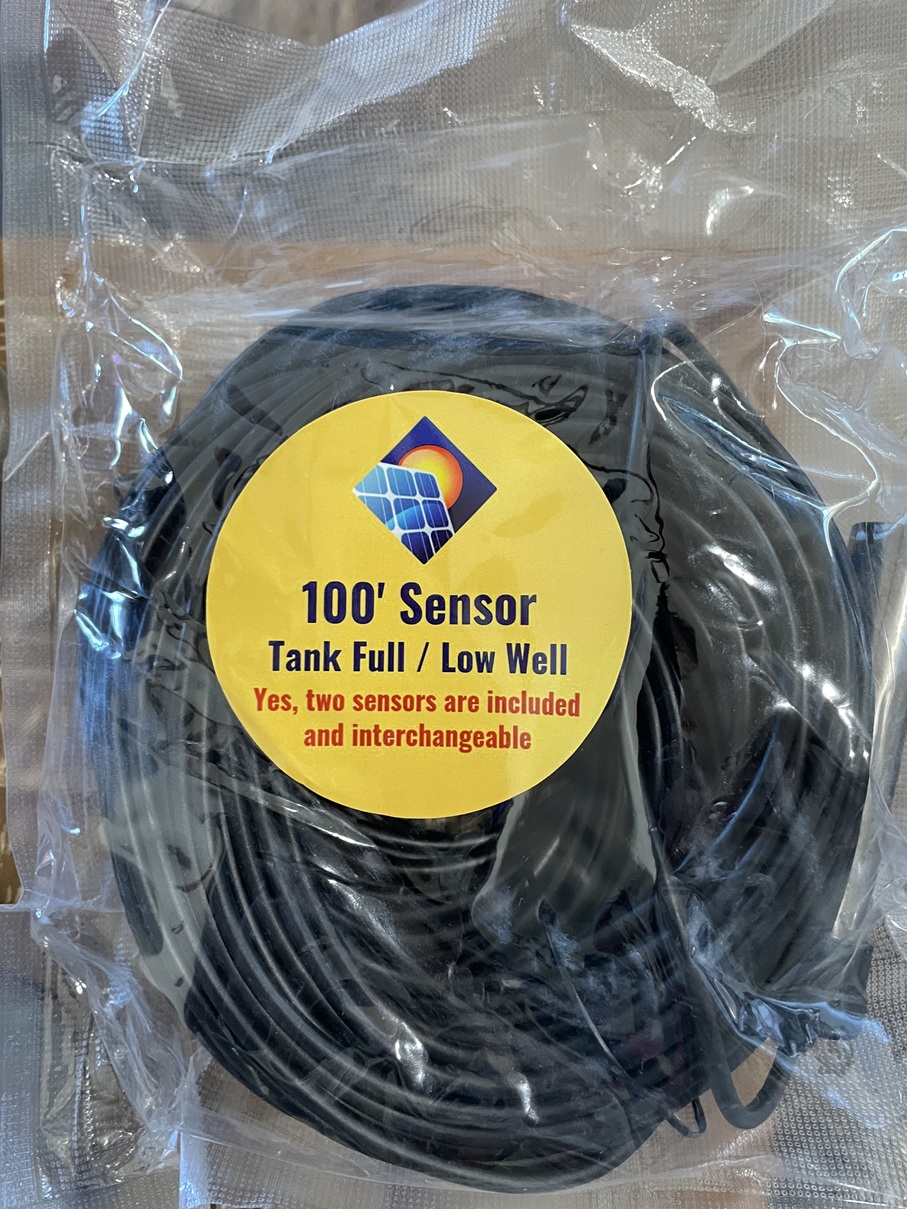
Last but not least…mislabeled or missing part…again? So here is a picture of the water level sensor. Read the label…again. “Yes, two sensors are included and interchangeable.” Yeah, I unrolled the 100′ of wire and saw the sensor, the silver probe. So where is the other “sensor”? Notice the other wording…”Tank Full / Low Well” Ah, how do they know that my well has low water level?
click to enlarge
The two sensors are located in the silver probe; 1 sensor is “tank full“, the other sensor is “tank fill“. There are not two separate sensor unit, they are both located in the probe.
“Low Well“??? How in the heck could they know my well is low on water when the sensor is located in the storage tank!?! So a bad case of mislabeling. A bit weird if you ask me.
Kinda Weird –
So I bought the unit on rpssolarpumps.com. If you read everything on their website it sounds as if they make, or at least assemble, the unit themselves. Ah, no. When the unit showed up the instruction manual was from “Back 40 Solar”. And the overall instruction manual left a lot to desired.
The unit is actually made by a company called Back 40 Solar (https://www.back40-solar.com/). So RPS is just the distributor not the manufacturer. But don’t try to buy direct from Back 40 Solar…they apparently only sell through their distributors.
And “rpssolarpumps” is actually Rural Power Systems (ruralpowersystems.com). So there appears to be a bit of an identity crisis going on here. But, I am not particularly worried…the unit worked even if RPS was a little dysfunctional fulfilling the purchase.
Yeah, I have no idea why I thought the Back 40 Solar vs RPS issue was “weird”. I think it just caught me by surprise that RPS was selling a Back 40 product. But hey, why not. Now I just have to figure out how to get this review to Back 40. Yeah, another interesting little tidbit…Try to find a way to contact Back 40 Solar. On their website I couldn’t find any email address, no phone number, no physical address, no mailing address, no contact form, nothing. Okay, there was a form you could fill out if you wanted to become a dealer. No, I don’t want to become a dealer. I did find an email address embedded in the html code of one of the pages so I will send them this review at that email address.
Anyone else find this weird or is just me? It appears that Back 40 Solar wants to stay hidden for some reason; they want no contact with actual customers. I wonder why. The distributor, RPS, does seem to be responsive so maybe it is no big deal…we’ll see.
Recap –
As I stated at the beginning…it works. Yup, that was the main goal…it needed to work which in turn eliminates 700’ of signal wire. And that hopefully eliminates the stray transient voltage that was frying my controllers. And it appears it will do just that…mission accomplished.
Here is a big whine on my part…price. Yeah, this thing ain’t cheap…retail is $949…and that is some serious coin. In October they were running a sale…$729 until 10/30. I bit the bullet and bought it a couple days before the end of the sale. Yeah, well, a week later I went back to the website page to get some info and it was on sale once again for $729 until11/30. Gee…perpetual sale. Just kinda throws up a red flag for me. Yeah, not sure why…just does.
Did I mention that the unit worked? Yup, sure does…mission accomplished…I’m happy…so far.
Sad part is, if they increased the quality of materials and construction just a bit, it would be a great unit vs a good unit. The total cost of the improvements would probably be less than $5…at most. And then add in the shipping department fix…BINGO! A great product and a better purchase experience.
I won’t, or at least shouldn’t, complain about the price. If I figured the cost of 700’ of shielded signal wire plus trenching cost/time the $729 would probably be right in the ballpark of a good deal. Throw in the cost of two burned up controllers and even the $949 price would be reasonable…staggering, but reasonable all things considered.
Now for a reality check…whether $729, but especially for $949, it is not acceptable to have half the parts missing. It just ain’t right. But, they did step up and make it right…but, there should not have been such an egregious/simple mistake to begin with. But, well done on fixing the missing parts issue. And the RPS customer support person was amazing!
Once again…bottom line…It works! It spanned the 700’ distance between the storage tanks (float switch) and the wellhead (pump controller) with no issues. Now here is the real test…Would I buy it again?Absolutely!! Another test…would I pay the $949 full price vs the sale price? Yeah, probably, I would begrudgingly buy it…but clearly I would whine a lot more about it. But it works!! And that is what really, truly matters.
Side Note: I am wondering if I should start videoing all unpacking of purchases made online. You know, anything expensive to document exactly what is going on…damage, missing, etc.
My experience with an MCB Interlock device has been a total success so far.
I needed to build a control box for my solar well. My solar well pump can directly accept AC or DC power. Part of the box build included an AC inlet for my genset and the incoming DC power from the PV array. I needed to make it easy to switch between power sources quickly and safely. And ensure that power could not come from both sources at once. Although highly unlikely that would ever be attempted, I wanted to ensure it as an impossibility. Hence, the “interlock” concept.
I first heard about their existence here on the forum, I don’t remember which thread. I purchased an interlock device off Amazon along with two Mollum MCBs; 20aAC and 25aDC. They arrived, and it didn’t work.
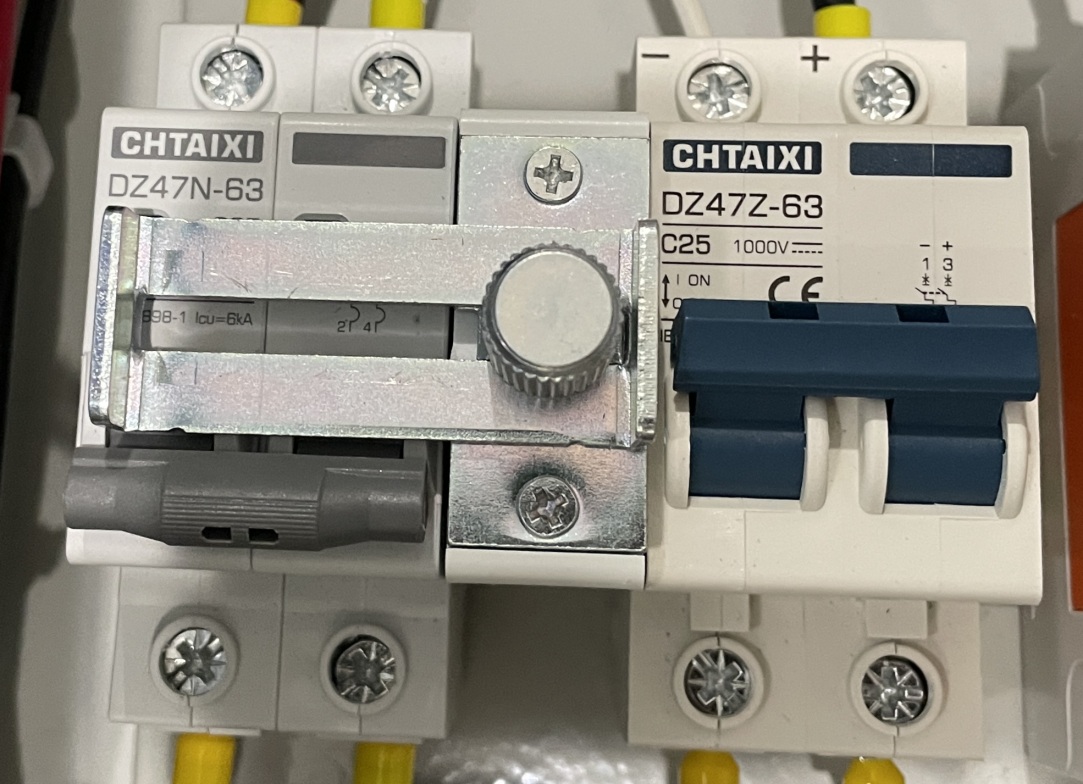
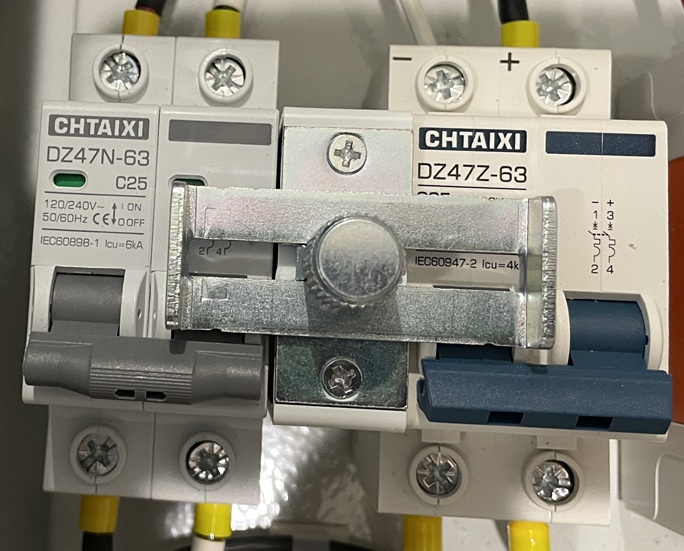
Problem: Mollum MCBs are not compatible with the interlock I purchased. Mollum breakers have the flip lever in the vertical middle of the unit. The interlock won’t slide with that configuration. So I purchased two Chtaixi MCBs after doing a bit of research (i.e. opening my eyes); its flip lever is located towards the bottom of the unit.
I Slid everything onto a DIN rail and it worked just as advertised.
So let me show you how it looks in my control box build…
AC power…
DC power…
But, here is a cool feature that I just stumbled upon…
Yup, when you want to lock out all incoming power from the genset or the PV array it turns into a “lock out”. Yeah, yeah…I know there is no place for a true padlock or even a tag to prevent sliding the interlock into operational capability. But, for me it is just a cool feature for added safety…not ultimate safety.
So, for a total of $48 I have the circuit breakers I need to disconnect power and protect the wire AND I have a device to safely and easily switch between power sources. Not a bad deal in my book.
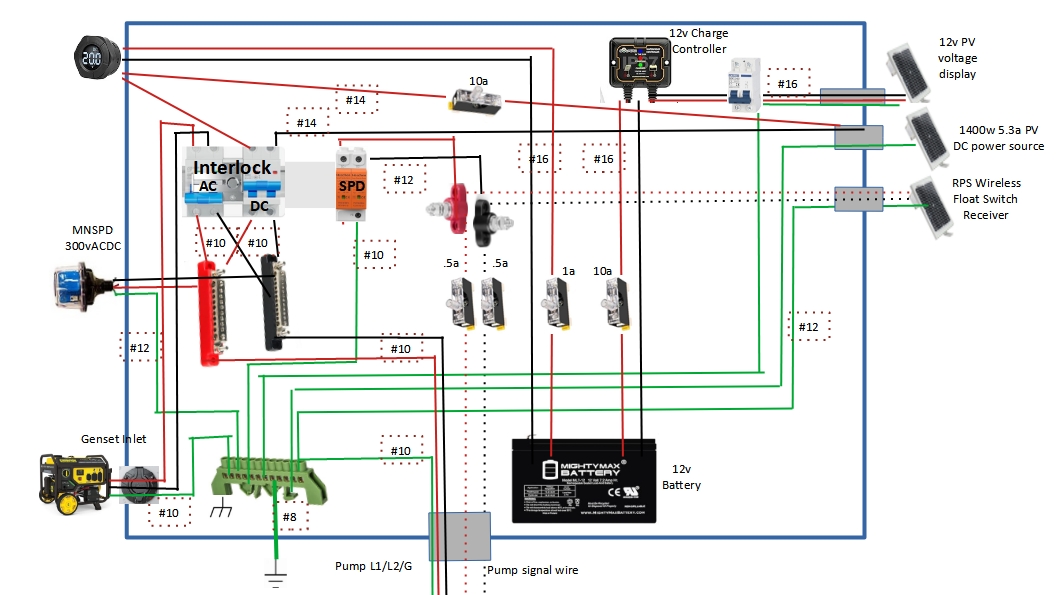
I am including the well box schematic below. Anyone’s input would be greatly appreciated…ANY! Yup, that means questions, concerns, issues, warnings, safety problems…and even compliment 😉
I am actually in the process of building the box right now…hurry, feedback needed.
I really want to write a little series of articles that, when combined, show a couple points that bug the crap out of me. But…I’m really not sure on where to start. Let me touch on the general points first, then maybe a starting point will manifest.
Points to Ponder –
You gotta know a bunch of stuff to go off-grid and/or work a homestead…or you need to be willing and able to learn.
Businesses are usually stupid…or don’t really care that much about their customers.
The simplest solution is usually the best/right solution.
There are some really great products out there…but they are usually really well hidden.
Don’t ever trust salesmen.
Mother nature rules…and can trash mankind whenever she wants.
Trying to be self-sufficient is a pain in the a$$…and expen$sive.
Yeah, you kinda get an idea of just how frustrated I might be?
Let me start all the way back at the beginning…
We bought our place 10 years ago…and I can’t express how grateful we are for God bringing us here. Fortunately for us it already had a well on it. Yup, that is an expensive necessity around these parts. Once we closed on the place I contacted a local well company to pull the pump and test the well…and refurb it if needed. We got lucky…the well was in great shape and needed no work on it.
There was no power at the well to run the pump and the pump, although working fine, was 30 years old and 220vAC. I went to a then local well supply house, outlined my situation, they recommended a new pump set-up, and we bought it. I installed it myself a couple years later and all was fine…till we needed to irrigate the garden, yard, and small orchard.
So we found out…not enough storage, not enough pump flow, WAY inconvenient to use a generator to run the pump…just not the right way to supply our water needs. So again, I contacted a now local solar business guy that I was friends with for advice. “Solar pump!!!” was his suggestion and he supplied me a quote. More money than we wanted to spend…but it “would cure our problems.”
I installed it myself and all was good…kinda. We weren’t getting the flow we needed (amount of water pumped out of the well) and we could only run the well during the day when the sun was shinning. And then disaster struck…a thunderstorm. “ZAP!!” A nearby lightening strike took out the well control module. It was under warranty but we had to send it in. Ahhhhhh…it would take at least a week, probably two, to get it back. Solution from the company…”buy a back-up controller”. Another $500 down the drain…but we kept on pumping.
Turns out that when the nearby lightening strike hit there was transient voltage that spread out towards our place and was absorbed by the signal wire between the well control module and the storage tank’s float switch…700’ in between. The hit wasn’t bad enough to show any damage on the controller’s circuit board…but enough voltage to kill the display board which in-turn killed the operational ability of the module.
Transient voltage refers to quick and very temporary spikes in electrical voltage,
typically lasting only a few milliseconds. The spikes can be caused by near-by lightning strikes,
switching operations, or electrical faults. And they can potentially damage sensitive electronic
equipment such as circuit boards.

Float switch is a unit that floats in the water tank and tells the well pump
when to turn on and send water to the tank and when to turn the well pump off
so the tank doesn’t overflow.
Basically, and on/off switch controlled by the water level.
So a little time goes on and we expanded the orchard and garden and yard…now way too little water to irrigate. So, another storage tank. Fortunately a decent and reputable local company gave us a deal, installed the tank myself, back in business with plenty of water to irrigate.
Another thunderstorm…we noticed tanks overflowing sometimes. Three months of troubleshooting later…problems with the new well control module. Yeah, from you know what. Fixed it ourselves…back in business. Well, kinda. (no pun intended). We still had a problem getting enough water to irrigate the orchard, garden, berry patches, grass, and the new pine trees. Began a slow process to think about a better solution.
Another thunderstorm with a near-by lightening strike…a dead well control module…the new module now dead. No problem, I had a back-up on the shelf (the original control module), installed it, contacted the company, they said send in the dead unit. Turns out the unit was dead as a door nail…completely bricked. $500 down the drain. And the control module now on the well was the “repaired” unit from the first lightening strike and was/is limping along on borrowed time.
Fed up with the situation I decided I better get thoroughly educated on all aspects of the solar well set-ups and what exactly was causing our problems. Two months later I finally had a handle on it. The problems:
The well control modules were getting zapped by transient voltage from nearby lightening strikes.
That transient voltage was coming in through the 700’ of buried signal wire between the storage tanks’ float switch and the well. Basically the wire was acting as an antenna collecting the voltage and shooting it into the electronic circuit board inside the well control module.
No off-the-shelf solution was available that wasn’t cost prohibitive. Meaning…at a least couple thousand dollars to install an applicable and reliable solution.
But…here is the ugly part(s)…
The original local dealer sold us a pump that didn’t meet our water supply needs when he could have if he had simply listened to us when we talked about the well depth, water needs, etc.
AND…the same dealer sold us that control module that was completely unneeded. There was a much less expensive and far simpler way to control the well pump.
When we worked directly with the pump manufacturer, who sold us the 2nd control module directly, they sold it when it was completely unneeded. Again, there was a much less expensive and far simpler way to control the well pump.
Neither the local dealer or the manufacturer had any solution for our situation.
But is gets worse. I accepted the situation for what is was and knew I had to figure out a solution myself…so the research began. I found a wireless float switch that would eliminate the 700’ of signal wire that was collecting the lightening transient voltage…$800. But there still a problem with the well control module and it was going to breakdown at some point. Along with that bad news was some really good news…the pump itself was very high quality and had really great options. However, the control module we had/have couldn’t access those truly useful options.
Yes, I ordered the wireless float switch. Wanna hear some irony?
The box with the new equipment arrived, a week after I made the purchase.
I made time to start work installing it on the existing module for a test run.
I set-up my camera to video the unboxing to post later.
I pulled out the first two pieces of equipment...ah, that was all there was.
The antennas, the tank probe, and some hardware were all missing!

Fortunately, I had the video.
I called the company, explained the situation, told them about the video,
and the really great customer service person created an order for the missing parts.
 They shipped the next morning.
A very awesome and needed option for the pump was…for basic operation the pump could run off solar panels or a generator very easily with nothing special needing to be done. The current well control module had no ability to implement that option. But, the well control module had options that meant absolutely nothing to me and were completely unneeded. After weeks of research, and a dozen emails back and forth to the “manufacturer” (turns out they were a distributor) I now understood how the pump worked, options for operation, and basically how it functioned overall. Interestingly enough…the pump itself was not “made” by the manufacturer, it actually was made in Italy and then private labeled by this company in Arizona.
The part that ticked me off the most…I could have had more than twice the pump/flow rate with the same type and quality of pump if the local guy had known what he was doing. He sold us a pump for a 750’ deep well vs. a pump for a 220’ well. Another model of that pump provides more than twice the flow rate for the same money for a 300’ well. Nothing I can do about that now…just move on.
So here is what I needed/wanted to control my well:
Earlier in the day pumping and more water in the storage tanks during the summer months.
A safe and reliable way to control the pump.
An easy way to be able to run the well from the solar panels or a generator.
A reasonable and realistic way to protect a control module and the well pump from lightening strikes.
Obviously there is no way to protect from a direct lightening strike, at least one that is affordable, but I could expect protection from the transient voltage issues that was burning out the existing control modules.
PROBLEM!!!! I couldn’t find anything to fit those requirements…nothing!
Come on…was I being unreasonable? I can’t be the first guy to run into this. And, it isn’t complicated. One limiting factor was my existing pump…I was stuck with it and its limiting flow rate. To replace it was simply too expensive. So I had to figure this out on my own. And I did!
I will write another article on what I am building for a solution…but, that isn’t the point of this article. Here I just want to point out the back-story and the lessons learned. I will do a “Part #2” that will be the lessons learned. Part #3 will be the overall solution to the problems/issues/challenges.
If you remember I upgraded my entire battery bank in the spring (2025) and increased battery storage from 32kWh to 41kWh (630ah – 800ah) < click here >. I also went with a “closed loop” battery bank connected to my Victron CCGX. The Midnite MNPowerFlo5 batteries now control the charging vs the charge controller “smart network” and GX device. Other than me tinkering with the DVCC settings (which I learned my lesson not to) the system has been up and running with no real problems of any kind. Well, almost…
I did the upgrade in March…which is clear and cool weather with bright, clear, sunny, blue skies. Just about perfect conditions for maximum PV production. And then July came around. Here in AZ the monsoon season usually starts in July, along with cloudy skies, sometimes for 2 – 4 days in a row. So out came the generator to occasionally top off the batteries and/or keep the lights on. And that is also the time period when I started messing with DVCC settings. Yeah, bad combination.
A number of Victron experts on this forum helped straighten me out, educate me, and turn all the DVCC settings back to the defaults. Thanks guys!!
But, I still had a solar production problem. Yeah, I didn’t do a very good job of calculating the peak solar/sun times for each month…July – September can be the cloudy season, and I didn’t really account for that very well. I often couldn’t get the batteries up to a full SOC, sometimes not even close. Hence, the genset usage.
I am 100% off-grid and wanted the battery storage to carry me almost a week on my household “minimum load”; I achieved that with the 41kWh of batteries. But sufficient energy storage without sufficient energy production kinda leaves you us in the dark…no pun intended.
My system has “evolved” over the last 6 years. Finally settling on almost entirely Victron…smurf through and through! My PVs…well, a mess. I started on a shoestring budget and have pinched pennies since then when it came to PVs. Some would, rightfully so, criticize that…but that is just how it happened.
I had/have 3 arrays;
800w (8x100w HQST 18v/5.5a) mounted on my utility room roof facing south-south-east (165degrees), first array built,
2235w (6x250w Canadian Solar 30v/8.3a) + (3x245w Canadian Solar 30v/8a) ground mount facing south-south-west (210degrees), array built a year after the first,
2235w (6x250w Canadian Solar 30v/8.3a) + (3x245w Canadian Solar 30v/8a) ground mount facing south (180degrees), array built a year after the 2nd array.
Arrays #1 & #2 combined into a Victron 150/70. Array #3 into a separate Victron 150/70.
Arrays #2 & #3 evolved; they each started with the 6xCS 250s and then I added the 245s (3 each) last year. Yeah, not the best method, but close enough for me at the time.
Arrays #2 & #3 were all used panels, but I tested them and they were producing at 95% rated capacity…and I got a killer deal on them at the time.
Array #1 Upgrade –
I knew I had to increase production but the roof of the utility room limited me on the size of panels I could put up there. And my wife was severely limiting the upgrade budget as well. My solar business buddy gave me some used 175w Solar World panels (37.5v/5a) (tested out at 97%), couldn’t turn them down and they were a good fit for the utility room roof. I was able to install 6 of those panels for a production increase of 31% (2S3P) over the old panels.
Additionally, combining Array #1 & #2 couldn’t be a good thing; 1) different panels, 2) different compass points. True south for our location is about 170 degrees; #1 was spot on, #2 was 20 degrees off. I am sure the MPPT had “issues” trying to workout the charging algorithm making it inefficient.
There wasn’t much I could do to increase production significantly at this point. But, I could remove the 6x250w CS panels and replace them with matching 6x245w CS panels. That gives me 9 matching 245w Canadian Solar (30v/8a) panels with no loss of production.
And since it will now be on its own Victron 150/70 MPPT Smart Solar Charger I should see more efficient, more production, out of the panels. Additionally, I will be painting the frame with all the panels removed and cleaning up some wiring.
Array #3 planned upgrade –
This array was the one place where I could increase production. So I will be removing all the panels, making frame modifications for another 6 panels, frame painting, wiring improvements, and panel reinstalling. I will then have a total of 15 x 250w Canadian Solar (30v/8.3a) panels on this array (3S5P).
And once again, since all panels will now be matching 250s I should see an efficiency increase there. And adding 6 more panels will increase the array by 1500w.
Projected Overall System Production Increase –
Additional 1750w in additional panels (plus another 1500w this winter)
Efficiency increase with the added 100/20 MPPT on Array #1,
Efficiency increase with matching panels on Array #2 & #3.
Current Project Status –
All of the work is done on Array #1, including the addition of the 100/20 MPPT.
Array #2 (phase 1) starts on Monday. Phase 2 will be this winter.
Array #3 starts the following week.
Watching the production side the last couple of days…yup, seeing more production with simply upgrading Array #1 so far.
Something New –
I was not happy with the array disconnect switches in the utility room. They just weren’t right for the job. So I came up with an “elegant” solution. Okay, maybe not elegant, but pretty cool IMO. I built a PV disconnect box. I integrated an appropriate sized circuit breaker for each array as the disconnects along with the SPDs.
Here’s the old set-up… Here is the new set-up… So each array has an exterior combiner box with fuses on each string, a circuit breaker for the array, and a Chinese SPD for the array. Then inside the utility room there is a circuit breaker (acting as a disconnect switch) and a Midnite Solar SPD. I like it!
One last thought…I looked and looked at Array #2 trying to figure out how to add substantial production capability to it. Location and spacing with the garden just wouldn’t let that happen. But I have another matching 6x245w CS panels…I didn’t want them to go to waste. I figured out that about 20’ away I can add another ground mount frame with the 6 panels and run them (3S2P) to the combiner box on Array #2. That will add another 1500w to the system sometime this winter.
Old production – 5.2kw
New Production – 8.5kw (when I am all done this winter with Array #2 – Phase 2)
So this is how I am upgrading the production side of the system…this time…and this winter. To me to just seems as if it never ends…it’s never enough. Oh well, the joys of solar, living off-grid…and evolution.
I already explained in painful excruciating detail about the ‘needs’, ‘issues’, and ‘resolutions’ of the new battery bank in Part #1. I also explained why the change/upgrade, but for those of you who missed it…
I thought there was a battery with a problem. Turns out there wasn’t.
I had already committed to selling my largest LifePo4 battery (230ah) to a good friend.
I realized that with some trading and selling the remaining 2 existing batteries, the new battery bank would be a net zero 20% increase in power storage at no additional cash outlay.
I realized that the upgrade would also bring me some added benefits and efficiency in my system overall since the batteries communicate with each other and with the system’s computer “brain.”
What battery did I choose? Let’s hit the “process” first.
I have had lithium (LifePo4) batteries for 3+ years now; 2 Elites and 1 Trophy. The Elite battery manufacturer went out of business so their warranty is useless and no support for them whatsoever. The Trophy battery is awesome but can’t communicate with the Elites or my system’s computer. And since the batteries aren’t matched exactly they do discharge and charge at different rates. When the chance to get a matched set of batteries came along that can all communicate with each other and with the system I couldn’t turn that opportunity down. Especially when it would be a net zero outcome, money wise.
When I started looking for batteries to purchase I came up with a number of features that were important to me:
Name brand – wanted to be able to trust the brand of a manufacturer that had proven themselves to make quality products.
Local support – wanted to be able to call on someone locally to help with the batteries if needed.
Good warranty – no matter how good a battery is, no matter how good the manufacturer is, there is always a possibility that something might go wrong with a battery. And I wanted that to be covered by a warranty that means something.
Well built – wanted a battery that had quality components, high quality cells, high quality BMS, and protected external terminals.
Communication – wanted the batteries to be able to talk with each other to coordinate their operations. I also wanted the battery bank ‘master’ battery to be able to talk to my system’s computer ‘brain’ to help with system efficiencies and reporting.
Price – wanted a battery on the lower end of the retail price scale. However, this wasn’t a truly high priority…more of a ‘want’ vs ‘need’.
Design – wanted a small profile server rack battery vs wall mount unit since I had limited vertical space available.
Initially I considered the following batteries:
EG4 LL-S Lithium $1,250
EG4-LifePower4 $1,142
Pytes V5 LiFePO4 $1,592
SOK 48V 100Ah PRO $1,202
ECO-WORTHY 48V 100Ah LiFePO4 $899
VATRER POWER 48V 100AH LiFePO4 $899
ExpertPower 48V 100Ah 5KWh Lithium LiFePO4 $949
Trophy 48V100E-1 $1,745
I eliminated the ExpertPower and Vatrer pretty quickly after some research due to their short time in business and unknown quality of build. On top of that, the support and warranty aspects were questionable. I have used Eco-Worthy products before and I like them even though they are not at the top of the quality chart. But I eliminated them as well due to support and warranty issues even though the build quality looks pretty good.
I cut the Pytes out due to their price…just way out of my budget. I really like the SOK battery! Great build quality, field serviceable, good warranty, solid communication protocol, and a decent price. On top of all that…SOK has been around for awhile and has a sterling reputation, but no local support for them was their only drawback. I figured I might live with that single negative.
Both EG4 batteries are decent batteries from a well-known company. Decent build quality, good performance, supposedly EMP hardened, comm capable with my system, decent warranty, but no local support. They were still in the running in #2 and #3 slots. I love Trophy batteries!! If I needed internal heaters in the batteries I would choose Trophy hands down. They are great batteries and their customer support is unmatched. However, I don’t need heaters and the price tag put it at the top of the expensive list…out of range for my project budget.
If I had to choose I would go with the SOK, but…
A buddy of mine owns a solar installation company about 10 miles from where I live. He is a good friend of mine and I’ve bought equipment through him before. Not only that, I previously managed to do a little trading with him when I did my major upgrade almost 2 years ago. Obviously I had to talk with him and see what he thought about my battery upgrade.
He listened to all my reasoning and I asked him for his opinion. He asked me if I had seen the MidNite Solar server rack battery. I had not. He showed me a unit he had in his shop’s showroom…it looked very sharp, clean, and well-built. He told me he had installed about 100 of them so far with no issues, no problems, no warranty claims, nothing but good results. He also personally knew one of the partners/owners of MidNite, even stayed at his house before.
I have used MidNite Solar products for years and installed lots of their equipment but had no idea that they carried a line of batteries. I had 100% confidence in the company and their product quality. I asked him my price per battery and was pleased with what I heard. I had something he wanted and so we agreed to a trade for 2 of the 8 batteries. But…I had to do my research before committing to a purchase.
ALL of my research showed that these batteries are absolutely Tier 1 products. However, they don’t have an LCD screen on them but that’s okay. Why? Coz…I am over being too much of a tech-head. I don’t need to be monitoring individual cell voltage, 4 different temperatures of the box interior, etc. The best proof that you built a good system is when you don’t want to, and don’t have to, monitor it. Sure, I will monitor it for the first 30 days or so just to ensure that all is working correctly, but after that…forget about it!
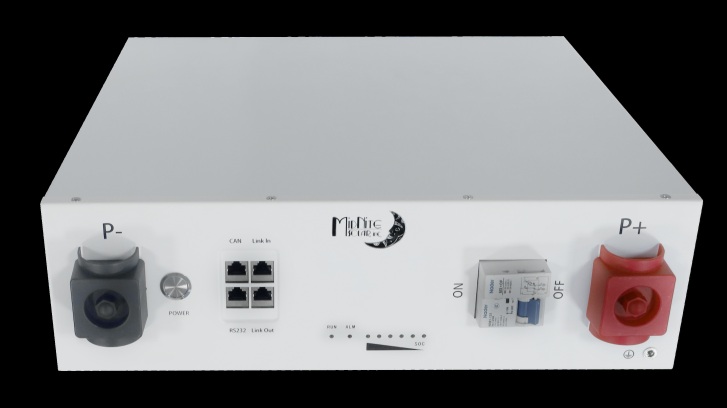
Choice: MidNite Solar MNPowerflo5 $1,099 (retail)
First bonus was the communication capability with my Victron system built in. Second bonus is the rack that comes with the batteries at no additional cost. Third bonus…dark start. When a battery becomes discharged to minimum safe level it is designed to shutdown. Almost all batteries then have to then be charged with an accessory charger or “jump started” to wake them back up; not these batteries. As soon as there is sufficient PV or genset power the battery will wake up on its own and begin to charge…nice! And to be honest…I love the white color vs the traditional black box battery scheme.
Decision made! MidNite Solar MNPowerflo5 was my choice. Order placed…waiting somewhat patiently. (Should be here sometime between March 19 – 21 with any luck.)
Yeah, then came the configuration process…how to group the batteries together for the best, safest, and most efficient configuration. Many folks use a stackable server rack system with a built-in busbar. However, that is not how these batteries stack in this case. So a vertical busbar on each side ( + & – ) is not on the plan. What I worked out though is, in my opinion, a better option. Why? Splitting the batteries into 2 sets and protecting each with a Class T fuse. I cover that in Part #1 < click here to read that >
The entire footprint is only 2’ deep by 3’ wide and approximately 26” tall. That fits well inside the current footprint minimizing the impact on the utility room. The wiring will be very clean and well-organized and mostly hidden.
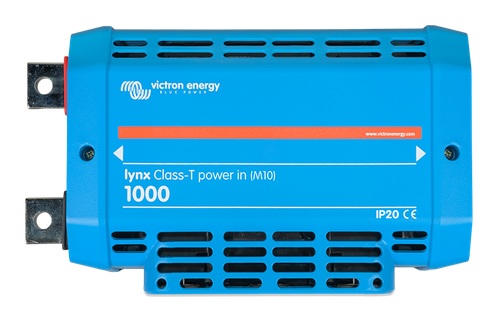
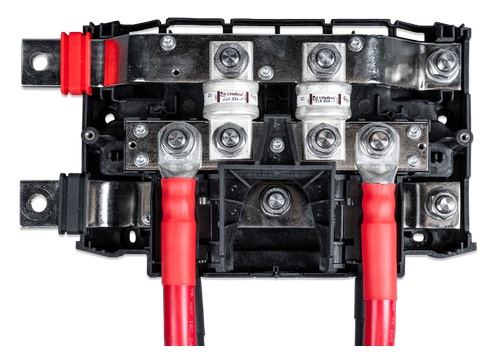
Let me explain how I replaced the dual vertical busbars mentioned earlier. First off, understand that connecting each battery individually to a busbar is the most efficient way to configure a battery bank. That enables each battery to individually transfer current to and from the system equally among all batteries. While I can’t quite do that, I will be able to configure the system that is probably 99% as good in the transfer of current, but 100% better in protecting each set (½ of the batteries) in the bank from each other. To accomplish that I bought a Victron Lynx PowerIn Class T unit.
First off, there is an internal 1000amp busbar…plenty of busbar to handle the system’s current. And there are two connections to that busbar…each protected by its own Class T fuse. Why is that important? Should a catastrophic current overload (massive amperage) occur sending current into the battery bank, both sets of batteries are protected with a 225a Class T fuse. Should the current overload originate from a battery, the set’s Class T fuse will isolate the set of batteries from the system and the other battery set.
And here is a nice little bonus…the Victron Lynx PowerIn Class T unit, being part of the Victron family of Lynx components, connects seamlessly with the PowerIn unit I am using for ‘distribution’. That makes the system much cleaner, much more professional, and much safer than anything I could engineer. And that my friend is one of the many reasons I love Victron equipment…modular (use only what you need) and everything built to work together…and the best product quality on the market.
Now, there is a hidden bonus to moving to MidNite Solar batteries…removing the Lynx Shunt from the system. Since the battery bank (via the ‘Master’ battery) connects directly to the system’s computer “brain” (Victron Color Control GX unit), it transfers all the required/needed system information, eliminating the need for the shunt unit. And that allows me to sell that shunt unit to help offset costs of the upgrade.
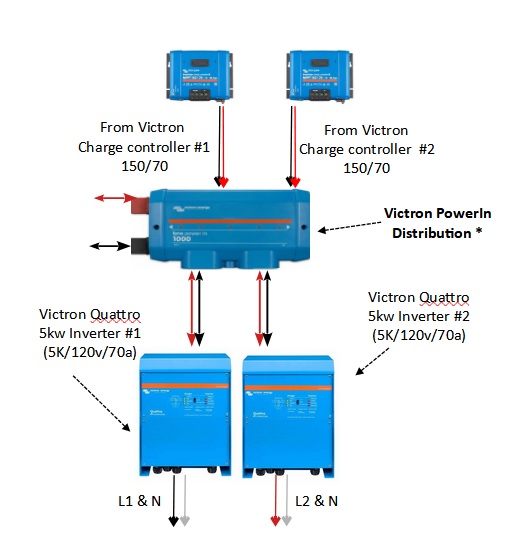
Here is a graphic of what the PowerIn ‘distribution’ unit does…So all-in-all we are getting great batteries from a high-quality company that will work very well with our existing system. Now, let me explain this to you…it takes time to figure this stuff out. And I have 13+ years of building solar systems…and 7 years of building whole-house off-grid solar systems. I spent probably 40 – 60 hours over a couple months to come to the point we are now. But…it was time and effort well spent!
When put together it will look something like this…
I think at this point I will do a series on the “build” and include video. Watch for it !
Thought I would reach out to the solar tech-heads today. I wrote previously that I thought I had a problem with one of my 3 LifePo4 batteries (1x230ah + 2x205ah). Turns out that it wasn’t actually a problem, I was still getting my full amp hours from the “bank” of batteries; one would just unload faster than the others. However, I already had put into motion replacing all my batteries…which would increase the overall power storage by 20%.
Current power storage capability 32.8kWh…about 40 hours of power with no additional sunlight.
After the upgrade the power storage capability 41kWh…about 49 hours of power with no additional sunlight.
I thought I would share the whole thought process on how I was going to configure the new battery bank. Why is that important? There is a balance between cost and benefit when it comes to installing solar components. But the overriding factor is safety…1) don’t injure anyone handling the components and 2) don’t burn down the house from a fire that starts from the solar equipment/install.
There are two additional factors involved here –
There are some efficiencies to be gained by having each battery “brain” (mini-computer) hooked to each others; and the “master brain” (mini-computer) of my overall solar system. Having the batteries talk to each other coordinating their charging/discharging, etc. does help. And the system’s “master brain” can better coordinate the interaction of all system components.
Below is a picture of the current battery side of the system. As you can see it looks a bit conflicted and confused. Although it works fine the aesthetics leave something to be desired. If the time comes to sell our place, heaven forbid, having a neat professional installation will, if not add value, will surely not detract from it. And yes, I will do a before and after picture to show what I mean.
To get the most out of this post you need to have a basic understanding of electricity and solar. But if you don’t, that is okay, you can always ask me questions.
First off is the electricity I currently use:
Average AC load: 8.5aAC – 20aAC (1kw – 2.4kw), Daily Average 20kWh
Normal Max AC load: 37aAC – 85aDC (2kw – 434kw)
Maximum AC Amperage: 84aAC (42aAC per each AC leg – each inverter)
Maximum DC Amperage: 194aDC (97aDC each leg – each inverter) – (2.3 DC amps for each 1 amp AC)
Proposed Battery Bank Design –
Each Battery Bank –
Battery bank consists of 2 battery sets
Each battery set consists of 2 batteries each
Batteries parallel daisy chained with 6” x #2awg (200a capacity rated at that length)
Set connected to Lynx with 24” x #2awg (200a capacity rated at that length)
Each set capable of 100a (based on internal BMS & circuit breaker)
Each battery bank is connected to system via The Lynx Class T unit (1000a busbar)
Each of two battery banks’ capable of 200a (split between 2 battery sets)
Each of two battery banks’ over current protection device is 225a Class T fuse housed in the Lynx Class T unit
Issues / Resolutions –
Issue – Protecting 2awg wire between batteries.
Resolution – Battery internal BMS (100a) & internal circuit breaker (125a) protects the 2awg wire between batteries. 2awg rating for 6” length is 200a capacity.
Issue – Protecting 2awg wire connecting battery set to Victron Lynx Class T unit.
Resolution – Battery BMS (100a) & circuit breaker (125a) protects 2awg wire between battery set and Lynx. 2awg rating for 24” length is 200a capacity.
Issue – Protecting each bank from the other bank due to dead short.
Resolution – Lynx Class T unit has 225a Class T fuse on each bank.
Protecting system due to dead short in batteries.
Resolution – Lynx Class T unit has 225a Class T fuse on each bank.
New Battery Bank DC Loads –
System
High Average: 20a
Normal Max: 85a
Maximum: 194a
Each of two battery banks
Average: 10a
Normal Max: 42.5a
Maximum: 97a
Each set of two batteries each
Average: 5a
Normal Max: 21a
Maximum: 49a
Each battery
Average: 2.5a
Normal Max: 10.5a
Maximum: 24.5a
Battery Nominal/Maximum for Charge/Discharge (as per battery spec sheet): 75a nominal 100a maximum
The Victron Lynx Class T unit w/2 battery bank connections
Each bank has dedicated 225a (20kAIC) fuse for over-current protection
Worst Case OPerational Scenario –
Problem: 3 out of 4 battery sets go off line. Dumping maximum 194a draw onto one battery set.
Outcome: Maximum draw still withing rating of 2awg wire between each battery, from battery sets to Lynx. And, current spread out over 2 batteries in set is still under 100a of BMS cutout if the draw is split equally between each battery in the set. And still under 125a of each battery’s circuit breaker if the draw is split equally between each battery in the set. If full draw hits a single battery before damage can be done to #2awg wire the BMS will shut down the battery and the battery internal circuit breaker will open stopping the flow of current.
If the current would somehow manage to keep flowing and increasing in amperage, the 225a Class T fuse will blow at the upper end of the #2awg wire carrying capacity before the wire fails.
Summary –
Solar power is complex but not un-doable for the average person. The key is learning and then applying commonsense to any problem once that problem is understood. Here I had no complicated problem…just had to apply the basic of electricity to the problem and the solution would be clear. Although, when “opinion” is added in, then there could be a number of correct answers.
Remember the overriding factors; 1) safety – don’t get anyone hurt, 2) safety – don’t burn the house down. Both are accomplished by the new battery bank configuration. Also, accomplished is economy. I was able to use a whole bunch of existing equipment and supplies such as wire/cable. And also accomplished were the side benefits of some increase in efficiencies, some increase in stored power, and better overall system quality.
Part #2 will be which battery brand I chose and why.
Personal Note: I thought you might get a kick out of seeing my current battery bank. And yes, I will show an “after” picture as well.



 luxuries and stability of a relatively normal life…without a utility bill or dependence on a power company. And it is boring! Meaning…I really don’t have to pay attention to the operation of the system…it just does it thing day in and day out…no issues,, no problems. Nice. But that all changed that day…
 off, the batteries offline, the computer brain showing an “alarm”, the charge controllers off, the system shutdown, no AC power at all.
 Remember, I built the system, programmed the inverters, programmed the CCGX, programmed the charge controllers, made all the settings myself…I know my system pretty well. But, I still couldn’t figure it out.
 correct order to shut it down…then trying to get her through each step in correct order to do a restart.
 amounts of pictures with descriptions of lights, buttons, and levers. I had my wife look it over and she felt she could do any of the operations outlined in the manual…with just the manual.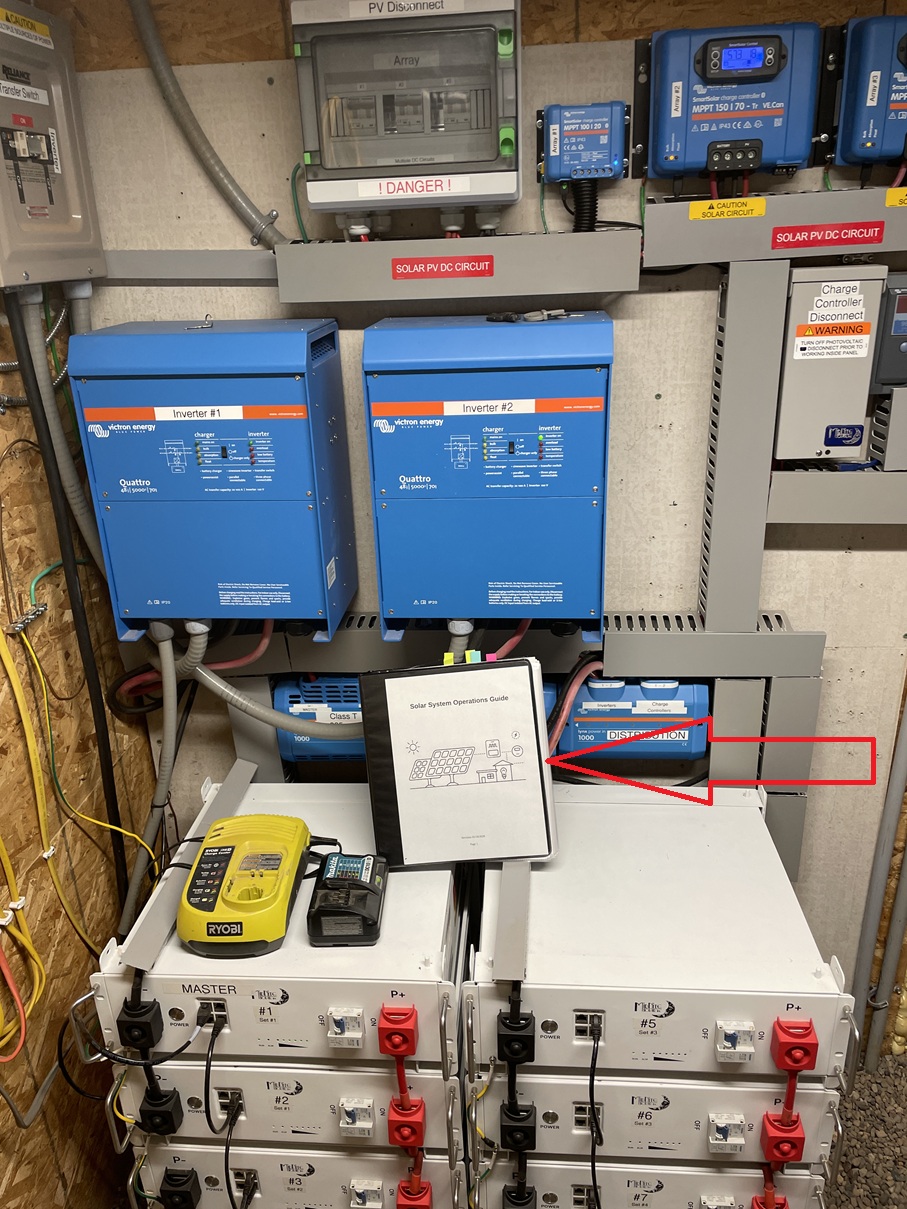

















 A.H. Trimble - Emergency preparedness information for disasters and grid-down