MCB Interlock

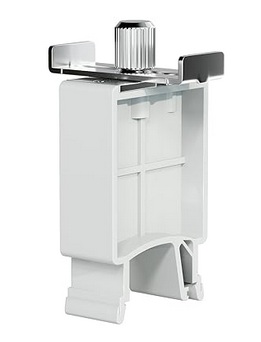
My experience with an MCB Interlock device has been a total success so far.

I needed to build a control box for my solar well. My solar well pump can directly accept AC or DC power. Part of the box build included an AC inlet for my genset and the incoming DC power from the PV array. I needed to make it easy to switch between power sources quickly and safely. And ensure that power could not come from both sources at once. Although highly unlikely that would ever be attempted, I wanted to ensure it as an impossibility. Hence, the “interlock” concept.

I first heard about their existence here on the forum, I don’t remember which thread. I purchased an interlock device off Amazon along with two Mollum MCBs; 20aAC and 25aDC. They arrived, and it didn’t work.

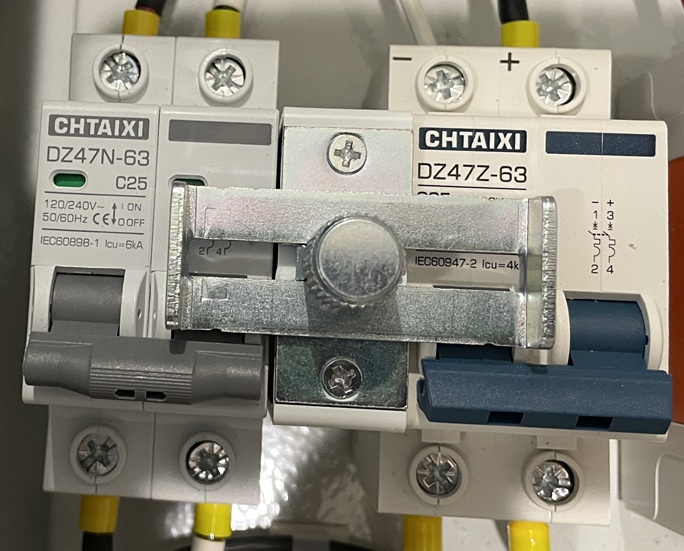
Problem: Mollum MCBs are not compatible with the interlock I purchased. Mollum breakers have the flip lever in the vertical middle of the unit. The interlock won’t slide with that configuration. So I purchased two Chtaixi MCBs after doing a bit of research (i.e. opening my eyes); its flip lever is located towards the bottom of the unit.

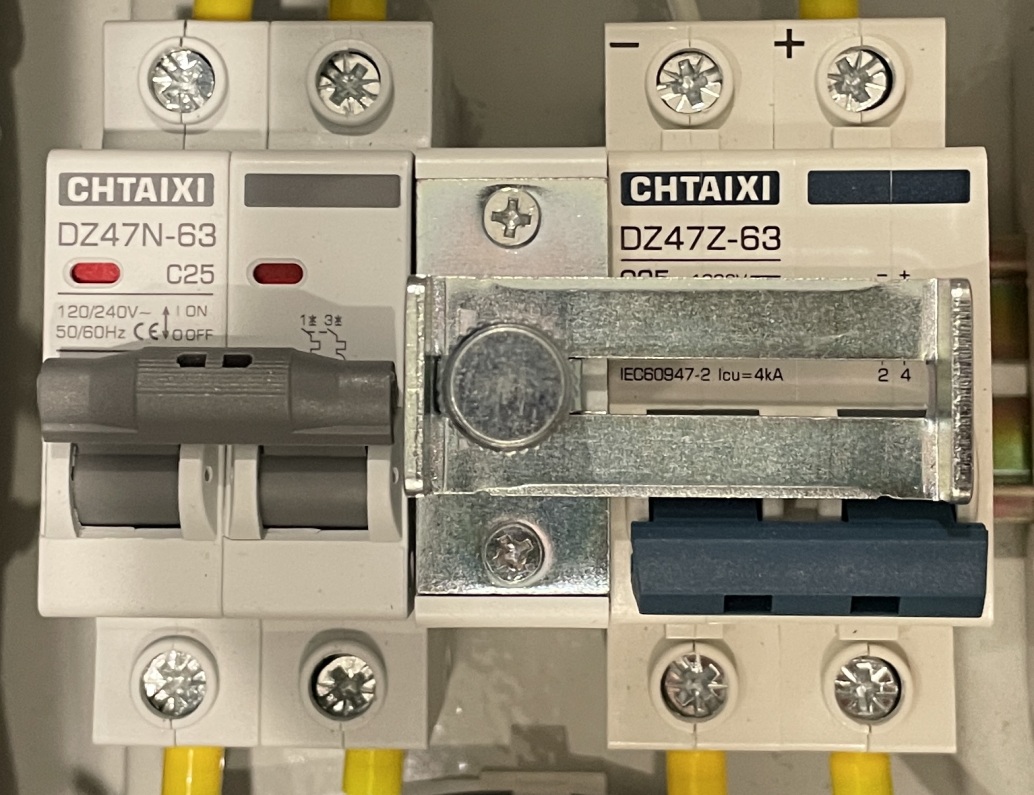
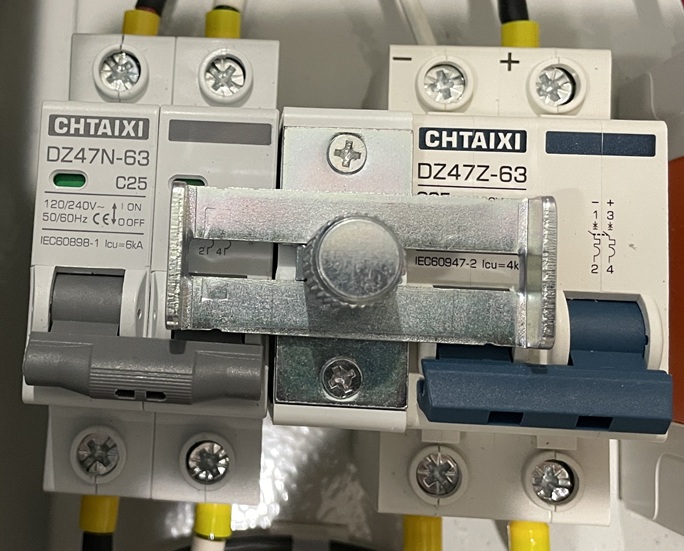
I Slid everything onto a DIN rail and it worked just as advertised. So let me show you how it looks in my control box build…

AC power…

DC power…

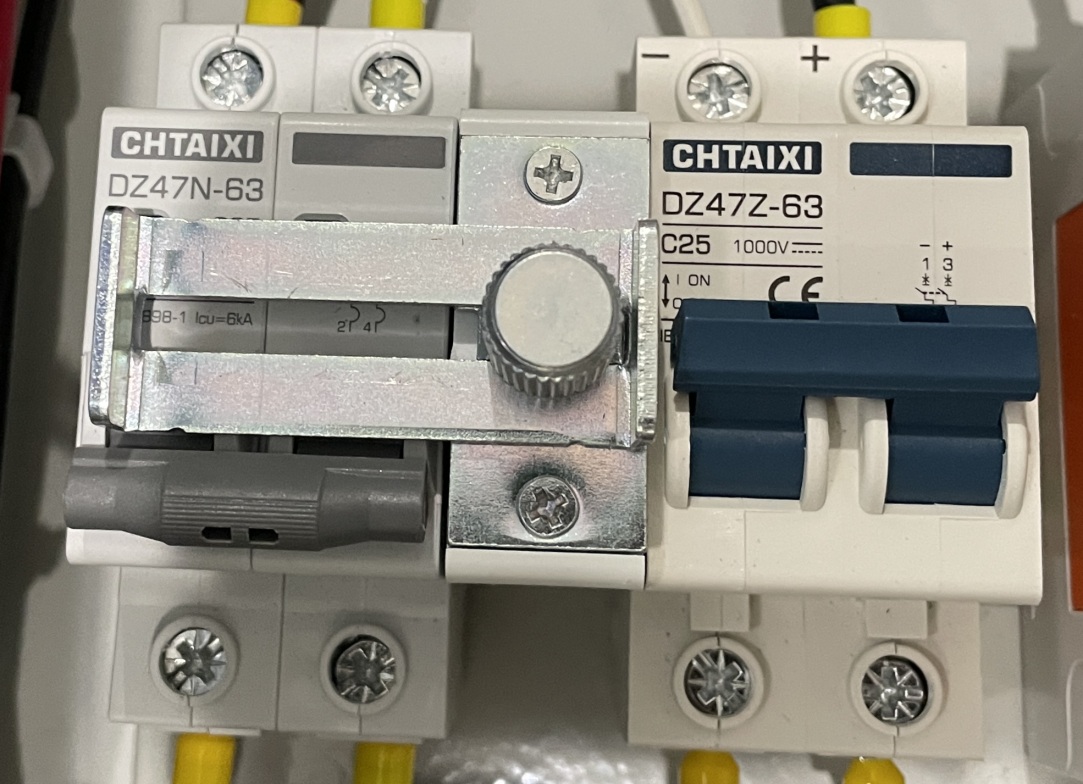
But, here is a cool feature that I just stumbled upon…Yup, when you want to lock out all incoming power from the genset or the PV array it turns into a “lock out”. Yeah, yeah…I know there is no place for a true padlock or even a tag to prevent sliding the interlock into operational capability. But, for me it is just a cool feature for added safety…not ultimate safety.

So, for a total of $48 I have the circuit breakers I need to disconnect power and protect the wire AND I have a device to safely and easily switch between power sources. Not a bad deal in my book.

And yes, you can use two AC breakers or two DC breakers for switch between power sources.

< click here…AMAZON: Breaker Manual Locking Device >


 2009 - 2025 Copyright © AHTrimble.com ~ All rights reserved
No reproduction or other use of this content
without expressed written permission from AHTrimble.com
No legal, economic, or financial advice is given, no expertise to be assumed.
See Content Use Policy for more information.</p

MCB Interlock

My experience with an MCB Interlock device has been a total success so far.

I needed to build a control box for my solar well. My solar well pump can directly accept AC or DC power. Part of the box build included an AC inlet for my genset and the incoming DC power from the PV array. I needed to make it easy to switch between power sources quickly and safely. And ensure that power could not come from both sources at once. Although highly unlikely that would ever be attempted, I wanted to ensure it as an impossibility. Hence, the “interlock” concept.

I first heard about their existence here on the forum, I don’t remember which thread. I purchased an interlock device off Amazon along with two Mollum MCBs; 20aAC and 25aDC. They arrived, and it didn’t work.

Problem: Mollum MCBs are not compatible with the interlock I purchased. Mollum breakers have the flip lever in the vertical middle of the unit. The interlock won’t slide with that configuration. So I purchased two Chtaixi MCBs after doing a bit of research (i.e. opening my eyes); its flip lever is located towards the bottom of the unit.

I Slid everything onto a DIN rail and it worked just as advertised.

So let me show you how it looks in my control box build…

AC power…

DC power…

But, here is a cool feature that I just stumbled upon…

Yup, when you want to lock out all incoming power from the genset or the PV array it turns into a “lock out”. Yeah, yeah…I know there is no place for a true padlock or even a tag to prevent sliding the interlock into operational capability. But, for me it is just a cool feature for added safety…not ultimate safety.

So, for a total of $48 I have the circuit breakers I need to disconnect power and protect the wire AND I have a device to safely and easily switch between power sources. Not a bad deal in my book.

If this is something that interests you…

The interlock: https://amzn.to/43JeNWI

AC MCB circuit breaker: https://amzn.to/3K7z29S

DC MCB circuit breaker: https://amzn.to/3Ko7xZH

SOLAR: Does it ever end? Is it ever enough?

If you remember I upgraded my entire battery bank in the spring (2025) and increased battery storage from 32kWh to 41kWh (630ah – 800ah) < click here >. I also went with a “closed loop” battery bank connected to my Victron CCGX. The Midnite MNPowerFlo5 batteries now control the charging vs the charge controller “smart network” and GX device. Other than me tinkering with the DVCC settings (which I learned my lesson not to) the system has been up and running with no real problems of any kind. Well, almost…

I did the upgrade in March…which is clear and cool weather with bright, clear, sunny, blue skies. Just about perfect conditions for maximum PV production. And then July came around. Here in AZ the monsoon season usually starts in July, along with cloudy skies, sometimes for 2 – 4 days in a row. So out came the generator to occasionally top off the batteries and/or keep the lights on. And that is also the time period when I started messing with DVCC settings. Yeah, bad combination.

A number of Victron experts on this forum helped straighten me out, educate me, and turn all the DVCC settings back to the defaults. Thanks guys!!

But, I still had a solar production problem. Yeah, I didn’t do a very good job of calculating the peak solar/sun times for each month…July – September can be the cloudy season, and I didn’t really account for that very well. I often couldn’t get the batteries up to a full SOC, sometimes not even close. Hence, the genset usage.

I am 100% off-grid and wanted the battery storage to carry me almost a week on my household “minimum load”; I achieved that with the 41kWh of batteries. But sufficient energy storage without sufficient energy production kinda leaves you us in the dark…no pun intended.

My system has “evolved” over the last 6 years. Finally settling on almost entirely Victronsmurf through and through! My PVs…well, a mess. I started on a shoestring budget and have pinched pennies since then when it came to PVs. Some would, rightfully so, criticize that…but that is just how it happened.

I had/have 3 arrays;

  1. 800w (8x100w HQST 18v/5.5a) mounted on my utility room roof facing south-south-east (165degrees), first array built,
  2. 2235w (6x250w Canadian Solar 30v/8.3a) + (3x245w Canadian Solar 30v/8a) ground mount facing south-south-west (210degrees), array built a year after the first,
  3. 2235w (6x250w Canadian Solar 30v/8.3a) + (3x245w Canadian Solar 30v/8a) ground mount facing south (180degrees), array built a year after the 2nd array.
  • Arrays #1 & #2 combined into a Victron 150/70. Array #3 into a separate Victron 150/70.
  • Arrays #2 & #3 evolved; they each started with the 6xCS 250s and then I added the 245s (3 each) last year. Yeah, not the best method, but close enough for me at the time.
  • Arrays #2 & #3 were all used panels, but I tested them and they were producing at 95% rated capacity…and I got a killer deal on them at the time.

Array #1 Upgrade –

I knew I had to increase production but the roof of the utility room limited me on the size of panels I could put up there. And my wife was severely limiting the upgrade budget as well. My solar business buddy gave me some used 175w Solar World panels (37.5v/5a) (tested out at 97%), couldn’t turn them down and they were a good fit for the utility room roof. I was able to install 6 of those panels for a production increase of 31% (2S3P) over the old panels.

Additionally, combining Array #1 & #2 couldn’t be a good thing; 1) different panels, 2) different compass points. True south for our location is about 170 degrees; #1 was spot on, #2 was 20 degrees off. I am sure the MPPT had “issues” trying to workout the charging algorithm making it inefficient.

So I purchased a Victron 100/20 MPPT Smart Solar Charger for Array #1.

Array #2 planned upgrade –

There wasn’t much I could do to increase production significantly at this point. But, I could remove the 6x250w CS panels and replace them with matching 6x245w CS panels. That gives me 9 matching 245w Canadian Solar (30v/8a) panels with no loss of production.

And since it will now be on its own Victron 150/70 MPPT Smart Solar Charger I should see more efficient, more production, out of the panels. Additionally, I will be painting the frame with all the panels removed and cleaning up some wiring.

Array #3 planned upgrade –

This array was the one place where I could increase production. So I will be removing all the panels, making frame modifications for another 6 panels, frame painting, wiring improvements, and panel reinstalling. I will then have a total of 15 x 250w Canadian Solar (30v/8.3a) panels on this array (3S5P).

And once again, since all panels will now be matching 250s I should see an efficiency increase there. And adding 6 more panels will increase the array by 1500w.

Projected Overall System Production Increase –

  • Additional 1750w in additional panels (plus another 1500w this winter)
  • Efficiency increase with the added 100/20 MPPT on Array #1,
  • Efficiency increase with matching panels on Array #2 & #3.

Current Project Status –

  • All of the work is done on Array #1, including the addition of the 100/20 MPPT.
  • Array #2 (phase 1) starts on Monday. Phase 2 will be this winter.
  • Array #3 starts the following week.

Watching the production side the last couple of days…yup, seeing more production with simply upgrading Array #1 so far.

Something New –

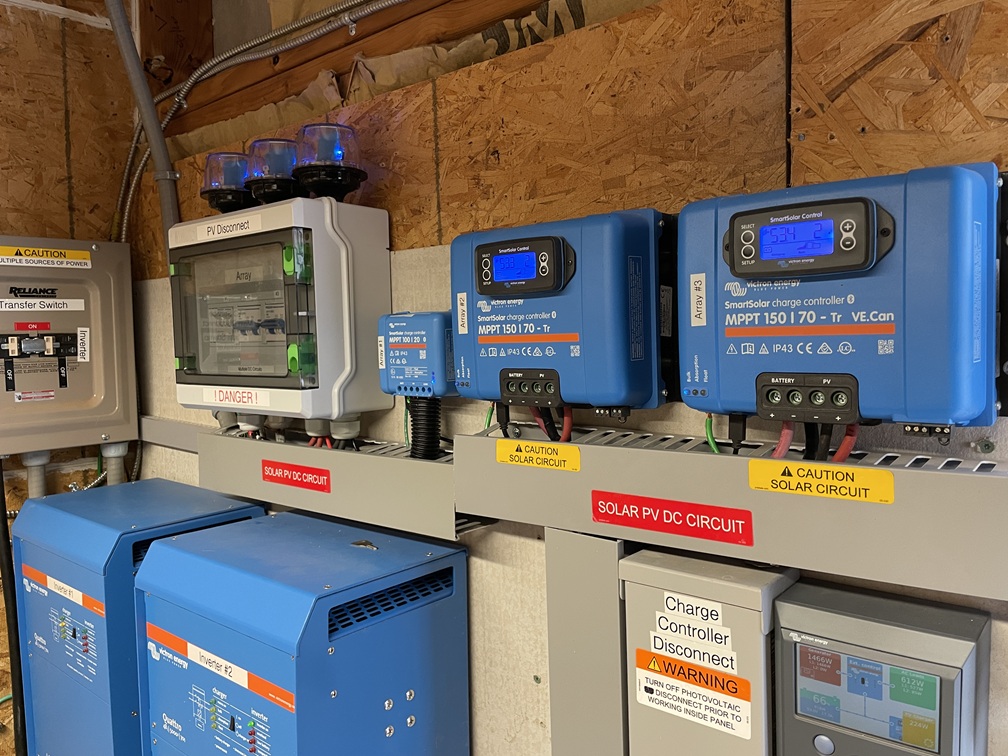
I was not happy with the array disconnect switches in the utility room. They just weren’t right for the job. So I came up with an “elegant” solution. Okay, maybe not elegant, but pretty cool IMO. I built a PV disconnect box. I integrated an appropriate sized circuit breaker for each array as the disconnects along with the SPDs.

Here’s the old set-up…
Here is the new set-up…
So each array has an exterior combiner box with fuses on each string, a circuit breaker for the array, and a Chinese SPD for the array. Then inside the utility room there is a circuit breaker (acting as a disconnect switch) and a Midnite Solar SPD. I like it!

One last thought…I looked and looked at Array #2 trying to figure out how to add substantial production capability to it. Location and spacing with the garden just wouldn’t let that happen. But I have another matching 6x245w CS panels…I didn’t want them to go to waste. I figured out that about 20’ away I can add another ground mount frame with the 6 panels and run them (3S2P) to the combiner box on Array #2. That will add another 1500w to the system sometime this winter.

Old production – 5.2kw

New Production – 8.5kw (when I am all done this winter with Array #2 – Phase 2)

So this is how I am upgrading the production side of the system…this time…and this winter. To me to just seems as if it never ends…it’s never enough. Oh well, the joys of solar, living off-grid…and evolution.

So…what/how has your solar journey been?


Related Articles –

SOLAR: More burned-up wiring…

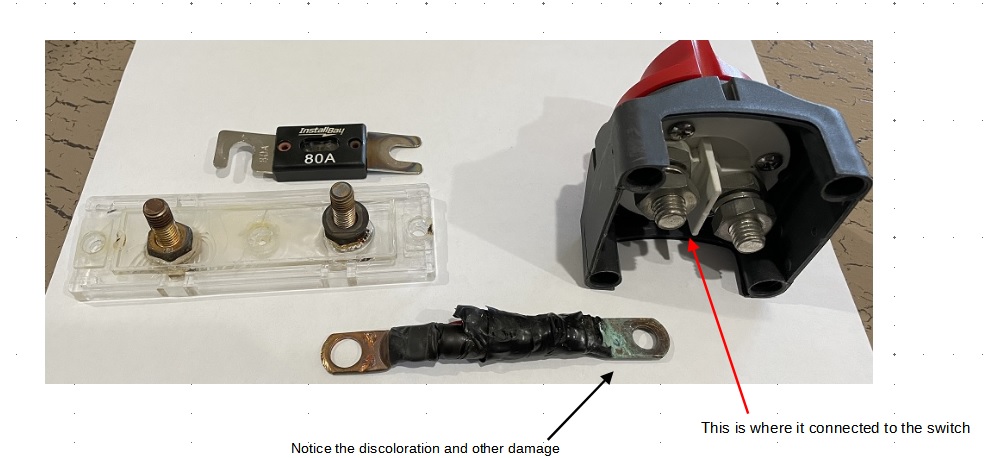
Last November I wrote a ‘Tip’ article regarding a fuse of mine that heated up and I had to replace it. Along the way I noticed that the problem was the connections on the fuse holder were not tight. I fixed it and didn’t think another thing of it until I was upgrading our solar system this past spring. Then I found this…


Here is a different angle…

I had corrected the problem I found originally, back in November, a loose nut on the fuse holder which created resistance. And that led to the fuse overheating and failing. I replaced the fuse and fuse holder, tightened everything to spec and went on with life.

The day the before I started the upgrade I went out to do a final assessment on the system. I wanted to make sure I had all the replacement/upgrade parts, cable, wire, etc. I noticed that the wire from the charge controller to the switch & fuse was once again warm, not hot, warm to the touch. I wasn’t worried because it was only warm and I would be working on it the next day anyways.

As I disassembled the fuse holder, took off the wire terminal, and then removed the switch from the wall it became apparent to me what was going on here. I had already taken the wire off the fuse holder, when I went to take the wire off the switch terminal the nut wasn’t loose…but it sure wasn’t tight. And this is what I saw on the wire terminal…

Note: The discoloration and build-up on the terminal is a result of loose nut connection. Not falling off loose, but not tight enough. And that ‘looseness’ created resistance which cased the corrosion and wire to be warm.

What is the bottom line here?

If you look at any quality piece of electrical equipment, it will state the ‘torque’ value that connections are meant to be set at, regardless whether it is a screw or nut/bolt. That setting is there for a reason. Electrical components heat and cool on a regular basis. As it does so, a nut or screw or bolt may loosen over time. If you are going to do the work, do it right with the right equipment. If you don’t have the right equipment then buy it…borrow it…or don’t do the work.

And yes, another reason to use fire resistant backer board behind your electrical equipment.

Follow-up note: The switch you see being used was rated for 275amps, far below the 70amp production capability of the charge controller. However, the switch was also only rated for 48vDC. There was as much as 58vDC running through the circuit. And yes, that means too many volts for the switch. But, the switch showed no signs of degradation of any kind. Manufacturers regularly derate their equipment to ensure safety when used. I was about 20% over rating. But that was not a full-time situation but unsafe all the same.

If you are wondering why I used that switch when I should have used one rated for 58vDC or higher…it was left over from the old 24v system and I didn’t check the rating when I went from 24v – 48v in 2020.


Related Articles –


 2009 - 2023 Copyright © AHTrimble.com ~ All rights reserved
No reproduction or other use of this content 
without expressed written permission from AHTrimble.com
See Content Use Policy for more information.

EMP, CME, & Lightening Surge Protection – Part #2

If you haven’t read Part #1 of this 2-part series you probably should.

< click here to read Part #1 >

My Protection Strategy –

So how do I protect my off-grid home?

First off…I place a more likely chance that I will suffer a lightening strike than an EMP. However, I don’t discount the occurrence of an EMP strike on the continental US, and that has the potential to affect our home. Remember I am off-grid so I don’t have thousands of miles of electrical transmission lines attached to my house. That my friend greatly reduces my exposure to an incoming EMP surge.

All that being said I take some basic precautions first…

  1. My PVs (solar panels) all have aluminum frames, all those frames are attache to an earth ground system. The earth ground system includes:
    1. A single continuous 8AWG bare copper wire connected to each panel of 3 PVs in the string via a lay-in grounding lug.
    2. The 8AWG bare copper wire from each string is connected to a 6AWG bare copper wire handling the array that contain 2 strings each.
    3. The two main arrays (#2 & #3) are connected via 6AWG bare copper wire to an earth ground that consists of three 8’ copper clad rods driven in the ground 10’ apart bonded with 6AWG bare copper. Note1: the arrays are approximately 50’ apart and the 6AWG bare copper wire connecting the two arrays are buried 12” in the ground between the two arrays. Note2: the third array is grounded separately to its own earth ground that is also the house system earth ground. Again, it consists of three 8’ copper clad rods driven in the ground 10’ apart bonded with 6AWG bare copper.
    4. Each array also has a 40ka surge protector in the EcoWorthy combiner box. That surge protector is connected to the 6AWG array ground wire. The combiner box is a Chinese manufacturer and I don’t know if it will work or not when the times comes. The SPD was included with the boxes when I bought them.
    5. This gives two types of surge protection; 1) any energy absorbed through the PV metal frames is directed into the ground, 2) any energy absorbed into the PV wiring is directed to the external combiner box’s SPD and that energy is directed into the ground.

  1. The utility room that houses the solar/electrical/electronic equipment has a metal roof and foil backed OSB on the side walls. I have no idea whatsoever if this provides any protection. Some folks think so, others don’t. I don’t count on it.
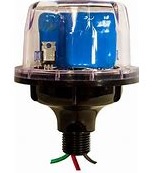
  2. Inside the utility room the incoming PV power lines come into separate array disconnect boxes. Each disconnect box has a Midnite Solar MNSPD-300-DC (80ka) installed.

I consider this to be my lightening strike/surge protection (E2 & E3); 1) good grounding, 2) a 40ka SPD, and 3) an 80ka SPD. But that stills leaves out the EMP E1 power surge. To address that issue you have to go downstream of my system.

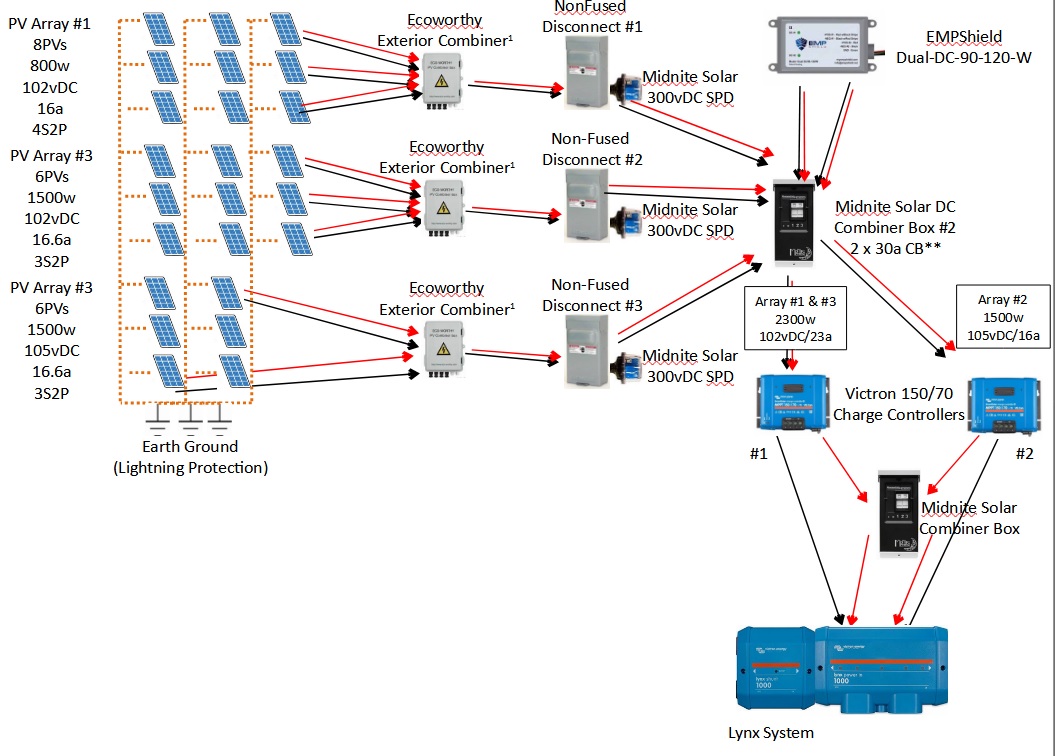
Downstream of the array disconnect boxes I have a combiner box that combines arrays into a circuit breakers that also acts as disconnects. that is located just before my charge controllers. Arrays #1 & #3 go into my charge controller #1, and array #2 goes into my charge controller #2. For the E1 surge I have an EMPShield model Dual-DC-90-120-W. Each charge controller has its own protection via this EMPShield unit since it is a “dual” unit. And yes, the EMPShield unit also provides E2 & E3 protection.

And how good is the EMPShield? Well, that is hard to say. Remember, we have no definitive idea if a device works, or not, until an event occurs. But, the documentation on the EMPShield device, along with the advertised testing, assures that it will protect against E1, E2, & E3 power surges. So that combination of surge protectors protects against surges coming into the system from the outside via the DC side of my off-grid solar system.

Now let’s talk the AC side of the system…I also have a Midnite Solar MNSPD-300-AC installed in my main breaker panel. That is intended to protect power surges getting into the system via house wiring. Yup, that means every single inch of wire in the house is a potential “antenna” for power surges. And yes, that means I am only protected against E2 & E3 surges from the AC side of the system. It is my intention that as my research continues and I become 100% convinced of EMPShield products I will install one of their AC units in the main breaker panel and move the Midnite Solar SPD to the inverter/generator transfer switch.

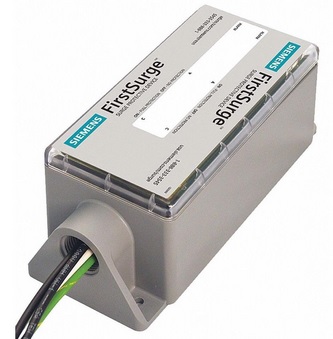
And if you are wondering…I have no problems with an Siemens FS140 (FirstSurge) being used as a substitute for a Midnite Solar SPD. I use Midnite simply because I found it first and have confidence in it for lightening protection.

How an SPD works –

If you are wondering how a SPD works…well, that is another whole article. But the short version is this…the SPD draws the power surge into itself away from other wiring and equipment and dissipates it through its internal parts. Yeah…call it magic, voodoo, or a modern engineering marvel…but that’s how they are designed to work.

Now, have you asked the question yet…Will all of this work and protect my house full of electronics/electrical equipment, and better yet, will it protect thousands of dollars worth of my solar system gear? If you have an answer let me know!

Yeah, a funny way to say I have no idea if this will all work to save me from an EMP, let alone a lightening strike. But I do know that doing nothing will definitely result in a bunch of burned up and useless equipment.

I will write reviews on EMPShield and Midnite products fairly soon. Should you buy now? Well…I did. And doing something is better than doing nothing. Do nothing ensures failure.

< click here to read Part #1


If you are interested in buying any of the mentioned products…PLEASE DO 🙂

I am providing links to the equipment below. If you buy one of the Amazon products through my link I will earn about a 1.5% commission. If you buy an EMPShield product I will earn a 15% commission. And if you use the coupon code “ahtrimble” when you buy an EMPShield product on their website you will get $50 off any product.

Any money I earn will go towards a test unit for the AC side of the system. If I earn more than the cost of a test unit then any excess funds will go towards another LifePO4 battery.

Click on the icon below for the MidNite Solar 300vDC unit (for protecting DC voltage equipment)…

MidNite Solar MNSPD-300-DC Surge Protection Device (300vDC )


Click on the icon below for the MidNite Solar 300vDC unit (for protecting AC voltage equipment)…

MidNite Solar MNSPD-300-AC Surge Protection Device (300vAC )


Click on the icon below for the Siemens FS140 Whole House Surge Protection…


Click on the EMPShield logo below  to buy EMPShield products. Use “ahtrimble” in the coupon code at check out for $50 off any EMPShield product. Hint: If you are buying more than one product then make them separate purchases and use the coupon code for each. If are having trouble deciding which product to buy, then write a comment below and ask for help from me.


Related Articles –


 2009 - 2023 Copyright © AHTrimble.com ~ All rights reserved
No reproduction or other use of this content 
without expressed written permission from AHTrimble.com
See Content Use Policy for more information.

EMP, CME, & Lightening Surge Protection – Part #1

Time to go technical…’high-tech’ to be exact…let’s talk surge protection.

For this discussion surge protection will include the concepts of lightening strikes (LS), Coronal Mass Ejections (CME), and of course, Electromagnetic Pulses (EMP). While they do differ, they all can be a threat to electrical and electronic equipment. Additionally, I won’t go into detail on protecting small devices such as handheld radios since I have already covered that in the past. I will concentrate on covering entire systems such as home AC electrical systems and solar systems (both AC & DC sides).

As with all my articles regarding equipment/gear I define the mission, or job, that I want that equipment/gear to accomplish. For this I define it as…

Reasonably, effectiveness & economically, protect our home’s complete electrical systems from damage due to electrical surges regardless of their origin.”

Also, when you hear me refer to a SPD, I am talking about a ‘surge protection device’.

Now that’s done let’s talk about risk management. As I have previously written extensively about risk management, it is determining the probability of an event occurring, and if it does occur, how severe will the potential damage be. Once those two criteria are properly assessed then proper mitigation measures can be identified and undertaken.

In my original article “Will we really be hit with an EMP?”, written in 2015 and updated in 2019, evaluated and stated both the probability and severity values. I originally set the probability at ‘very low’ and the severity as ‘nationally devastating’. Numerically speaking now I would go with 4 – 5 for probability (moderate) and 9 – 10 for severity (nationally devastating).

For the purposes of this article I put the CME events at a ‘moderate’ in severity and ‘low ‘in probability. And then for lightening I go with ‘serious’ in probability and ‘devastating’ in severity. And then somewhere in here I have to inject a healthy dose of reality. I don’t it is feasible at all to ‘harden’ my entire house and all associated electrical and electronic items against all possible surge events. I simply don’t have them time, the expertise, nor the money to do so. And honestly, I don’t have the desire to. I want to live in reality and not acquire a bunker and/or siege mentality out at the fringes.

So let’s talk the most likely of the surges involved with the most potential of severe damage…EMP.

EMP’s are a result of a high-altitude nuclear detonation. Modern nuclear devices that would be used in an EMP strike consist of three waves of energy pulses; E1, E2, & E3. Now, I am not going into intense details…it would make everyone’s eyes glaze over. There are plenty of articles on the subject if you want to get that far into the weeds.

EMP information, generally speaking…

  • EMP devices are generally detonated high in the atmosphere so the damage can cover large areas of earth’s surface.
  • The detonation effects spread out in all directions but the earth attracts most of the energy pulses downward.
  • The higher the detonation the lessening of the pulse energy.
  • The further away from directly underneath the detonation the lessening of the pulse energy.
  • In North America the energy pulses are drawn more to the south of the detonation point due magnetic field and orientation to the equator.
E1 Pulse –

This first pulse of energy does most of the damage in systems. It is primarily high-voltage that does the damage. This first pulse of energy travels at about 90% the speed of light (about 168,000 miles per second) and peak energy is about at the 5 nanosecond mark.

Realistic Example: You are 250 miles from a EMP blast, that means it hits you in about 0.0015 seconds (15 thousandths of a second) but traveling at 168,000 miles per second, and once it hits you, the peak energy arrives in 5 nanoseconds. So once the energy hits you, the energy goes from 0% to 100% of peak withing 5,000,000,000ths of a second. And the pulse has passed you in about 100nanoseconds. Meaning you have to protect your systems quickly, approximately within a nanosecond, and for about 20nanoseconds.

The voltage that actually reaches a maximum of about 50,000volts per square meter. Meaning, if you had a 1 meter square steel plate sitting on the ground directly beneath the detonation point the steel plate would absorb 50,000volts. If what was struck was a normal 3-wire household service cable 100’ long from the electric pole to the electrical service entrance it would absorb about the same 50,000volts. Ironically, the amperage would only be less that 50amps for that same area…but only for far less than a second.

As you can see it is the absorbed voltage that will do the damage but it occurs very, very quickly. And that is why normal residential, and even commercial, surge protectors simply won’t provide protection…they can engage/react quickly enough…about 500-1000 times too slow to react to the incoming energy surge.

E2 Pulse –

This is the next energy pulse to hit…about 1000nanoseconds after the E1 strike, and 900nanoseconds after the E1 is gone. And the reaction speed required is about a microsecond. Yeah, slowpoke!

To get a grasp of this energy pules you can think in terms of a lightening strike. And also think of it in terms of DC voltage. The power can reach 100,000 volts and 100,000amps when it hits…depending on your relative location to the detonation. And surge protection devices such as Midnite SPDs can handle this kind of strike..essentially a lightening strike.

Here’s the problem…that same SPD would get burned out by the initial energy surge…the E1…so it is no longer available to handle the E2 energy surge…and your system is pretty sure to now damaged.

E3 Pulse –

The final energy surge is just plain weird! The energy surge is produced by the earth’s magnetic field being heaved about. And that surge can last from 10 – 100’s of seconds. To get an understanding of this pulse…think DC current. Unfortunately household systems, including power stations and transmission equipment are designed to handle AC current not DC current. That gets you a whole lot of burned out equipment.

Once again E1 pulses normally burnout SPDs that could have handled this E3 power surge.

Pulses Summary –

Whew! I am glad that is over. But the summary is pretty simple, 3 different pulses of energy, all 3 can destroy equipment, and the first pulse is the worst and generally destroys any device (SPD) that could prevent damage from the 2nd and 3rd pulses. And yes, generally speaking almost all SPDs in use today can’t handle the E1 pulse. So you’re screwed right? Ah, no.

Remember, most common SPDs can’t protect against an E1 pulse…they burnout with all your other electrical/electronic gear. But, most common SPDs are fairly inexpensive…about $125 – $150 range for Midnite SPDs. The commercial grade SPDs can hit $300, but they still are too slow to protect against the E1 pulse.

That means something rather simple…You gotta find E1 protection if you are going to be worried about EMP protection. If you are going for less protection against energy pulses, such as lightening protection, then a Midnite Solar SPD or the more expensive Siemens FS140 are great options.

Next comes what I do!

NOTE: In Part #2 I will give links to various products that I personally use and believe in. And if you purchase a product through one of those links I will make a bit of money…from 2% – 15%. The money I make from any of those purchases will go towards a new battery for my solar system. And I can offer a $50 off coupon for the #1 EMP surge protection device!!!

< click here to read Part #2 >


Related Articles –


 2009 - 2023 Copyright © AHTrimble.com ~ All rights reserved
No reproduction or other use of this content 
without expressed written permission from AHTrimble.com
See Content Use Policy for more information.

DC Wire – Types, Size Chart, and Fusing

One of the things that can get confusing, but is extremely important, is knowing what size of wire to use when working with DC circuits. And once you get the wire size figured out…then trying to figure out what size fuse should you use.

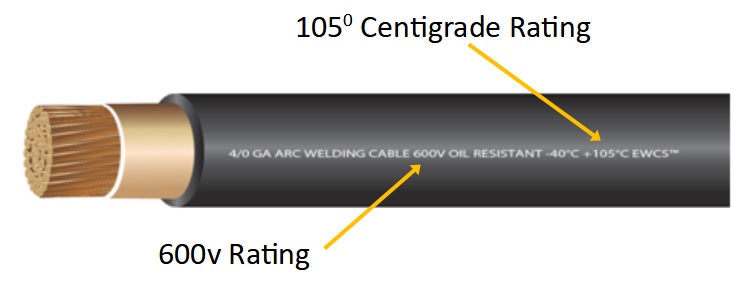
So I’ve included a wire sizing chart at the bottom of the page for you to download. And I will provide a couple of tips as well. Finally, I will provide a link to a great little sizing and fusing calculator that I think makes everything much easier when trying to calculate all of this. But first, some good information to know…Also, it is important to note that when dealing with DC currents in solar power systems (SPS) you need a high-quality wire with a good insulation rating; 105 degrees centigrade is commonly referred to as the standard. Voltage rating should be “600V”. Also, stranded wire is best when using wire in the DC side of SPSs…the more strands the better. But, a good measure would be as follows, with each strand being 30AWG wire…
6AWG – 260 strands
4AWG – 364 strands
2AWG – 624 strands
1AWG – 767 strands
1/0 – 975 strands
2/0 – 1196 strands
3/0 – 1547 strands
4/0 – 1950 strands

Most wire wire/cable will come with rubber or rubber-based insulation. Silicone-based wire insulation is generally considered superior to rubber-based wire insulation for a number of reasons, one being a higher heat rating, up to 200 degrees centigrade. Silicone is the most fire-resistant of common insulation material, it is also highly resistant to extreme environments. Then we also see silicone as being more flexible and more compression resistant. And yes, silicone is more suitable for outdoor applications, but when running wire outdoors it’s always best placed inside a protective conduit.

Aluminum wire should not be used…period. Copper wire is the standard for DC applications due to its high electrical conductivity. However, there is even better wire than standard copper wire, tin-plated stranded copper wire. Tin-plated copper wire is noted for its longevity because of its anti-corrosion properties. And, studies show that this variety of copper wiring is able to withstand adverse weather conditions and end up lasting far longer than the standard copper wires. It’s also preferred in applications where the wire will be exposed to a high degree of humidity. And lastly, tin-plated copper wire has more electrical conductivity as compared to other varieties of copper wires. And yes, it is more expensive.

Here is a little tip for you…up-size wire recommendations one size. Yup, look up the recommended wire size…then go with one size larger. This gives you a measure of safety when deciding on your wiring. Better to have a wire/cable one size too large than one size too small. One size too small can result in more resistance and potentially melting the wire itself. And obviously, if you melt wire it is a bad thing, a very band thing…which could result in a fire.

And that brings me to another tidbit of information that should be, will be, important to you…protecting your wire from over-current. The reason you protect your wire from over-current to prevent melting wire/cable and the possibility of fire is plain and obvious. So you put a fuse in the circuit.
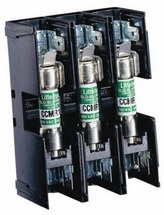
Quality equipment manufacturers (Tier 1 companies) will provide fusing and/or circuit breakers internally to the equipment to protect that equipment. It is the installer’s responsibility to protect the wire connecting the equipment with fuses and/or circuit breakers.

Looking at a fuse and its job is pretty simple…the job of the fuse is to melt its wire or plate element at a lower current (amperage) than the wire can handle. That breaks the circuit and stops the flow of electricity. If the fuse is rated for a higher current than the wire, then the wire become the fuse by failing before the fuse blows.

Here’s an example: 1AWG wire is rated to handle 150amps at a total circuit of under 15′ (up-sized one size). Now, if you wanted to protect that wire from failure and put a 200amp fuse in the circuit…the wire would theoretically fail at 150amps before the fuse “blew” (a.k.a. opened) at 200amps.

To avoid this problem in our example you would use a fuse of slightly less that 200amps…say 125 – 150amps. That way the fuse would do its job before the wire failed and caused a potentially serious problem.
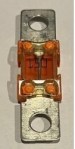
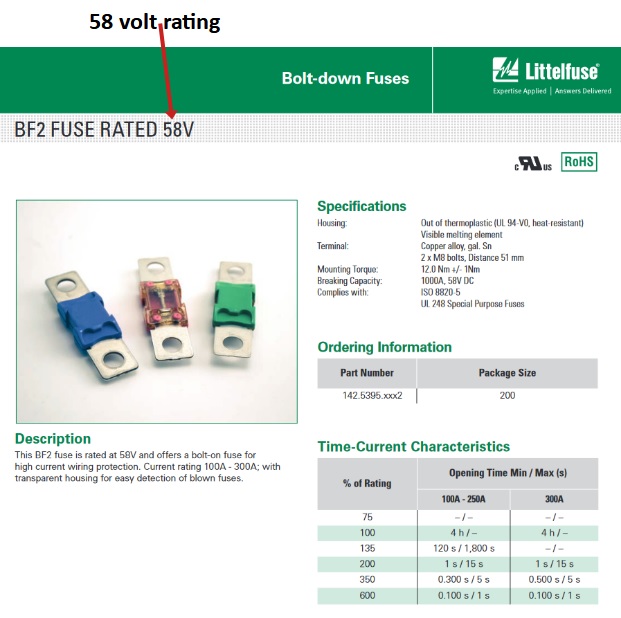
And here is another thing to consider when deciding on the correct fuse to use…its different ratings. So take a 125amp/58v BF-2 fuse from Littelfuse. It is rated at 125amps, yes? But does that mean it will blow as soon as the current hits 126amps? No. If you review the chart that accompanies the fuse you will see it will maintain integrity for different lengths of time at different currents (amps).

At 100% of rating, in this case 125amps, the fuse will maintain integrity for 4 hours. If the current rises to 135% of its rating (169amps) the fuse will still be good for approximately 2 minuets before it opens/blows. At 200% of its rating (250amps) it will open/blow at about the 1 second mark. And at 750amps it will open/blow at about 1/10th of a second. So before you decide on the right fuse looks closely at its ratings.

In our 1AWG, 200amp wire circuit at a full 200amps of current, the 125amp fuse would blow in 2 – 3 seconds
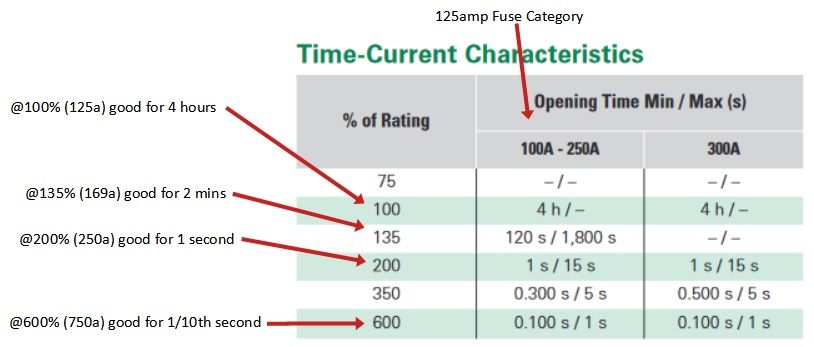
Also, notice the fuse description in the example, “125amp/58v”, that means it is rated for 125amps only up to 58volts. Meaning, if you try to employ it in a circuit above 58v it will not function correctly…as in fail.

What???  And why is it rated at 58v, sounds strange, eh? That fuse is designed for 48volt solar power systems. So why the larger than 48 voltage rating? Remember that solar power system voltages can run as high as 56 – 58 volts +/- coming out of the MPPT charge controller.

Now, let’s return to the wire insulation rating. Remember I mentioned that wire should have at least a rating of 105 degrees centigrade? That means 220 degrees Fahrenheit. That is above boiling temperature of water before it fails. Silicone insulation can handle almost 400 degrees Fahrenheit before failure. So you can see one of the obvious benefits to silicone wire insulation. Now, that being said…if you are building a circuit counting on silicone’s ability to handle almost double the temps vs rubber-based insulation…you are building the circuit in dangerous country. Consider redesigning the circuit more for safety.

And there is one really misunderstood aspect of deciding on wire/cable size…the distance or length of the actual wire run. Most folks will look at the circuit and say there is 5′ between the pieces of equipment and then use that to choose the wire/cable size. WRONG!! You use the total distance of the run…round trip. The circuit is the round trip of the current. So 5′ between equipment is a 10′ distance/length.

OK, so here is the long awaited chart with one note before the displaying it…when looking at the “circuit type” use “Critical” and “3% voltage drop” and when looking at the distance, the distance is the maximum run. So when you see 15′, that means up to 15′ round trip. Notice the “round trip”…that means the wire going to AND from the two devices.

( This is a very large graphic chart. Click to enlarge or you can download it as well. )

< click here to download the DC Wire Selection Chart in PDF file format >

“Voltage drop”…don’t worry about it…just use “3%” when using the chart. But if you really want to know…voltage drop is the amount of voltage will be lost through “resistance” in the wire. Meaning the lower the quality of the wire, the more resistance, the more voltage drop, resulting in less energy being moved from one device to another. Yes, that is a bad thing, it’s a waste of energy. That is the reason to correctly size wire…to efficiently move current/power through the wire.

Now, let’s talk about the wire sizing and fusing calculator that is found on the “explorist.life” website. I like it…I like it a lot! You input the “amps”, the “voltage”, and the round trip length between the devices…then it shows you the recommended size of wire/cable to use to safely and efficiently carry that current. I like to reduce the “voltage drop” to 1.5% when using the calculator. That gives an extra margin of safety and efficiency.

There is also an option “Show Fuse Sizing Recommendations ” it gives you a great bunch of fuse information; 1)Minimum Fuse Size, 2) Recommended Fuse Size, 3) Max Wire Capacity, 4) Max Fuse Size. That is great, and critical, information to help guide you through making those design decisions. But again, I like to up-size the wire/cable one size just to be safe…and it allows for a little system expansion should the need arise.

The calculator link is https://www.explorist.life/wire-sizing-calculator/

And yes, https://www.explorist.life, run by Nate Yarbrough, has a lot of great information for you if you care to look around, including some very good videos.

TakeAways –
  • Use high quality, well insulated, stranded wire in DC circuits.
  • Up-size the wire by one size.
  • Use the right chart and/or calculator to determine the correct fuse size.
  • Ensure that the fuse rating(s) always are lower than the wire rating.
  • If you don’t understand all of this…then you shouldn’t be doing it yourself.

Related Articles –


Third Battery Arrived – Trophy 220E-1

note: This post should have been made 6 days after the initial post regarding the battery purchase, but it was delayed along with the first post.

Well, you know by my last post regarding my quest for a new battery was arduous but I pulled the trigger and bought a third battery for my system upgrade.

If you want to read about our solar power system upgrade you can read about here < click here >

If you want to read about evaluating and choosing the new Trophy Battery you can read about it here < click here >

If you are wondering why I didn’t buy two new batteries to round out the two I already had for a total of four batteries you can read about it at the bottom of the Solar HomePage < click here >

If you remember from the first post in this series about buying a new battery I had the batteries shipped to a friends business, his warehouse. It saved a considerable amount of money avoiding a “residential deliver” and a “tailgate lift fee”.

As soon as I got there I started popping the pallet straps, then I figured it would be good to have a video of what it looked like. Here is the video…

So the batteries (5 total – 3x110Ah, 2x220Ah) were well secured to the pallet, they shipping cases were all in great shape, no apparent damage. Trophy did a great job of designing the shipping cases. They also did a great job on shipping case placement on the pallet and strapping them down really well. And yup, FedEx handled them with care and delivered them a full day ahead of time…despite a snowstorm in the area.

I am thrilled so far…more evaluation to come!


Related Articles –


Donate-3

 2009 - 2022 Copyright © AHTrimble.com ~ All rights reserved
No reproduction or other use of this content 
without expressed written permission from AHTrimble.com
See Content Use Policy for more information.

Ordered My Third Battery !

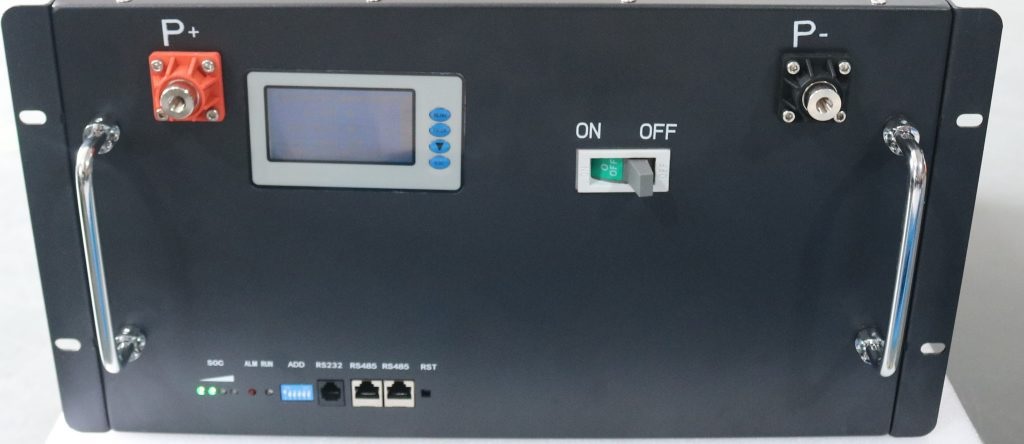
note: this post was written on December 6th, posting was delayed for a number of reasons. As promised before, I am posting about my experience with Trophy Battery…and purchasing the third battery in a bank of 4 batteries. The fourth battery will have to wait awhile…we just don’t have the money for it just yet, the third one was expensive enough. Bummer! As I mentioned before, I researched a lot of battery options…watched numerous videos, read a ton of reviews, spoke to more than one manufacturer directly, and I even talked with a 20-year veteran of the solar business for advice. I looked at everything I could find about the different companies and their batteries. One thing was paramount…internal Battery Management System (BMS); and I wanted steel case, rack mount batteries from the very beginning. Oh, and no off-the-wall stuff like golf cart batteries. I looked into, researched, evaluated the following batteries:
  • EG4 LiFePOWER4
  • SOK
  • Jakiper
  • Ampere Time
I eliminated right away the following batteries:
  • FNS / Sacred Sun due to my prior experience with them.
  • Storz due to their high price tag.
  • Victron due to their high price tag.
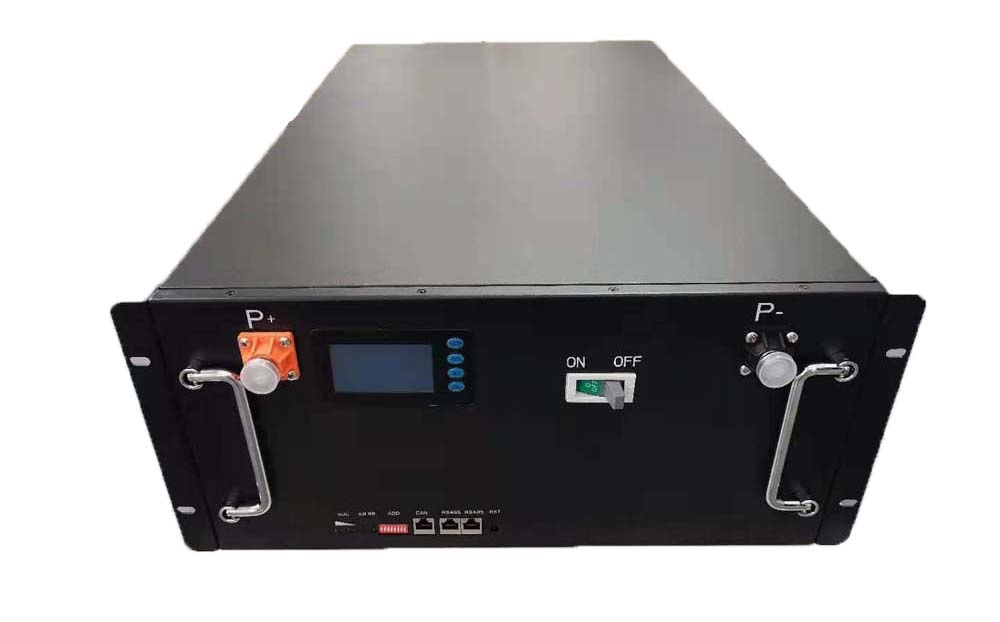
Eventually I settled on Trophy Battery, the 220Ah beast to be exact. Their build was top notch, their capacity and voltages most closely matched my existing two batteries. I like the way they were designed, especially the built-in high current DC 175amp circuit breaker. I liked what I saw at every turn, more than any other battery or battery provider. Done…I would buy the Trophy Battery model 48V220C-1 48/51.2v, 220Ah. I talked with a neighbor/friend who is also a DIY solar guy to get his opinion and he thought the batteries were awesome. He wanted to order as well after we had talked for about an hour. And I am helping out a close friend and his wife who are kinda stuck in their DIY solar journey, I agreed to help them out and build their system, they needed batteries as well. Their situation wasn’t all that unusual, their system would be in an unheated Conex container. Ahhhhhhh, Trophy batteries have built-in heaters to keep them functional (i.e. charging) at below freezing temperatures. They were in as well…they wanted model 48V110C-1 48/51.2v, 110Ah…3 of them. At Trophy I spoke with Dan, the owner multiple times before placing the order. He was great and easy to work with and answered all my questions. I collected the money from the other two folks and placed the order. We did it together to save on shipping. Placing the order with Trophy was not without a minor issue. Their website locked my account and the cart would not function. Turned out to be a blessing…I placed the order directly with Dan and was pleased. The batteries shipped the next day and are due for delivery in less than a week…1 week after the order was placed. They are coming FedEx freight to a friend’s business to help save money. It saves money to have them delivered to a business vs a residence. I received multiple emails from Trophy keeping me advised of the order/shipping process. Some of the features I think are important to note:
  • 16 x EVE Power 230Ah cells
  • Heaters for charging in cold weather
  • Sophisticated programmable 200amp Battery Management System (BMS)
  • Soft start, automatic pre-charge of inverter capacitors to prevent damage
  • High current DC built-in circuit breaker
  • Front display screen for BMS
  • US based 24/7 support
  • 10-year non-prorated warranty
  • An owner’s manual…in ENGLISH!!
That is a 220Ah, 11.3watt battery for $3595.00! That comes out to 32cents per watt. Compared to many popular comparative 100Ah batteries at 34cents per watt…but the cheaper battery comes without the heaters, without the 200amp BMS,and without the internal high current DC circuit breaker! And it would take two of the 100Ah batteries and it would still fall short by 10% of the overall Ah rating…with less features. So far I am thrilled! I will keep you advised. < click here to ope a PDF file with Trophy Battery – 220E Battery Info >
Related Articles –
Donate-3
 2009 - 2023 Copyright © AHTrimble.com ~ All rights reserved
No reproduction or other use of this content 
without expressed written permission from AHTrimble.com
See Content Use Policy for more information.

Our Solar System Upgrade

There seemed to be a bunch of interest in the solar stuff I have been posting. And, I decided a couple months ago to upgrade our system. Seems like a perfect time to share more solar info, add to the solar book I am writing, and use it to double check what I am doing. I hope you get something out of it. And as always…ask questions, make comments, add suggestions, and do helpful critiques as you wish 🙂

Existing System –
  • 3.8Kw of solar panels (2 arrays of 1.5Kw, 1 array of 800w)
  • 1 x Victron Smart Solar MPPT 150/70 charge controller
  • 1 x Victron Quattro 48vDC/5000w/120vAC/70a inverter/charger
  • 1 x Victron Smart Shunt with BMV-712 Smart connected to a Victron Color Control GX
  • 2 x 202Ah LifePo4 batteries in parallel
  • On the usable house AC side we get 120vAC at approximately 41a
  • Our average power usage per day is 11.3kWh (last 12 months of history)
  • < click here to open the PDF file showing our current solar system >
Drawbacks to the Existing System –
  • We used our generator 3 days out of the last year due to low battery, approximately 40kWh.
  • We had the inverter cut out due to over discharge (drawing too much power) twice, once in June, once in July. Yup, we were using the AC’s at the time.
  • We have used two inverter style air conditioners for two summers and love them. But, we can’t run them past 10pm without risk of running the batteries too low. Fortunately, there aren’t too many nights that much AC is needed.
  • On cloudy days, or when the batteries start the day low, it is difficult to charge the batteries 100%.
  • This past year we experimented with using electric baseboard heaters during mildly cold days and evenings. They work fine, really nice. But, we can’t run more than 3 on at low settings, or two on high setting, without risking shutting down the inverter due to over discharge (drawing too much power) if/when we turn on something like the air fryer.
Proposed Upgrade to System –
  • Increase to 5.9Kw of solar panels (2 arrays of 2.235Kw, 1 array of 1.47Kw), 58% increase in power generation.
  • Add a second Victron Smart Solar MPPT 150/70 charge controller, 100% increase in potential PV to battery power generation. It will also balance the charging of the incoming solar panel power avoiding overloading a single MPPT system.
  • Add a second Victron Quattro 48vDC/5000w/120vAC/70a inverter/charger resulting in a doubling of available AC power, 100% increase. Giving us 10Kw/240vAC @ 82amps.
  • Add 2 x 220Ah LifePo4 batteries into existing battery bank, increasing our energy storage by 107%.

As a side-effect to the upgrade I will be “cleaning up” the wire layout, increasing the size of wire at strategic wiring points, improving the fusing and circuit breaker systems, and replacing important Tier 2 equipment with Tier 1 equipment. And for a major safety upgrade I will be putting up cement board (fire resistant) behind all the equipment vs the particle board I have now.

I will be posting as I go to show the “before”, what is planed for the “after”…and then what actually gets installed. Of course I will be glad to respond to any input or questions along the way.


Related Pages & Articles –


 2009 - 2023 Copyright © AHTrimble.com ~ All rights reserved
No reproduction or other use of this content 
without expressed written permission from AHTrimble.com
See Content Use Policy for more information.