GoalZero Boulder 30w Solar Panel & Guardian Charge Controller

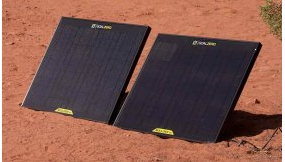
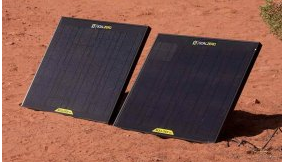
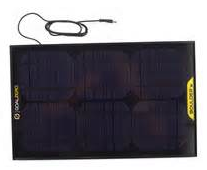
GoalZeroThe first large(r) solar system that I purchased was a GoalZero Boulder 30w Solar Panel with a GoalZero Guardian 12v Charge Controller. It came already packaged and ready to put into service, which I did on Day 1. That system has not disappointed me since.

I wanted a pre-configured solar charging system that was already tested, proven and ready-to-go right out of the box. I chose GoalZero solar equipment for this application, which required ease of storage and transportability.

“Rugged, durable, and rigid. The Boulder 30 Solar Panel is built with strong tempered glass and an aluminum frame for temporary or permanent installation.”

Boulder 30 Solar Panel General Info –
* Weight: 6.5 lbs (2.95 kg)
* Dimensions: 21 x 18 x 1 in (53 x 46 x 2.5 cm)Goal Zero Boulder 30w solar panels
* Certs: CE, FCC
* Optimal Operating Temp: 32-104 F (0-40 C)
* Warranty 12 months
* Rated Power: 30W
* Open Circuit Voltage: 18-20V
* Cell Type: Monocrystalline

Ports –
* Solar Port (blue, 8mm): 14-16V, up to 2.0A (30W max), not regulated
* Can be daisy chained together.

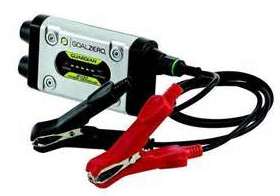
To control the charging I chose the GoalZero Guardian 12V Charge Controller 14002 Solar charger/controller unit.GoalZero 12V Charge Controller 14002

After buying the first panel and charger/controller I purchased a second Boulder 30 panel. The two panels can be daisy-chained together effectively doubling the charging rate to 60w. Then about 6 months later I purchased a second charger/controller.

That gives me the ability to charge two batteries at the same time or redundancy on the original charger/controller unit. Two is one, one is none.

In a pinch I can use the smaller 12V solar charger (Nomad) but they have a much slower charging rate than the larger Boulder panels. But they too can be daisy-chained to increase the charge rate.

There are lots of options for solar charging of batteries and alternatives to GoalZero. You can pick whatever system is best for you, just do your research, or find someone you trust and buy what they bought. GoalZero is kind of pricey but I believe they are a high-quality brand from everything I’ve seen.

Note: I understand that GoalZero is no longer producing the charger/controller units. You can still find them occasionally on eBay for about $45 – $55.00. Worth the money.

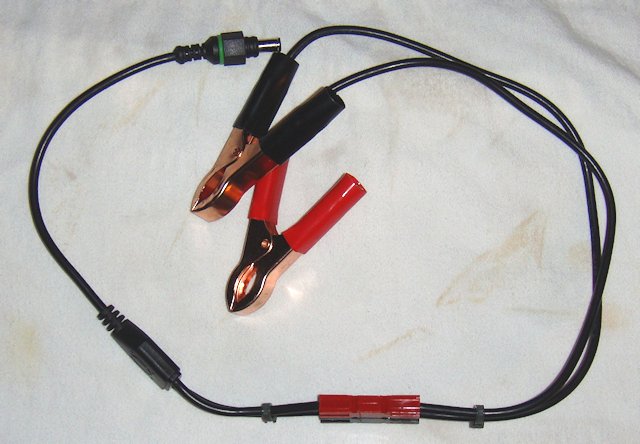
I did make a slight modification with my two Guardians. Everything is standard with the exception that I cut the batter alligator clip connection wire assembly.

And then installed 45amp Anderson Powerpoles. This gave the battery clamps the capability to still work as designed. But, it also gave the charge controller the ability to hook directly into my radio boxes and power poxes.

This is a great combination of GoalZero equipment that provides 30w solar power or combine it with additional Boulder 30 panels to beef up your power delivery. Yes, you can buy 30w panel systems cheaper, but you can’t get cheap and GoalZero quality.

A solid buy in my opinion.

Update: 7/24/2019 – This article is essentially for information only…and to give you ideas. These products are no longer available.  I no longer recommend GoalZero products. They tend to be a full generation behind in technology and they are way over priced in my opinion. GoalZero quality has slipped noticeably in the last couple of years. I will try and get a new recommendation out as soon as I can.


2009 - 2019 Copyright © AHTrimble.com ~ All rights reserved
No reproduction or other use of this content 
without expressed written permission from AHTrimble.com
See Content Use Policy for more information.

Heavy Power Cable for 12vDC Power Boxes

Heavy power Cable with Anderson Powerpoles for radionote: first appeared in August 2015

Having already designed portable radio boxes and portable power boxes there is the question on how to hook the two together. It would seem rather easy to provide a solution…and it is. But I took it just one minor step further. But let me digress for a minute…

Earlier in the summer I was taking my conceal carry mid-license refresher. And one of the instructors got out a coffee warmer thingy that he connected to a box with a battery in it. Then he hooked a small solar panel to it and started bragging on his system. I just kept my mouth shut.

But what I noticed was how lightweight the wire was between the solar panel and the box. And actually it was rather long as well. But it did make me think through just what would be the right way, an “anti-failure” way, to hook up power boxes to whatever they were supposed to be powering.

One thing I did figure out pretty quickly that at the amps and voltage we are dealing with at my level, 12vDC, 60 – 100w solar panels, 15 – 20 ampere current draws…10guage wire was plenty adequate.

However, it is the conditions in which the cable will have to “live” that will be more demanding that the size of the wire itself. The specific conditions I am referring to is outdoor, in the field, all weather, etc. That requires pretty decently protected wire. And that means thick insulation that can handle a wide range environments.

As I tried to find the right kind of wire with the right kind of jacketing I found a couple things; 1) expensive, 2) sold in long lengths, 3) had to buy it online, 4) expensive. I wasn’t happy and let it drop.Everstart 08118-77-58 Booster Cables by Coleman Cable, Inc.

Then one night I am in Walmart with my wife doing some shopping. Like I always do, I wandered over to the sporting good department to see if there was any 22LR on the shelf. Never is anymore, and not that night either. But on the way to meet back up with her I was walking through the automotive department.

Low and behold I walked past the car batteries and jumper cables. Bingo! I looked down and there was a set of jumper cables, 10ga wire, with heavy-duty jacketing. The price was way more that reasonable and way cheaper than just plain wire than I had seen online. I bought the set of jumper cables.

The next evening I had a little time so out to the shop I went. Opened up the package, took out the cables, and proceeded to cut off the clamps from the cables. I then had a nice 10ga, heavy-duty jacketed, pair of wires in a neat little 7’ length.

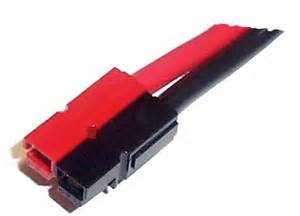
I installed 45 amp Anerdson Powerpoles on the ends. Notice that both wires in the pair are black. However, one is Ham In The Box - Anderson Powerpolea smooth jacket the other has multiple little ridges running its length. The wire with the little ridges is the positive, or red wire, in my book. That made it easy to install the Powerpoles.

As I was admiring my work I felt the tension and the weight of the cables themselves. And I was concerned how it might eventually affect the Powerpoles where they are held together by the little roll pin. I also wasn’t real crazy how the ends of the Powerpoles were open just enough to allow water to enter them if they got seriously wet, or I got unlucky. So I had a dilemma on my hands.

I kept thinking the problem through and I remembered the “fix” for the Baofeng UV-5RA radio 14.5” antenna. And TE Connectivity CPGI-WCSM-12/3-150-BLKsearched through my electronics tool kit for the right size shrink wrap. I took some heavy wall shrink wrap¹ cut it into a 2” long piece. Then cut another piece into a 1-1/2” piece.

I slid the 2” long piece over the Powerpole and onto the wire leaving a small amount of shrink wrap on the Powerpole itself. Then put the heat to it. It shrunk down really nicely tightening up the connection and stabilizing the wire in the Powerpole housing. It also sealed off the opening that was around the wire where it went into the Powerpole housing.Heavy power Cable with Anderson Powerpoles for radio

Next I slid the 1-1/2” long piece over the Powerpole and the previously installed piece of shrink wrap. I had it extend a little more onto the Powerpoles. Obviously it was short on the cable end, but that was OK. This piece was intended to stabilize the first, add a little more protection to the Powerpole and add a little more rigidity to the overall connection. I put the heat to this one.

Here is the picture showing the outcome. I know it is a little ugly but it works like a charm. The connection is very secure, no water is coming in between the wire and the Powerpole housing, and there is plenty of protection to avoid over-flexing of the wire where it enters the housing. In other words…it is stable and secure. Just what the doctor ordered.

Heavy power Cable with Anderson Powerpoles for radioSo now I have a very solid, durable, power cable of the right length that will carry all of the current that it will normally carry. And it can do so on any environment that I can think of because the wire jacket/insulation is really thick and sturdy.

Mission accomplished!


Two great options to make the heavy cable even more useful…

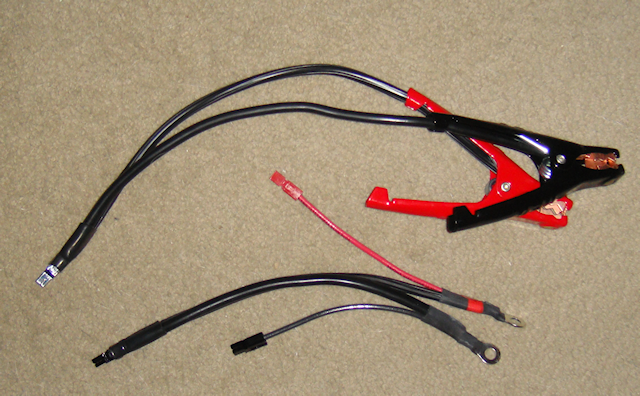
#1 – I cut enough cable on the battery clamps to install a set of Anderson Powerpoles. That enables me to still use the cable to hook to a battery via battery clamps.

#2 – I cut a hunk of the cable and installed Anderspon Powerpoles on one end. On the other end I installed a set of ring terminals and added in a little “pigtail” with another set of Powerpoles. This gives me flexibility to hook up to small batteries with “bolt terminals” or batteries that the battery clamps won’t work on. Once again…flexible and adaptable.

Note: Notice teh use of shrink wrap to protect and seal cables and Powerpoles.

Heavy Cable with battery clamps, ring terminals and Anderson Powerpoles

 Shrink wrap info –

HeavyCable-05¹ – Shrink wrap is made by TE Connectivity and its their produce ID CPGI-WCSM-12/3-150-BLK. I bought it at Home Depot for under $5.00

Technical Specs
  • Item Heat Shrink Tubing
  • Material Flexible Polyolefin
  • Wall Type Heavy Wall
  • Temp. Range-67 Degrees to 275 Degrees F
  • Shrink Ratio4:1
  • Color Black
  • Length 6″
  • Wire Range14 to 6 AWG
  • I.D. Before Shrinking 0.472″
  • I.D. After Shrinking 0.118″
  • Wall Thickness After Shrinking0.079″
  • Shrink Temp 203 Degrees F
  • Max. Voltage 1000V
  • FeaturesMeet/Exceed Industrial and Military Standards
  • Standards Western Underground


2009 - 2019 Copyright © AHTrimble.com ~ All rights reserved
No reproduction or other use of this content 
without expressed written permission from AHTrimble.com
See Content Use Policy for more information.

TRAP – Generators can get you unwanted attention

Honda Generatornote: first appeared in January 2015

I had a buddy that was absolutely sold on generators, he had three of them. Swore by them and he was proud to own them. He was showing them off to me one day and I asked him, “What would you use them for?” He just stared at me with this blank look on his face. I asked him again. Finally he got his composure back and said for the house. I said okay, “Where is your fuel for them?” He only had a single 5-gal can of old gas, half full. My friend didn’t buy me lunch that day.

What I am getting at is a couple things:

  1. If you are going to own a generator what is specific purpose?
  2. Do you store enough stabilized fuel for it?Blackout

Then once you have asked & answered those questions I want you to think about this…Disaster struck, maybe even “grid-down”, and you get out your generator and stored fuel. You fire that puppy up and poof your lights are on, your AC is running and the freezer is safe.

OK, now think about this for one second…Who sees you are the only house on your side of town with lights on? And all your neighbors, or anyone else driving or walking by, can hear your generator purring along. What do you think will go through their head? So now it is day 5 or 10 or day 20. Now exactly how popular are you?

Honda generator with propane fuelYes, generators have their place in “prepping”, there is absolutely no question about that. But have you identified a specific purpose/mission/reason for your generator? Can it meet that task? Do you have the right amount of fuel for it and its mission? And are you prepared for a whole lot of attention, a bunch of it probably unwanted?

Do I have a generator?  Yup, a Honda EU2000i for keeping my batteries charged if the two solar panels can’t keep up.


2009 - 2019 Copyright © AHTrimble.com ~ All rights reserved
No reproduction or other use of this content 
without expressed written permission from AHTrimble.com
See Content Use Policy for more information.

Portable Power Box – Part #2 (update)

note: article originally appeared in October 2015

Last July I wrote about a “power box” project that I felt added a lot of capability and versatility to by Ham Radio operations. And I expanded it to give me great capabilities in other areas of prepping as well. Well, here are couple of those ideas for you to consider.

If you haven’t read the original 2-port article I would suggest you do. It will give you the background of w the power box can do and how it was designed and built.

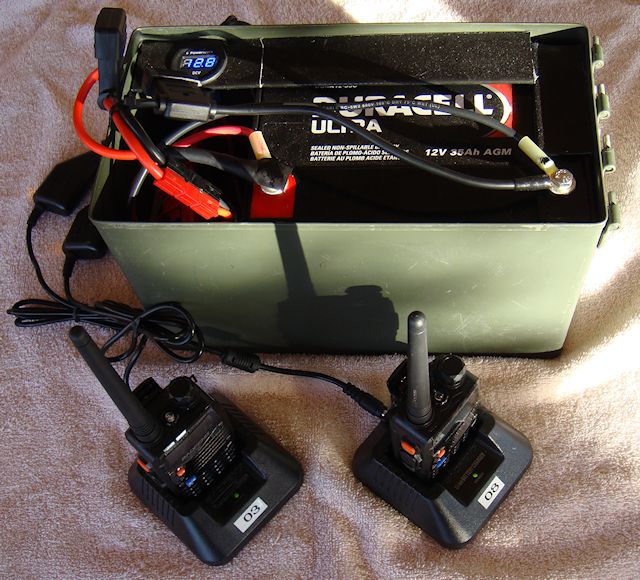
I started with the basic “truly portable power box” and decided to test it on what has become a primary use…charging my portable handheld radios.

I hadn’t considered it for that purpose originally. I planned on using the larger power box for that mission. However, I thought I might this much smaller box out to see if it could do the mission for just two handhelds. Recharging two handhelds would really be a big help for a limited “need” event. Why two? One for me and one for my wife. Or, one for me and one for my camping buddy. The result was extremely good!

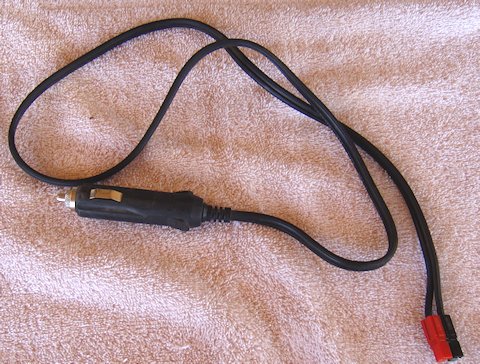
First thing I did was top off the power box battery charge to 13.2v. Then I hooked up a dual cigarette adapter cable to the box.

Then I hooked in the 12vDC vehicle adapter for the Baofeng UV-5R charging cradle. Next I hooked the charging cradles up to the adapter. Everything was looking good, nothing burning up, no blown fuses.

I had earlier completely discharged two 1800mAH radio batteries to give it a fair test. So I went ahead and popped the radios in the chargers. Three hours later I had two completely charged handheld radio batteries. Considering that in testing the same batteries took 2 – 3 hours charging on AC power, I felt like it was a complete success. Now I have proven that I can charge my handhelds from my truly portable power box giving me more flexibility in my radio operations. And, I only brought the charge on the batter from 13.2v down to 12.7v.

Well, then it came time to bring the battery charge back up to full. I already had my Glowtech60 set-up from some previous testing, I figured I would just hook it up and top off the battery. But then I started thinking…

I love flexibility and multiple options for everything, it’s called redundancy. Some might call it OCD 🙂

So I tried to figure out all the different ways I could charge up that power box using my solar options. And one stuck out to me that I hadn’t actually tried and tested . No time like the present!

So I gathered up my SolPad7 solar charger.My SolPad7 has a 12vDC outlet to the charge controller. It also came with a cigarette style adapter/outlet. Then I made a quick cigarette adapter cable and started connecting the equipment.

At this point all that was left to do was plug the SolPad7 into the power box and see what happens.

I took a reading on the power box, 12.7v. I plugged in the SolPad7 in a sunny location and recorded the time, 11:00am.

I went back later, 1:00pm, and it was showing 12.8v.

Yo might be saying that it only went up .1v (1/10th of a volt) but that is OK with me. Notice the size of the SolPad? A mere 7″ x 10″ area, 70 square inches. And a maximum of 7w. I’ll take it!

Why? Because it gives me that much more flexibility that I didn’t have before.


2009 - 2019 Copyright © AHTrimble.com ~ All rights reserved
No reproduction or other use of this content 
without expressed written permission from AHTrimble.com
See Content Use Policy for more information.

Portable Power Box – Part #2

Portable Power Box solar Ham radio - part #2note: this article originally appeared in July 2015

In Part # 1 of this series I outlined the mission for this portable power box. Here it is to refresh your memory –

“Provide sufficient power to allow the limited use of a radio for at least 15% of any given 24-hour period. During which transmission power usage will be approximately 40% of that time period.”

In that article I also laid out the different parts that would make up the “guts” of this project plus the two options of solar recharging. < click here to read Part #1 >

In this article I will go over step-by-step of this build. I hope that this gives you the motivation to consider a project such as this. It can be invaluable when you need your radio during emergencies, disasters or especially during a “grid-down” event. Let’s get started…

Step #1 – Securing the battery.
MiniMe-01It is of paramount importance that the battery be secured. Not that this is going to be rolled down a hill or placed upside down, but the battery shouldn’t move around too much. I also didn’t want to put a massive amount of weight or content inside the box either. On top of all of that, I wanted to make sure that it was relatively easy to swap out the battery. So therein lays the challenges.

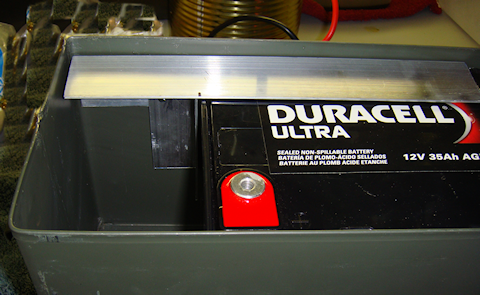
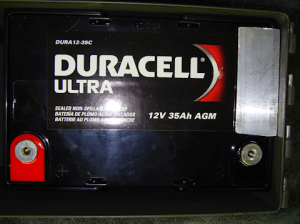
So I kept looking at it trying to figure out what would be most MiniMe-02economical of material and weight. I had to secure it from moving up towards the lid and shifting lengthwise as well. First thing I did was secure one end of the battery that restricts its MiniMe-03movement towards the lid. I used a piece of 1-1/4” angle aluminum. I secure it to the box with pop rivets since this piece will not be removed from the box. Notice I used Gorilla Tape later to “pad” the piece of aluminum and to make it a bit more “sticky” helping to keep the battery from excessive movement.
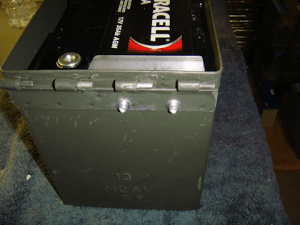
Note #1: The pop rivets do not stick out further than the boxes hinge so I don’t see any problems with the pop rivets protruding a little bit.

Next I wanted to secure the whole length of the battery from moving towards the lid to prevent the battery from MiniMe-04being damaged, and especially to protect it from shorting out across the terminals. That led me to the long support. But I still had the sliding lengthwise movement to be concerned about. And I wanted to make sure I didn’t restrict the volt meter installation. Once again, notice I used Gorilla MiniMe-05Tape to “pad” the piece of aluminum and to make it a pit more “sticky” helping to keep the battery from excessive movement.
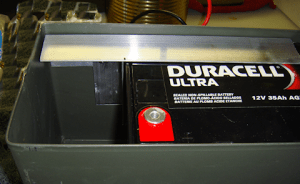
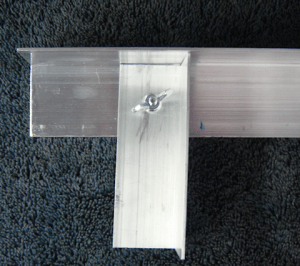
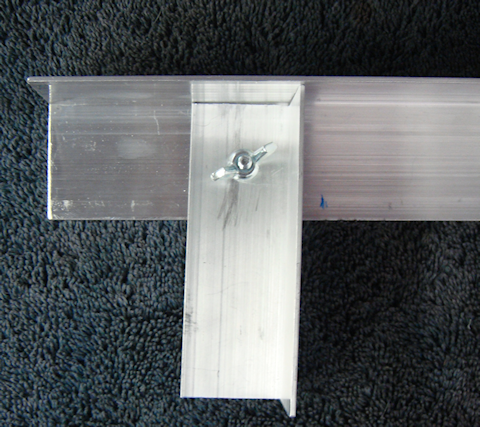
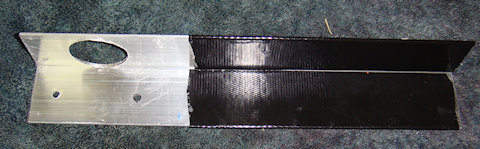
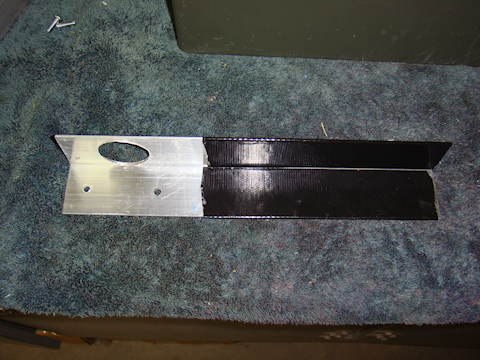
I decided all that was needed was a single, albeit tall, piece of angle aluminum to keep it from sliding lengthwise. And then I realized I could attach it to the long support to minimize the number of holes through the box. And to top it off I would drill my volt meter installation hole through the 1-1/2” angle aluminum so I wouldn’t have to fabricate an instrument panel like I MiniMe-06had originally intended.
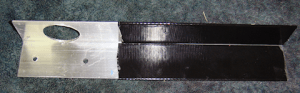
I used Gorilla Tape to “pad” the piece of aluminum. Again, to make it a bit more “sticky” helping to keep the battery from excessive movement, but I also liked the more professional “look” it gave the overall fabrication.

The combination of the long horizontal retaining piece and the shorter vertical retaining piece are all held into place MiniMe-05by two #8 x 3/4” bolts. And those are secured with star washers and wingnuts. The wingnuts make it a whole lot easier to remove when, or if, it comes time to swap out the battery.

Step #2 – Installing the Powerwerx Panel Mount Digital Volt Meter.

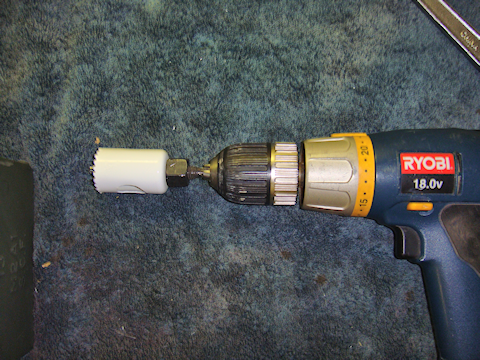
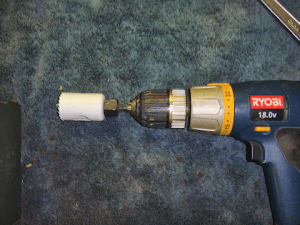
I had originally was going to fabricate an instrument/control panel for inside the box. I was going to mount the volt meter to it and have  MiniMe-41a little room left over in case I needed to install something else. But after looking at the set-up I had fabricated so far I decided to mount the volt meter directly to the long horizontal support piece (1-1/2″ angle aluminum). I used a 1-1/4” hole saw and had the hole done in a couple of minutes, filed MiniMe-40smoothed and Gorilla taped for looks but the tape also to help hold the volt meter in place.
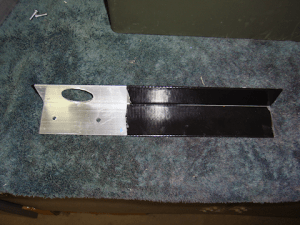
Note #2: Make sure you leave enough room for the volt meter retaining washer that will fit on the back of the angle aluminum. If you get it to close to the angle itself then the washer won’t have enough room to fit.

Note #3: My hole saw had a real “wobble” to it. It is not the best quality hole saw, so you get what you pay for. I used the Gorilla Tape to clean up the hole and make it look more professional but I almost got the hole too close to the angle. I had to finesse it a little to get it tightened up. Measure the whole thing out really well before you start to drill the hole.

Step #3 -Installing the LVD (low voltage disconnect)

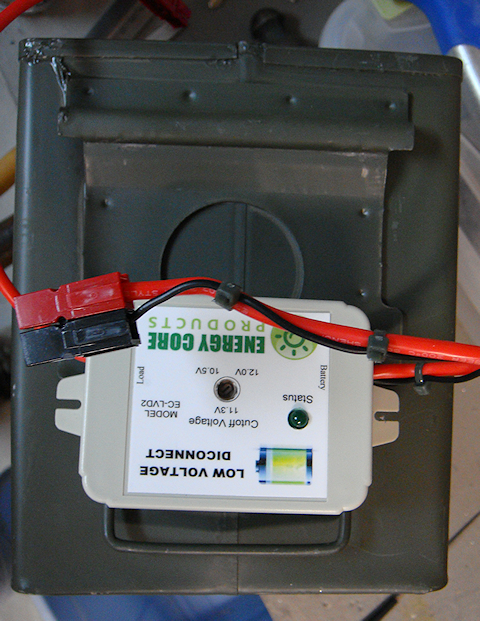
I had thought long and hard about installing an LVD in each radio box, but realized the proper location is the power box itself. I am using the Energy Core EC-LVD2. However, there is no temperature sensing by the LVD unit. So I will have to see how true to the voltage the cut-out point is. Also, I adjusted the “disconnect point” on the LVD to the highest setting it has to protect the battery, 12v. I did the adjustment outside in hot weather. Why? Because that is the most probable environmental condition that I will be operating the power pack in.
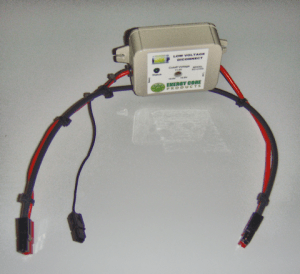
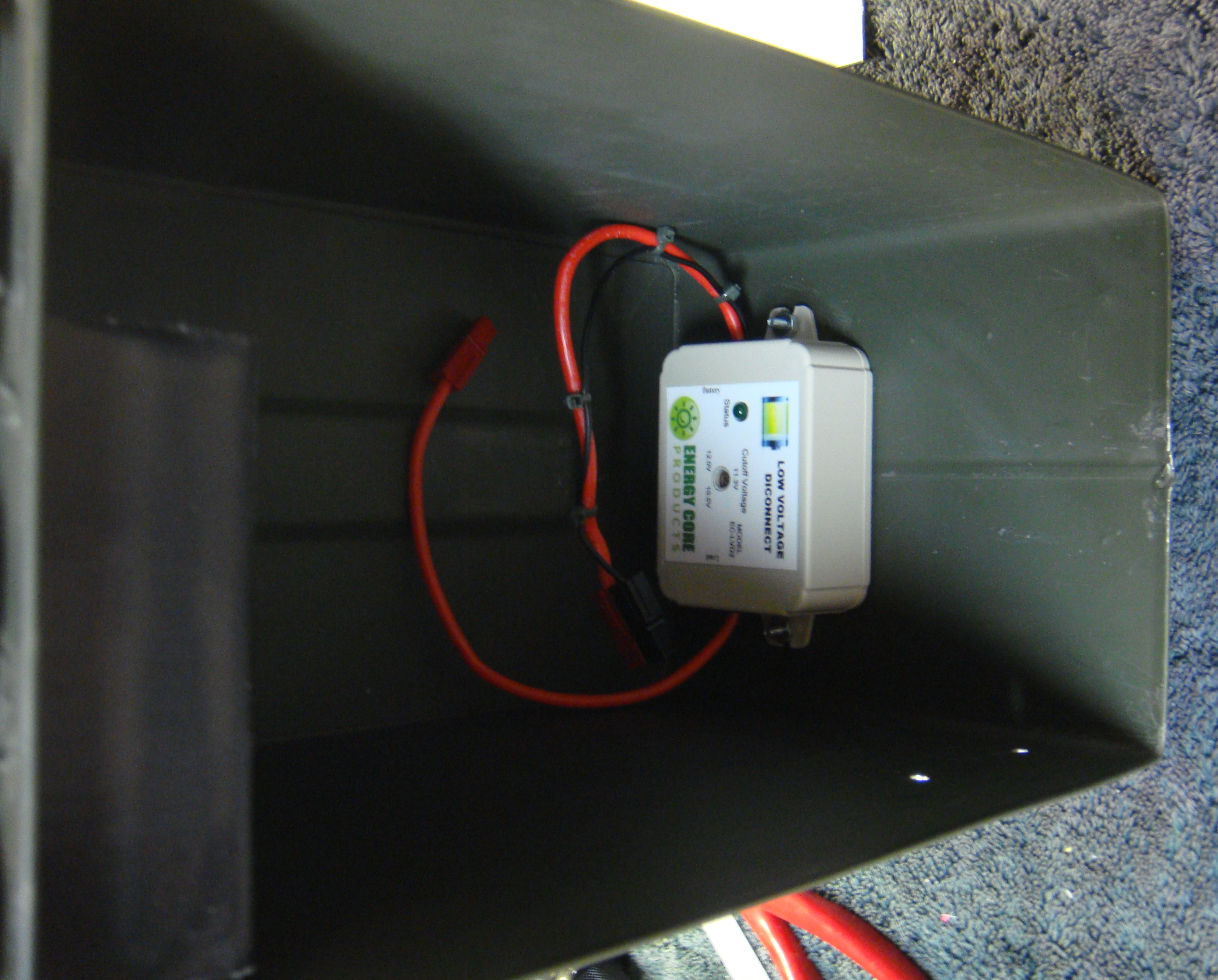
MiniMe-07Next was to wire up the LVD with Anderson Powerpoles.The LVD only has a positive (red) wire to install in the circuit. The black wire is only to ground the unit itself. The heavy black wire you see in the picture to the left is simply to keep the whole wiring project organized and easy to understand.

I connected the black wire to the LVD’s red wire via zip ties. I didn’t have to. But this keeps the wiring straight and reduces the chances of confusion later if the box needs some electrical or wiring work done on it. Notice the small black wire by itself? That gets connected to the Red-Dee-2 block and grounds the LVD unit itself.MiniMe-08
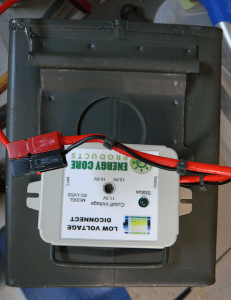
The next step was to properly place the LVD in the box. I placed it on the outside of the box to clearly see where it was to be installed and how it would look in relation to the entire installation. I marked, punched and drilled the holes based on the positioning on the outside. Verified that is fit on the inside that it was good to go. Perfect MiniMe-09placement and fit.
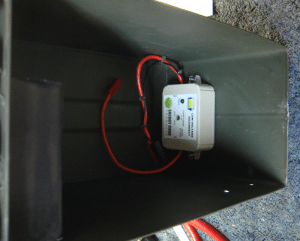
 

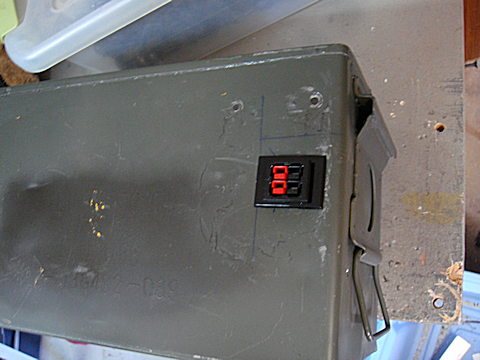
Step #4 – Installing the Anderson Powerpole Chassis Mount.Anderson Powerpole Chassis Mount for 2 Powerpoles Sets (4 conductors)

I am mounting the chassis mount on the opposite side from the volt meter to make sure I have enough room to get everything in the box without it being too jumbled up. The square hole that is required is slightly larger than 1″. I located the correct MiniMe-10position for the chassis mount to go through the box wall. I marked it really clearly, including the center of the square that was to be cut out.MiniMe-11
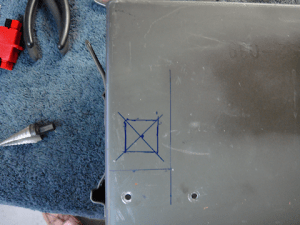
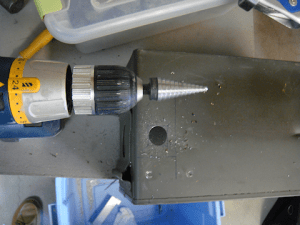
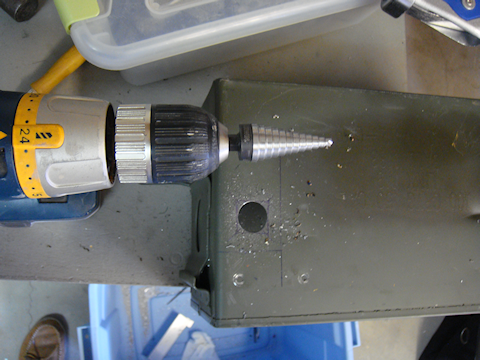
I have a 1″ metal hole saw that works really well through tougher metal and figured why not use that to remove the majority of the metal from the hole.
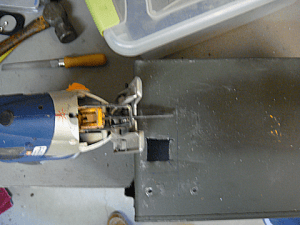
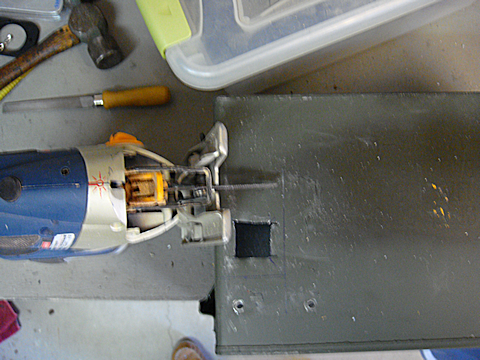
MiniMe-12Once I had drilled out the majority of the hole I got out the saber saw with a good metal blade and squared off the hole easily. I used my flat file to clean up the edges.
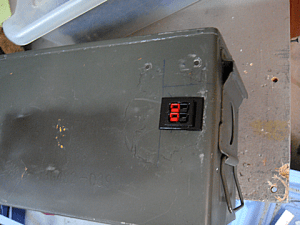
MiniMe-13The chassis mount slipped into place exactly like it was designed to.


Step #5 – Wiring up the system.
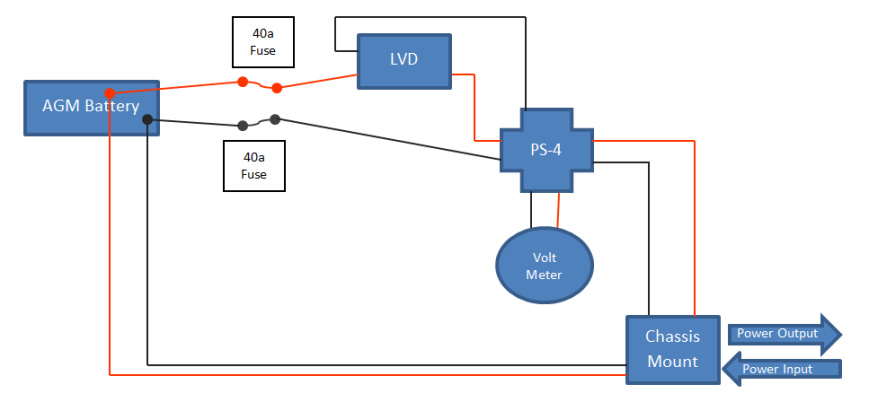
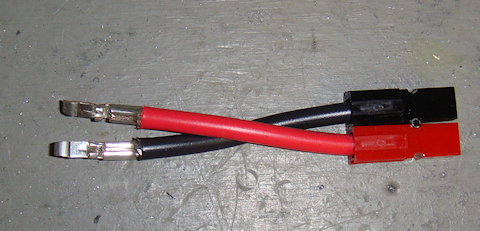
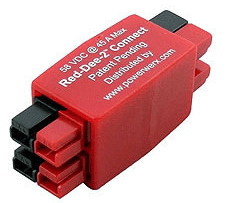
Portable power box wiring diagramThe first step was to wire the chassis mount’s pre-installed Anderson Powerpole connections. I could have done a longer straight MiniMe-15run to the LVD connection. However, I am absolutely committed to MiniMe-14keeping everything modular and interchangeable. That being the case I used this short pair to connect the “power out” pair on the chassis mount to the Powerwerx Red-Dee-2 power splitter. See wiring diagram for more information.
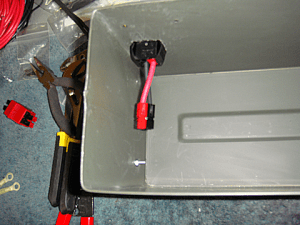
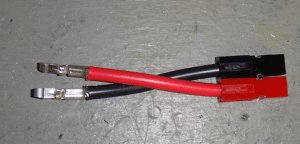
The “power out” wires are wired to the top pair of the Powerwerx Red-Dee-2 for power box power distributionchassis mount. The lower pair in the chassis mount is for “power in” purposes. Those “power in” purposes? The solar charger, 12vDC direct charger, or to allow the power box to be hooked in parallel to its brother power box creating a 70 Ah power source.
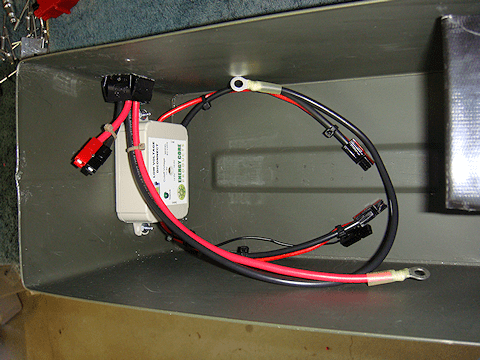
MiniMe-42


I wired the “power in” wire pair directly to the battery with ring terminals and Anderson Powerpole connectors directly into the chassis mount. I wanted any “power in” to be connected directly to the battery to reduce current loss since it would be for charging the battery or running a parallel operation.

The wiring in pretty cramped and crammed in the box, but I was going for the smallest possible and practical box I could get everything into. It doesn’t have to look pretty, it just has to have quality parts and workmanship.  Oh, and it also has to work.MiniMe-50
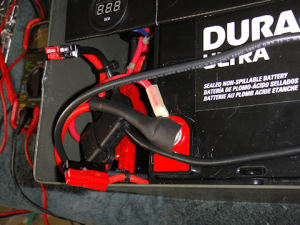
Tip #1 – Notice I am using zip ties? That reduces the tension on the wires and takes the strain off the Powerpole connectors.

Step #6 – Testing the system
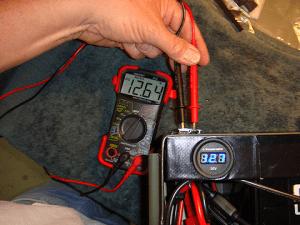
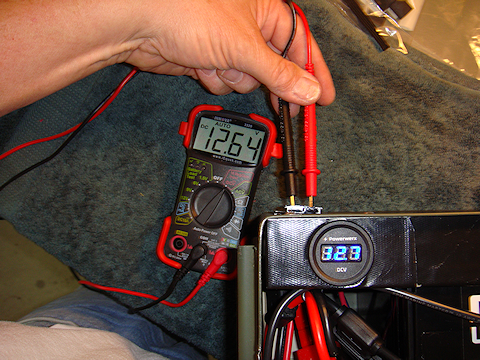
MiniMe-31As always, before putting the power box into operation I had to test the entire system. I test it one component at a time as I hook each piece up. I get a volt reading directly from the battery that becomes my baseline. Then a reading through the ATC fuse connection. Then hook that to the Powerwerx Red-Dee-2 power splitter and test each outlet of the splitter.

Then I hook up the volt meter and verify that it is getting the same reading my multimeter is getting. There was a .06 voltage difference. And that is only because the voltmeter only displays 10ths of a volt, whereas the multimeter displays in 100ths. Then finally I checked the connections in the chassis mount. All were good.

Step #7 – Protect the positive terminal.

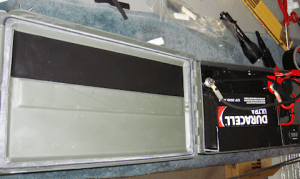
There is a very minor issue that I felt I wanted to take proper precautions for. The positive terminal of the battery does not make contact with the box’s metal lid when the box is closed. But only by a small fraction of an inch. So I wanted to further reduce any chance of shorting the positive terminal to the box lid.

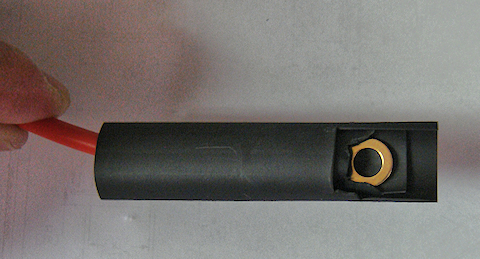
The way I did that was to cut two pieces of shrink wrap. One about 2″ long, the second slightly longer. I cut a notch out in the end of the first piece of shrink wrap to create a small “flap” that will cover the head of the bolt that is the positive terminal.

I then took the slightly longer piece of shrink wrap and did the same thing but made the notch larger to create a larger “flap” that covers more then just bolt head. So now I have two flaps of rubber that cover the head of the bolt that is the positive terminal of the battery. But I wanted to take it one step further. I took piece of my Gorilla Tape and ran it along the underside of the box. If the bolt head were to make contact with the lid, this is where ti would happen. So the layer of Gorilla Tape acts as an additional insulating layer.

MiniMe-23     MiniMe-22

bolt head battery terminal is covered with two layers of shrink wrap

bolt head (battery terminal) is covered with two layers of shrink wrap


Final Product !
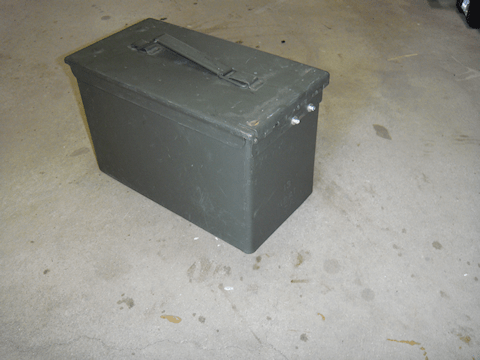
Looking at the box from the right rear corner
Looking at the box from the right rear corner


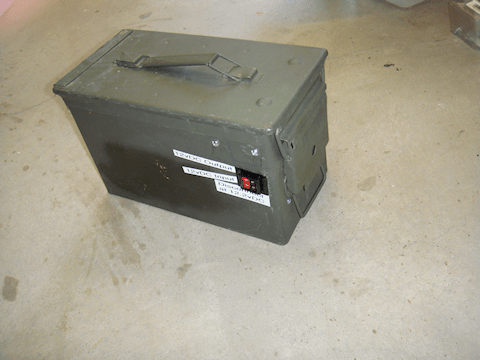
looking at the box from the left front corner

looking at the box from the left front corner

Final Note : Yes, I put the labels on there at an angle on purpose. It was a little flair, some dramatic license, to differentiate the purposes for the two sets of Anderson Powerpole connections.


2009 - 2019 Copyright © AHTrimble.com ~ All rights reserved
No reproduction or other use of this content 
without expressed written permission from AHTrimble.com
See Content Use Policy for more information.

Portable Power Box – Part #1

note: first appeared in July 2015

I am not a Ham radio “geek” but I do have a couple Ham radios and I like using them. One thing for certain, when an emergency, disaster, or “grid-down” strikes…radios will be essential. I mean “essential” not because they are a radio, but because communications will be absolutely necessary in those situations.

Along with the actual radio you have to have a quality antenna for your rig, that should go without saying. But what about power?


As with all my equipment I define a mission. The mission for this project is:

“Provide sufficient power to allow the limited use of a radio for at least 15% of any given 24-hour period. During which transmission power usage will be approximately 40% of that time period.”

Notice that the time period required to keep the radio operational is less than four hours of actual run-time. That may not sound like a lot but it could be significant when available power is at a premium. Stated in a little more “plain English” I want to be able to run my radio about 3.5 hours per day. And of that run-time I want to be able to transmit almost 1.5 hours. Based on the calculations stated in the mission, I need a 34 ampere hour capacity battery and the capability to recharge it.

And while I may have generator capability available to recharge the unit, I want it to be solar rechargeable. But, I don’t want it “tied” to a solar panel set-up. I want to be able to interchange whatever solar system I have or can come across to recharge the unit.

I also don’t want it overly complicated and not “multiple-mission” capable. This unit is strictly for powering a Ham radio and the ability to recharge it via generator or solar. Can it do other things? Of course. But those are side-benefits.

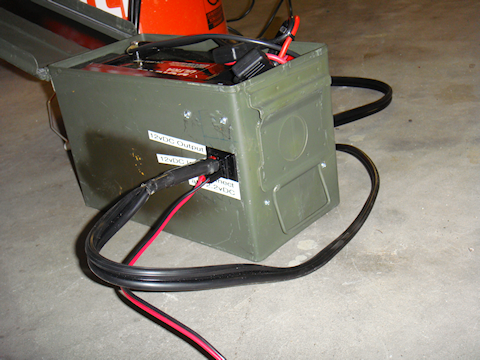
Here goes with the components –portable Power Box in a .50cal ammo can

For the storage box that will house everything I am going with a military surplus .50cal ammo can. It is a good size, very sturdy, and air/water tight. But most importantly it just seems to be the right size.

Once I picked out the box itself I was able to start looking into batteries. Obviously I wanted a “deep cycle” battery vs. a “cranking amps” battery. And the best/cost effective deep cycle batteries on the market right now are AGM style batteries in terms of how long they will keep a charge up. I won’t go into AGM details or why it is better; that’s way too technical for the scope of this article. That will be the focus of a later article just on that subject. But for now just know that I went with a deep cycle AGM battery. I wanted as many ampere hours as I could possibly get, but the box space was my limiting factor.

I spent probably 10 hours online looking at different battery manufacturers reading about the dimensions of different batteries and other details. I thought I had a battery identified correctly and ordered two. They arrived quickly, appeared to be solid, quality batteries. And of course, as you might guess, they didn’t fit.

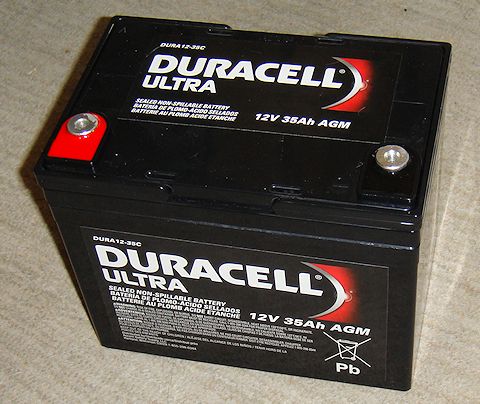
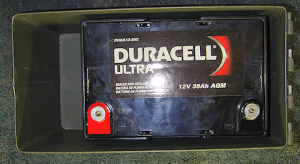
I had rounded up the width measurement of the box, and the batteries had a very small lip on them that was not included in the technical information of the battery stating the actual width. Combine the two very small variances and the batteries would not fit side-by-side in the box I had planned. Fortunately, they were the same batteries that I had identified for another project so all was not lost. So, hours more searching online till I finally gave up. Good news is we have a Duracell Ultra battery 12v 35Ah AGM, model # DURA12-35CBatteriesPlus store in town so I grabbed the box and headed to the store. Ten minutes later I was walking out the door with a great battery, the Duracell Ultra 12v 35Ah AGM, model # DURA12-35C.

I was pleasantly surprised to have 35Ah capacity in such a small package. And remember that, based on my usage requirements, I needed a 34Ah battery or larger. You never know when the extra 3% capacity will be the one transmission you get out before the battery dies. Yeah, sorry a little melodramatic but you get my point.


So here are some technical facts on the DURA12-35C:

  • AGM technology (absorbed glass matt)
  • 12vDC SLA (Sealed Lead Acid) Battery Battery
  • 35Ah
  • U1 Group Size battery
  • Handles offer easy lift & carrying
  • Speedy connection with 6mm female threaded terminals
  • Size: 7-3/4″ L x 5-1/8″ W x 6-1/2″ H

Now here is a point of the box design that I struggled with just a little bit. I wanted to keep the integrity of the box intact. In other words I don’t want anything going through the box walls. That will keep it water and air tight. But I need to be able to have a set of Anderson Powerpoles to hook up a line to the radio and I need a set of Anderson Powerpoles to connect the solar charging unit to the box to keep the batteries charged up. And I want a voltmeter to keep track of the battery.

I have seen over the years that the more points you have that are vulnerable, the more likely you are to have a failure. So every breach of the boxes integrity is a potential failure point. But there is also the convenience factor as well; the box has to be easy to use.

Anderson Powerpole Chassis Mount for 2 Powerpoles Sets (4 conductors)This is where compromise and trade-offs come into play. I decided to go with the Anderson Powerpole Chassis Mount. This gives me a sturdy mounting system for two sets of Anderson Powerpole PowerWerx.com supplier of Anderson Powerpolesconnections (power out, charging in). The Anderson Powerpole Chassis Mount is available through Powerwerx.com

While the box is no longer water or air tight, I think it will fall into that category of “good enough.” While it won’t keep water out, it will resist rain. And while it isn’t airtight, it will keep most of the dirt and dust out. I am thinking that when I complete the install I will look for ways to seal it up on the inside to make it more resistant to rain and blowing dirt/sand.

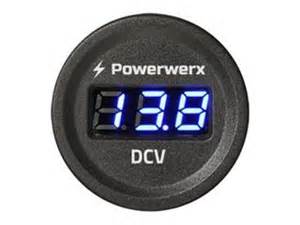
To track the battery voltage condition I went with the Powerwerx Panel Mount Digital Volt Meter. It has a nice blue Powerwerx Panel Mount Digital Blue Volt Meter for 12/24V Systemsdisplay and I’ve used them before. Again, available through Powerwerx.com PowerWerx.com supplier of Anderson PowerpolesNice little high-quality units. But this volt meter will be mounted inside of the box not mounted on the exterior. To do that I would have to drill a 1-1/2” hole through the box sidewall and I am just not ready to make that size failure point.

I will have to fabricate a couple of “hold-downs” to keep the battery in-place. I will also have to fabricate a panel on which to mount the volt meter. I will integrate them just to make everything sturdier. And I will probably have to do a “bolt-through” or two to make it all stable. But I will try to keep those integrity breaches to a minimum.ATC Style Fuse Holder 10ga with 1/4" Ring Terminals and Anderson Powerpoles

To protect the electrical circuit I will use a Powerwerx ATC Style Fuse Holder 10ga with 1/4″ Ring Terminals and Anderson Powerpoles. The fuses are common, readily available and I can even pinch them from a vehicle if I need to.

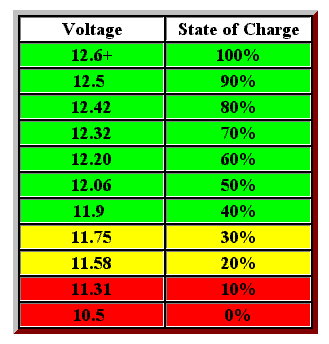
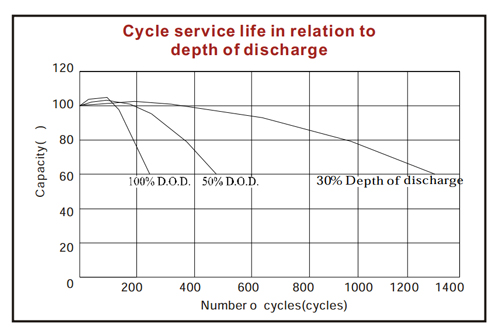
There is a wildcard as far as interior components are concerned, LVD (low voltage disconnect). Overly discharging an AGM battery seriously reduces its life span (number of charging cycles). So you only want to draw it down to a certain voltage level. Based on the voltage stats of the Yaesu FT-8900R radio, the radio can operate down to about 10 volts before it shuts off. However, that is too much battery discharge under normal conditions for an AGM battery. Refer to the chart to see how the “depth of discharge” can serious reduce the number of times you can recharge the battery.

AGM battery discharge volts state of chargeAGM battery depth of discharge cycle chartNow, I can do one of two things to overcome that challenge:

1) Monitor the volt meter for a reasonable discharge depth, say 12.32 volts. And when the battery hits that level I manually turn off the radio till the battery is recharged.

2) Use a LVD unit that will automatically turn off the radio when a pre-set voltage level is reached. And it will also turn the power back on to the radio when it reaches a safe charge level once again. I am evaluating several different LVD units; one reasonably priced, the other is considerably more expensive. You can guess which one is probably better suited for this application. But I will provide more when my testing is done and I’ve made a final decision.

So that is it, no more guts for the power box than what I have outlined above other than the wiring. I will be using all Ham In The Box - Anderson Powerpole10g wire to ensure that the maximum current can be carried throughout the system. And, I want to make sure that I don’t overheat anything and burn it all up. As for connecting the wire to components I will once again be using Anderson Powerpole connectors for everything. This gives me a whole lot of options and flexibility. And most of all, when things get bad I can pull different pieces of my projects out to repair other more critical equipment. And I can do it with a minimal of effort, damage, and installation effort.

Solar Power –

I have already decided on two solar charging options:

Option #1 – A single panel system from GoalZero, Boulder 30 panel with the Guardian 12v charge controller. Goal Zero guardian 12v charge controllerThe charge controller has a built-in PWM Lead-Acid and supports up to 90W solar panels. It also has LED Status lights for the charging status and battery. Some technical specs on the panel –

Rated Power: 30WGoalZero Boulder 30
Open Circuit Voltage: 18-20V
Cell Type: Monocrystalline
Weight: 6.5 lbs
Dimensions: 21″ x 18″ x 1″
Optimal Operating Temp: 32-104 F
Certs: CE, FCC

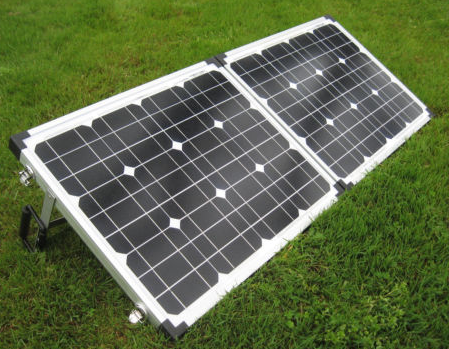
Options #2 – A Glow Tech dual panel, portable system 60 watt folding solar kit, with folding stand, and integrated charge controller. Features of the Glow Tech system:
•   High efficiency monocrystalline solar panelsGlow Tech solar Power Box 60 watt folding solar kit, w/folding stand, charge controller
•   Suited for flooded, gel, AGM, or calcium batteries
•   Low iron tempered glass resists breakage
•   Durable folding frame, so you can tilt the panels toward the sun
•   Built-in PWM charge controller
•   Bonus! Includes fabric storage bag
•   Spring-loaded carrying handle
•   Solar panels are weatherproof and sealed to withstand the elements
•   Includes cables pre-wired for easy hookup
•   25 years warranty on the solar panels

Technical Info:

•   Rated Power Output:   60WGlow Tech solar Power Box 60 watt folding solar kit, w/folding stand, charge controller
•   Optimum Operating Voltage [Vmp]:   17.5V
•   Optimum Operating Current [Imp]:  3.43A
•   Open Circuit Voltage [Voc]:  21.7V
•   Short Circuit Current [Isc]:   3.82A
•   Normal Operating Cell Temp [NOCT]:  47±2°C
•   Maximum System Voltage:  1000 vDC
•   Series Fuse Rating:   10A
•   Operating Temperature:  -40°C to +85°C
•   Application Class:  Class A
•   Cell Technology:   Monocrystalline Silicon
•   Folded Dimensions (approx.):   22¼” x 17¾” x 3″
•   Unfolded Dimensions (approx.):  43″ x 18″
•   Total Weight (approx.):   19lb 7oz


2009 - 2019 Copyright © AHTrimble.com ~ All rights reserved
No reproduction or other use of this content 
without expressed written permission from AHTrimble.com
See Content Use Policy for more information.