Great Solar Upgrade – Day #2

Day #2 come and gone!

Day #1 was without incident, problem, or even a hiccup…for which I am grateful. Day #2…not so much…but not bad at all.

First off let me explain that I had the project broken down into phases.

Phase #1 – Preparation: Getting all my parts and equipment purchased, on-site, any pre-work completed on them, get generator ready, gasoline purchased, and tools either purchased or centralized.

Phase #2 – Deconstruction: Remove all the old system components, organize, confirm that they are still serviceable, and replace/repair as needed.

Phase #3 – AC Re-Do: Replace the AC main disconnect fuses with circuit breaker, combine/join AC main panel, AC main disconnect, transfer switch into a single unit, rewire the generator to transfer switch wiring for later addition of a 240vAC inlet, and hook-up temporary fix to run generator.

Phase #4 – Construction: Add Hardee Cement Board to walls.

Phase #5 – Build Out DC: Literally rebuild the entire DC side of the system, including all the new gear.

Phase #6 – Configure: Charge up the new battery to same voltage as the existing two batteries. Using Victron software to configure and fine-tune the system.

Phase #7 – PVs (solar panels): Add another string (245w X 3S) to Array #2 and #3 and replace 8 x 100w PVs on Array #1 with 6 x 245w PVs (3S2P).

Phase #8 – Take a freaking week off and do nothing but enjoy the new system!

Phases #1 – #4 are complete, phase #5 is well underway. I did hit a snag and had to rebuild and relocate the AC main panel, AC main disconnect, and the transfer switch. That added an extra 2 hours to the process…rebuilding what had already been done. But, I had to move it to clean-up the layout and give proper access to the transfer panel and ensure the right clearance around Inverter #1. Other than that, the 13-hour day #2 went well.

I gotta post this, eat some breakfast, and get back after it 🙂

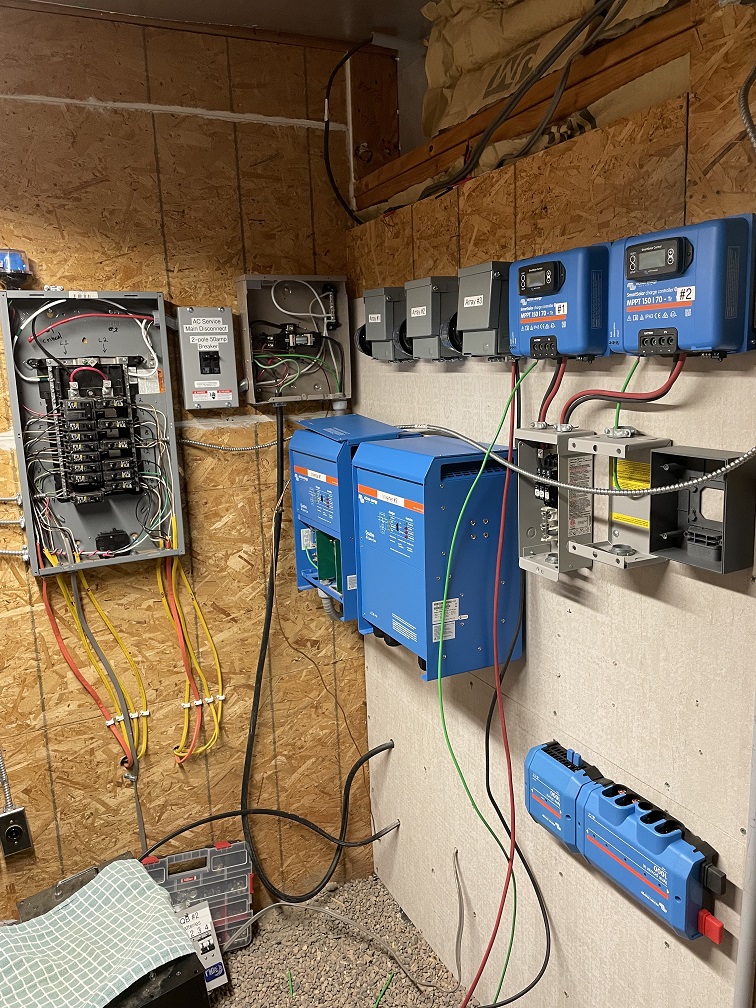
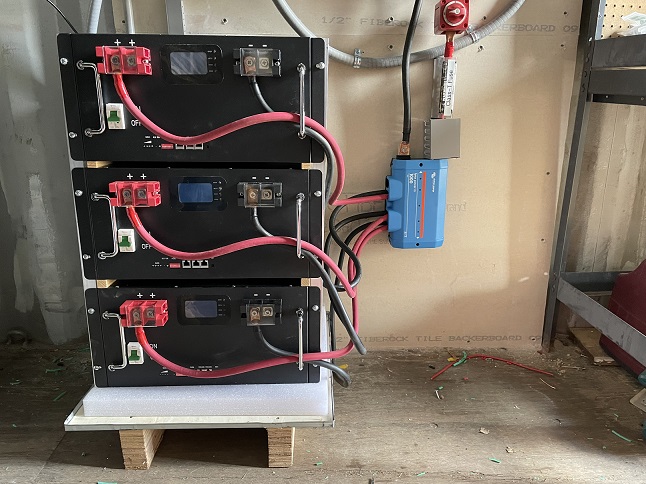
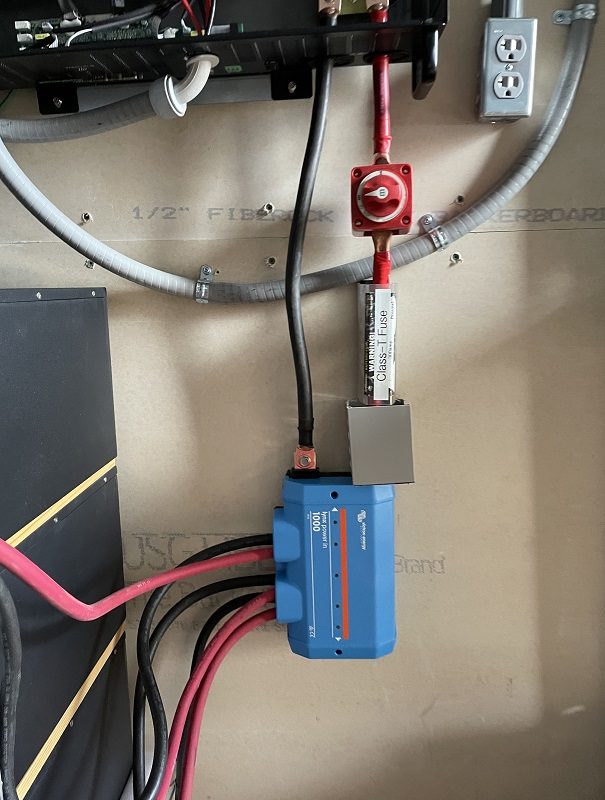
At the beginning of Day #2 –

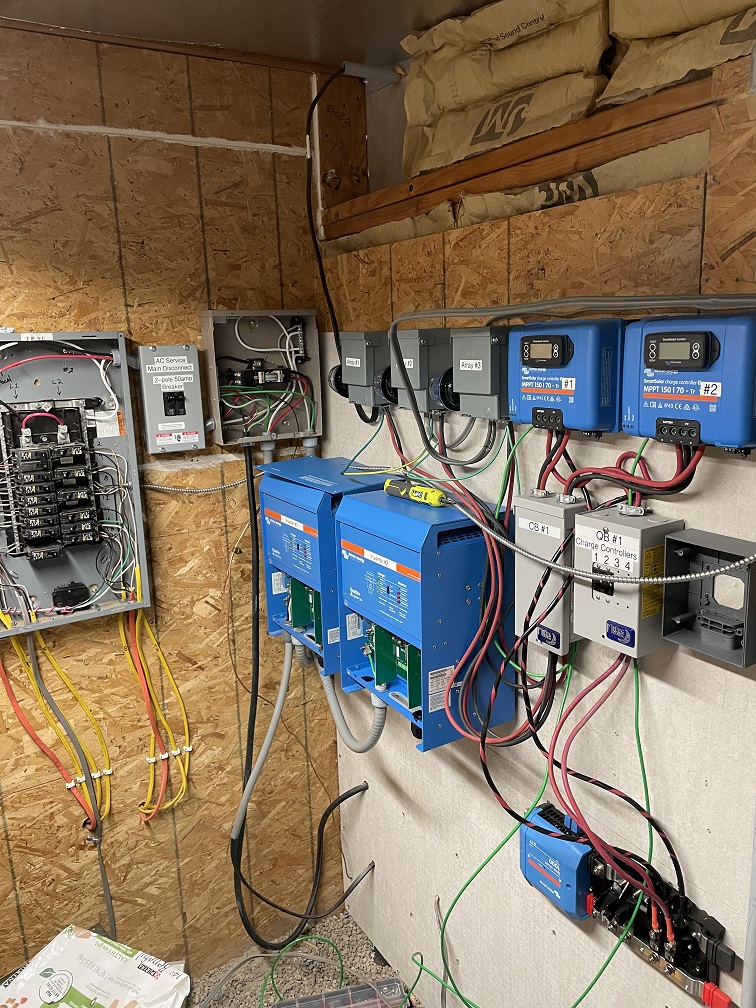
At the end of Day #2 –


Related Articles –
 2009 - 2023 Copyright © AHTrimble.com ~ All rights reserved
No reproduction or other use of this content 
without expressed written permission from AHTrimble.com
See Content Use Policy for more information.

Great Solar Upgrade – Day #1

So late last week I actually began the “Great Solar Upgrade” here at the glamstead. I began labeling electrical boxes, installing wire tension lugs, and some other pre-work tasks. Yesterday was Day #1 of actually digging into the system itself.

Here is what the changes are:

    • Solar generation increase from 3.8kw to 6kw, 58% increase in PV power.
    • Power output increase from 5kw @120v to 10kw @120/240v, 100% increase.
    • Power storage increase from 12kwh to 32.3kwh, 63% increase in power storage.

So a non-solar person that means I can generate more power from my solar panels, run twice the electrical loads in my house from my inverters, and store a 3 days of regular power in my batteries. In a conservation situation, that means I can go about 6 -7 days without sun and still have electricity.

So I am trying something new I will post a video of what is happening with the system, and also a before and after picture each day with a brief narrative. But, later I will produce a much more detailed story of what happened each day and why…for you solar nerds like me.

So here is the start of Day #1 (the before) –

Here is the end of Day #1 (the after) –


Related Articles –


 2009 - 2023 Copyright © AHTrimble.com ~ All rights reserved
No reproduction or other use of this content 
without expressed written permission from AHTrimble.com
See Content Use Policy for more information.

Victron Lynx PowerIn – Class T Fuse & Battery Switch

In a recently installed solar system I use a Class T fuse between the Trophy battery bank and the inverter. A Class T fuse is a fast-acting, high amp rated capable fuse.

I installed a 300amp fuse based on the anticipated current draw for size inverter that the system has (6kw, 50aAC, 150aDC max). The fuse is placed directly after the Victron PowerIn that is the busbar for 3 x 10⁵ah LifePO4 batteries connected in parallel. The Class T fuse can handle a 20,000aDC inflow without failing. Do not confuse this with the 300a interrupt rating of the fuse. The 20,000aDC inflow rating means that the fuse will maintain its integrity even at 20,000aDC. You can’t get that with a fuse such as an ANL and most DC circuit breakers.

I did not use a ‘lug’ style connection point with the PowerIn because cost was a factor, the Class T fuse holder is a mechanical version…a used one I had access to. Meaning, the insulation stripped cable goes to the fuse holder is placed into a mechanical lug which is tightened down. I did however use a feral to keep the cable end from deforming and losing connection integrity.

But, this installation presented a bit of a problem…an exposed PowerIn connection point with exposed lug. No way you want an exposed high current connection point such as this. Just think about a young child, or yourself, touching the exposed lug and completing a circuit! Or dropping a tool that makes contact with both points. Yuck!

Fortunately there is an easy fix to this situation…wire trays, wire raceways, wire ducts, etc.; they go by a number of different names. But they are simple is concept…plastic constructed boxes to protect wires.

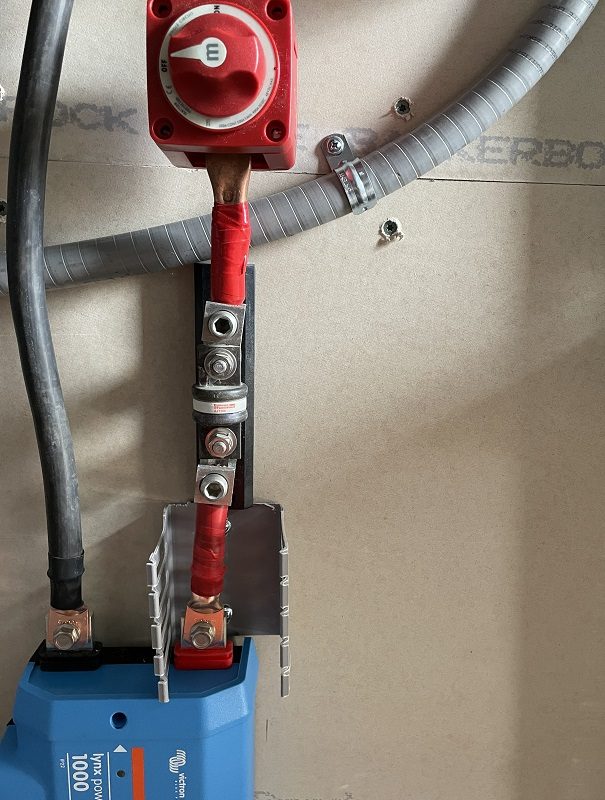
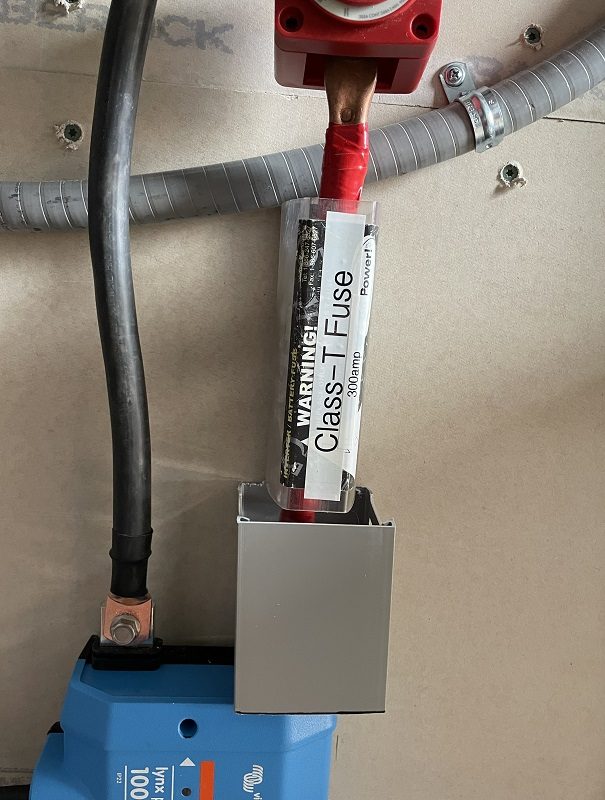
In the picture below I simply cut a very short piece of wire duct to fit between the PowerIn and the Class T fuse holder. With the wire duct cover in place a person, or tool, can’t come into contact with the exposed end of the busbar or the wire lug.

The Class T fuse hold comes with a protective cover preventing contact with the fuse, its connection points, etc.

And, if you looked at the picture close enough…you see an exposed lug going into the battery switch. Once the switch is permanently mounted I will cut another piece of wire duct to cover it as well.

Speaking of the battery switch…why do I have one?

Yes, each battery has a circuit breaker…I know that. And each circuit breaker is designed to cut off the flow of power from the battery…I know that too. But, me personally, I like to be able to completely and assuredly disconnect any power flowing between the inverter and the battery bank. And yes, that battery switch is not only rated for the current that will be flowing…it is ‘marine grade’ which is a full step up from normal and common battery switches.


Related Articles –

Donate-3


2009 - 2023 Copyright © AHTrimble.com ~ All rights reserved
No reproduction or other use of this content 
without expressed written permission from AHTrimble.com
See Content Use Policy for more information.

Victron Lynx PowerIn – Used as a Battery BusBar

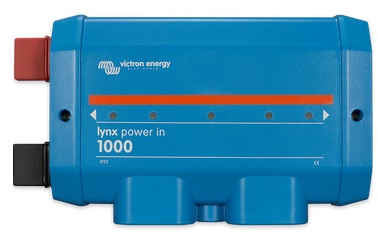
I’ve written about Victron’s Lynx PowerIn before…and how really cool I think it is. Today I am showing you how I used it for a busbar to connect three 105ah LifePO4 Trophy batteries into a solar system.


First off, remember that the PowerIn has a 1000amp busbar built in to the unit itself.

And it already has 13 connection points already for you to use:

  • 8 connection points for 4 sets of heavy duty cable/wire (4 positive & 4 negative),
  • 1 connection point for an additional connection to the negative side of the busbar,
  • 4 connection points to connect additional Lynx units to the PowerIn or other system components.

In this system that I put together I used:

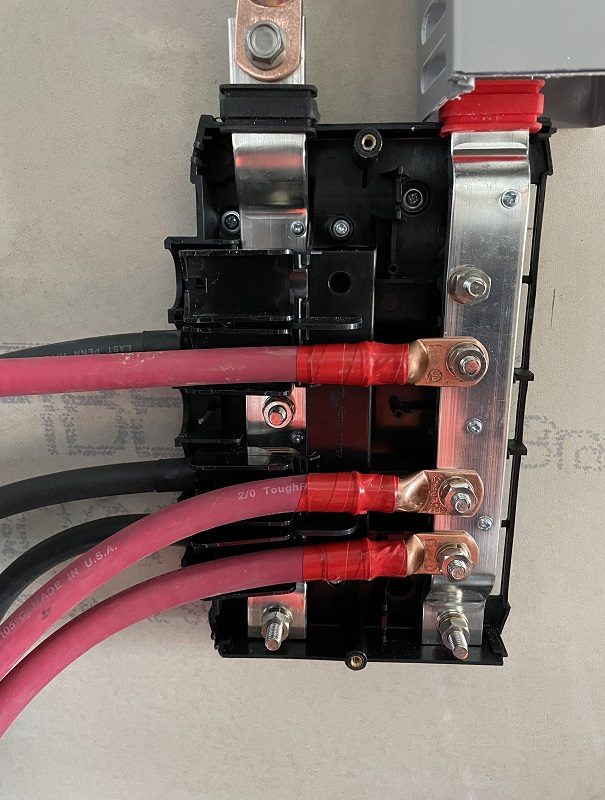
  • 6 connection points for 3 sets of 2/0 cable/wire (3 positive & 3 negative) connecting each Trophy battery to the busbar in parallel,
  • 2 connection points (1 positive & 1 negative) connecting the negative end of the busbar directly to the inverter, the positive end to the 300amp Class T fuse.

Note: As per battery manufacturer I am not connecting a ground wire from the PowerIn busbar to earth ground.

You connect the negative wire first on the negative busbar, then flip down the plastic piece that keeps the wire separated and protected.

Then you install the positive wire.

Close it up and you are ready to go.

I used 2/0 cable connecting the each battery to the PowerIn’s busbar for 3 reasons; 1) Trophy battery manufacturer recommendation, 2) inverter manufacturer recommends 1/0 cable but 1/0 cable is not a standard size for solar system wiring and I like to up-size cable/wire anyways, 3) based on 50aAC output that means roughly 150aDC max draw, sizing calculator says 4AWG but leaves no leeway for over-current protection, Since my Class T fuse provides 300amp over-current protection that means it can safely protect 1/0 cable, so I once again up-size to 2/0. Yes, I am allowing for over-current protection on any one battery cable vs 3…it is my margin of safety.

From the PowerIn to the inverter I use 4/0 cable. That is standard practice when running cable from a battery busbar to the inverter. Yes, I could have used 2/0 again, but why? Using 4/0 allows for battery bank expansion and truly adds that margin of safety when dealing with the potential of very high over-current in the event of a problem.

So there you have it…using a Victron PowerIn as a busbar! A very nice, neat, safe, and professional install. Yes, I could have used 2 conventional busbars, but why?

In the article “Victron Energy Lynx Distribution System – Lynx PowerIn Part #1” I did the math comparison of the costs…$221 (individual components) vs $156 (Victron PowerIn)…and with individual components I would have not had the quality of busbar, 600a vs 1000a, and I would not have had as many connection points, and not have had the expandable capability of the PowerIn. So do it any way you wish…but Victron’s PowerIn is the Tier 1 professional method.


Related Articles –

Donate-3


2009 - 2023 Copyright © AHTrimble.com ~ All rights reserved
No reproduction or other use of this content 
without expressed written permission from AHTrimble.com
See Content Use Policy for more information.

Keeping Lithium Batteries Warm

As you probably know, it is harmful to a lithium battery to charge it when it is at freezing temperature or below. That means 32F for us normal people…and 0 centigrade for those folks who don’t understand regular science and measurements.

Ok, ok…yes, I know that was pretty much rude and arrogant on the part of this American…typical…right!? But kinda funny from my perspective 😉

Back to lithium batteries…you can safely discharge lithium batteries slightly below 32F but you are not doing the batteries any favors. Charging lithium batteries at or below 32F can actually damage them. The lower the temp at which you try to charge it, the more damage is done…until you destroy it beyond recovery. So simply don’t do it.

However, in our area more and more folks are putting their solar equipment in CONEX containers or stand-alone, unheated sheds. And then winter rolls around, the temp inside the CONEX drops below freezing and they lose power. And then of course they are upset with someone…other than themselves. Why? Because they didn’t understand that most LifePO4 batteries, the good ones at least, have a temp sensor that will shut the battery down to prevent damage to the battery when the battery cells temp drop close to 32F.

And I have seen some real overcome projects come out of that…complex insulation boxes, propane heaters, heat lamps, etc. Ah, no need for all of that. And besides…a heat lamp uses an extraordinary amount of power…and that depletes your batteries pretty quickly during those long winter months.

So I did what many pros do…heat mats with thermostatically controlled outlets. Yup, that simple.

I looked on Amazon, and at my local hardware stone, looked for a high-quality thermostatically controlled outlet that turns on between 35F – 38F and turns of at 45F – 50F. I needed an outlet for each heating mat and a heating mat for between each set of batteries. Maybe consider a heating mat for the exposed side of each battery if they are in a block configuration.

If you are going to do this, the outlet units run from $15 – $26 or so for 1 – 3 outlets…just make sure you go for the best possible quality ones you can afford….you are protecting batteries worth thousands of dollars…you can afford quality outlets.

If you decide to do this, you can look at terrarium or seedling heating mats which run for $10 – $35. Or you can look at seedling heating mats as well which run about $12 – $18 each. Depending on how you have your batteries placed, you can place a mat between each two batteries, maybe one on the exposed side of batteries as well. Just make sure that the mat won’t overheat your battery. Batter should stay below 70F or so.

I would not place a mat over the face of a battery where there are terminals, wiring, controls, or displays.

Depending on your situation you might also need an insulated blanket over the batteries to keep the mat generated heat around the batteries. If that is the case I would suggest you move…you live in a far too cold environment 🙂

As with anytime you are working around electrical equipment, be very, very careful and follow all safety requirements and instructions. If you are hesitant or doubt your ability in any way…just call a qualified electrician or licensed solar installer. And naturally, you want to always follow recommendations and guidance from the battery manufacturer.

I am not a licensed electrician or a certified, licensed, bonded, or qualified solar system installer. The above information is not a recommendation or guidance for you to use in your system or with your equipment.

Donate-3

 2009 - 2023 Copyright © AHTrimble.com ~ All rights reserved
No reproduction or other use of this content 
without expressed written permission from AHTrimble.com
See Content Use Policy for more information.

Victron Energy Lynx Distribution System – Lynx PowerIn Part #2

Welcome to Part #2 of the Victron Energy Lynx PowerIn article!

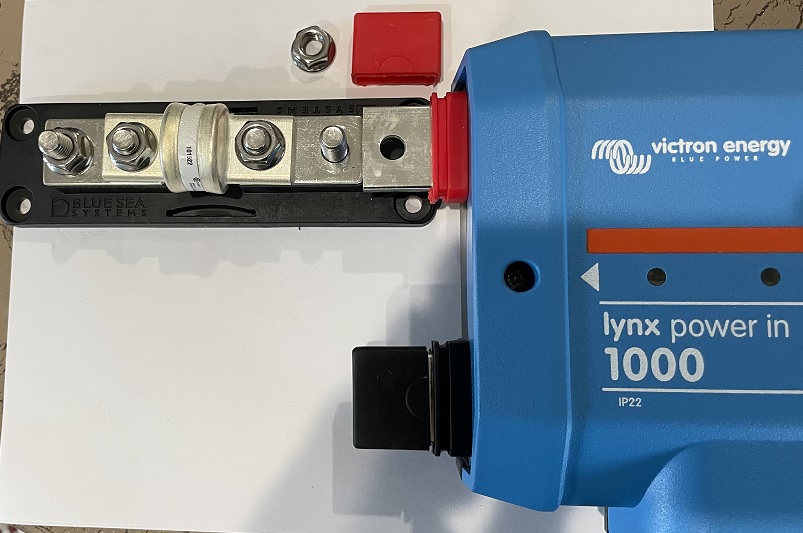
In Part #1 < click here to read Part #1 > I shared a bunch of information, here in Part #2 I will show you how I attached a Class T fuse and how I turned a PowerIn into a fused distributor/connection point.


The battery side of this is pretty simple –

Adding a Class T fuse to the PowerIn.

The PowerIn external terminal hole is 8mm, the Class T fuse is 3/8″ stud. Yup, won’t work. I drilled out the external terminal with a 3/8″ drill bit.

Once I had it drilled out, it fit nice and snug.

Added the Class T fuse holder plastic protective cover and all was good. The cover protects any accidental contact with the terminals. Yes, I used a Bluesea Class T fuse…you can’t get much better quality than Blesea.

On the distribution side of things it can used a bit differently –

I have two charge controllers and two inverters that need hooked into the system.

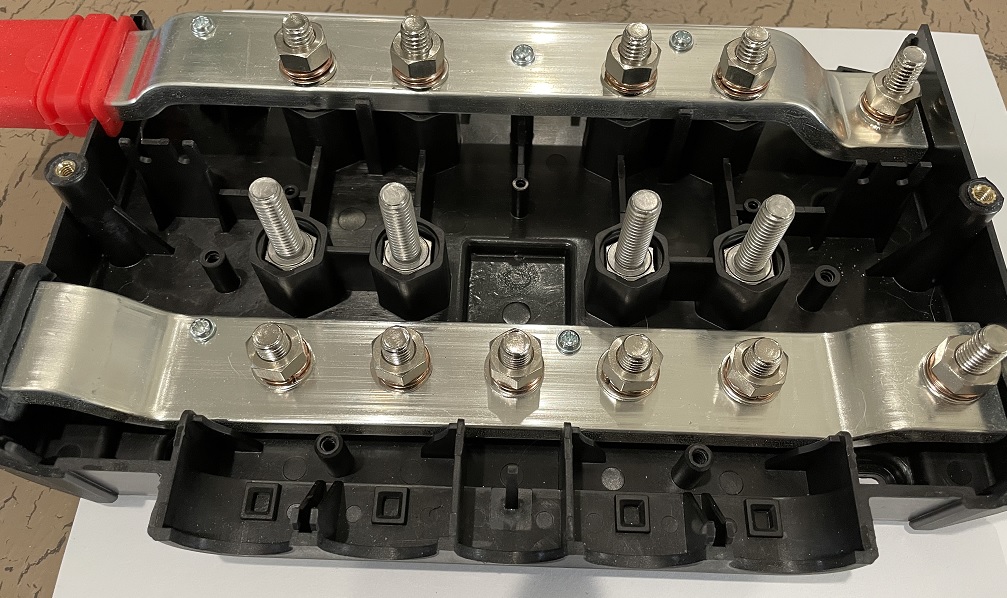
I could have used a Lynx Distributor, but it costs $66 more and I didn’t need the monitoring capability, nor the pretty lights on the cover. But, I did need fusing capability. So here is a great “hack” for you…you can turn a PowerIn into a budget (a.k.a. “poor man’s”) Lynx Distributor with 4 simple additions…nuts, washers, and bolts. Here is how you do it…

PowerIn Hack –

First thing, buy:

  • Four (4) M8 x 25mm Hex Head Screw Bolt, Fully Threaded, Stainless Steel 18-8, Plain Finish
  • Eight (8) M8 Hex Nut M8-1.25, 65mm Height, 304 18-8 Stainless Steel
  • Twelve (12) 316 Stainless Steel Flat Washer, Plain Finish, Meets DIN 125, M8 Hole Size, 8.4mm ID, 16mm OD, 1.6mm Nominal Thickness
  • Four (4) M8 Copper Split Lock Sealing Ring Spring Washer Fastener

Important note: Use stainless steel and copper only as mentioned. Do not use any regular steel, etc.

Next…

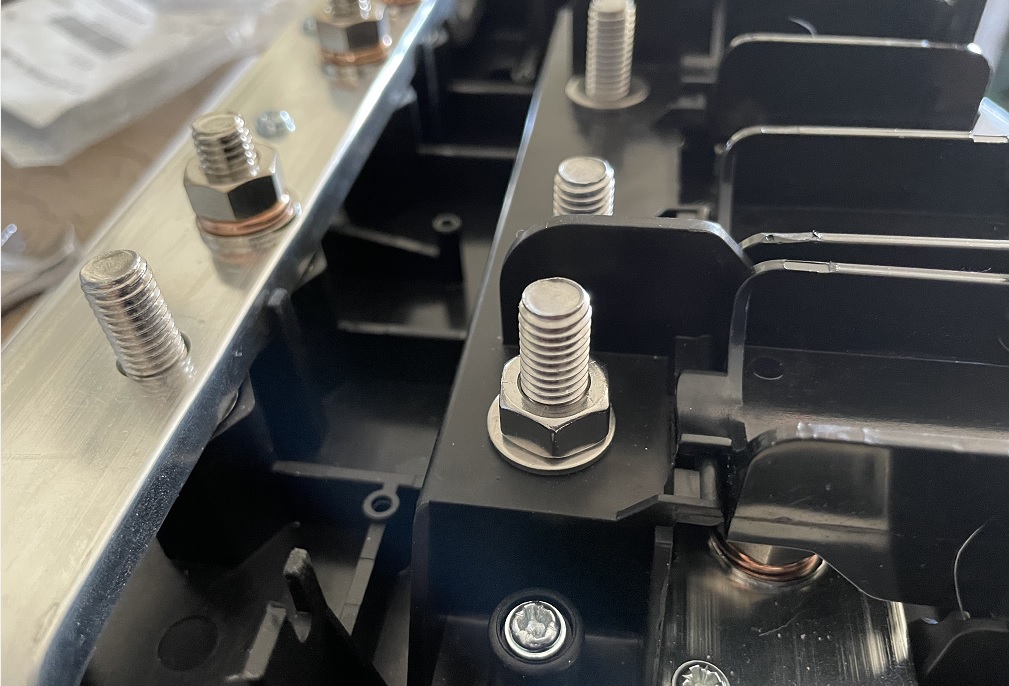
Then place the four M8 bolts in slots as pictured…

Then place a stainless steel washer on each bolt as pictured…(the washers reinforce the bottom part of the plastic to prevent damage to the plastic when you reinstall it).

Next you will replace the plastic cover and insert/tighten the 4 retaining screws that you previously removed.

Then add another stainless steel washer and stainless steel nut as pictured…(the washers again strengthen the plastic from damage, the nut raises the working surface to a level point for the fuse).

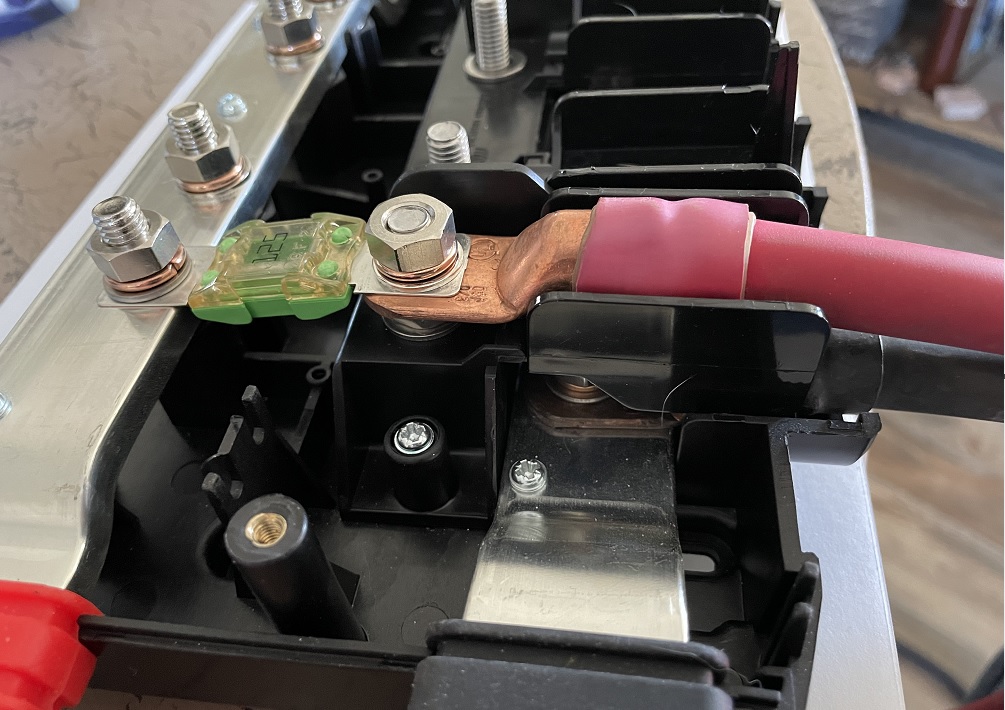
Then you can add your lugs and fuses…

PowerIn with hack completed, fuse installed and both positive and negative wires installed.

Important Note: There are other websites who do kinda the same hack…but they mostly get it wrong. They do not add the nut on top of the washer that sits on top of the plastic piece and before the fuse & lugs. Not putting that nut on creates a very disjointed angle for the fuse that could damage the internal fuse connections.

So there you have it…a Lynx PowerIn has many uses including that of a stripped down, economical Lynx Distributor.

Let me know if you have any questions!


Related Articles –

Send me your thoughts, ideas, comments, questions, and concerns…

Go back

Your message has been sent

Warning
Warning
Warning

Warning.


Donate-3

 2009 - 2023 Copyright © AHTrimble.com ~ All rights reserved
No reproduction or other use of this content 
without expressed written permission from AHTrimble.com
See Content Use Policy for more information.

Victron Energy Lynx Distribution System – Lynx PowerIn Part #1

The Victron Lynx Distribution System is a modular busbar system that incorporates DC connections, distribution, fusing, battery monitoring and Lithium battery management.

The system consists of the following components:

  • Lynx PowerIn
  • Lynx Distributor
  • Lynx Shun
  • Lynx Smart BMS

Each component’s main part is its 1000amp positive and negative busbars. And each component’s primary feature is the ability to connect together via the 1000amp busbars. However, each component has a separate function, they are:

  • Lynx Smart BMS – Only for use together with Victron Energy Smart Lithium batteries. If you don’t have Victron batteries, then you won’t ever need this component.
  • Lynx Shunt – Operates much like a smart shunt to monitor system energy usage. It connects to a Victron GX device to display that information, and the information can also be accessed via the VictronConnect app.
  • Lynx Distributor – Along with positive and negative busbars, there are 4 fused connections for batteries or DC equipment together with fuse monitoring.
  • Lynx PowerIn – Is essentially a Lynx Distributor without the computer board, fuse holders, and monitoring.

And the PowerIn component is the subject of this post. Why? Because I love it and I am using it in my upgraded glamstead solar power system. And most of all…you might find it useful as well!

There are 6 connection points on the positive bus bar and 7 connection points on the negative busbar, one of which is a ground connection. And remember, the busbar is 1000amp, made from solid copper with plating…making it even better than copper only. You can connect batteries, loads, chargers, etc. to the busbar as needed/required.

Connection points…
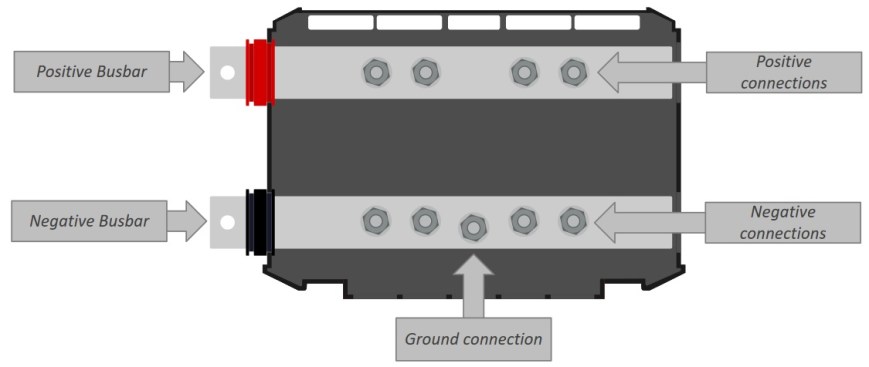
Wiring diagram…My use of the PowerIn is two-fold; 1) using it as a busbar to connect my LifePO4 batteries in parallel, 2) using a second one as a distribution/connection point for my inverters and charge controllers. I also use a Lynx Shunt, but that is a post for another day.

Use #1 – Battery busbar system:
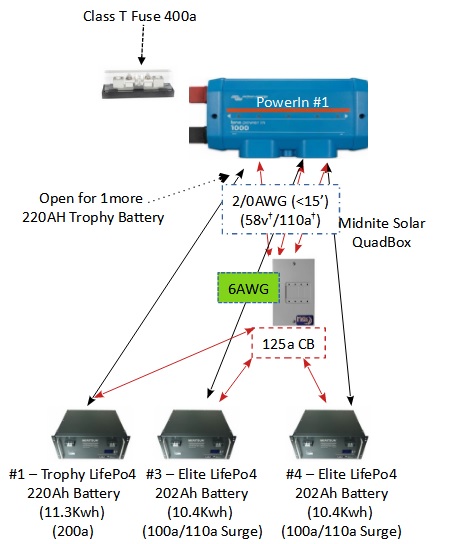
My batteries are “rack mount” batteries, but I do not have room for a racking system. So I am placing the batteries on a very low 3″ floor stand; batteries will be 2-high, 2-wide (when completed). If I had a rack system then I would not use a PowerIn, I would use a busbar built into a rack system mounted vertically.

With the PowerIn each battery will have equal length 2/0 cables capable of carrying at least 200amps. When complete, each battery will also have a Bluesea 175a high current MRBF Terminal Fuse mounted on the positive terminal to each battery. The MRBF fuse will isolate/protect each battery in the case of a high-current dead short. Yes, I know I am over-engineering the system. But, I am trying to give it as much redundant protection as I realistically can.

Also, connected to the external positive busbar “prong” (for lack of better description) I will attached a 400amp Class T fuse to protect the battery bank from an external high-current dead short, or, protect the system from a high-current dead short in the battery bank. Yes, I know…that means I am over-engineering again with a battery bank fuse protection and each battery fuse protected as well. But if you have ever seen a high-current dead short…well, you would want a lot of protection…a lot.

It at some point in time it might be desirable to add additional batteries to the battery bank (more than 4). If so, I will simply add another PowerIn by connecting it to the existing PowerIn and thus extending the busbar connection system. That is one of the true beauties of the Victron Lynx system…it is scalable and expandable.

The economics of a PowerIn –

First off, a PowerIn can be found on Amazon for $156.00…seems a little expensive to you? Well, let’s look at it in real terms compared to just a simple plain busbar set-up.

  • Good quality busbar with cover $110.58 (this is a 600amp vs Victron 1000amp) with only 4 connections vs Victron’s 6.
  • And you will need two of these, 1 for negative connections, 1 for positive connections = $221.16. And it isn’t modular.

The Victron PowerIn is $65 less expensive, more connections, more features and a very cool pretty blue cover.

But you say…I can buy two 250amp busbars for $37.99 on Amazon! Yup, you can…but look at the details…it is 250amps at 12v not the 58.4v that the solar batteries can operate at. (Oh, and other busbars are only rated at 48v maximum NOT 58.4v that the batteries can operate at.) Oh, and the busbar is plated brass NOT plated copper!

So go ahead and buy the cheap low-priced busbars and see how that works for you! If you choose this route…have plenty of fire extinguishers on hand and really good home owner’s insurance.

For those of you that want to see more of what you can do with the PowerIn…Part #2 will give details on attaching a Class T fuse to a PowerIn and how to turn the PowerIn into a fused distributor. And that info comes tomorrow!!

Let me know if you have any questions!

< click here to read Part #2 of the Victron Energy PowerIn >


Send me your thoughts, ideas, comments, questions, and concerns…

Go back

Your message has been sent

Warning
Warning
Warning

Warning.


Related Articles –

Donate-3


 2009 - 2023 Copyright © AHTrimble.com ~ All rights reserved
No reproduction or other use of this content 
without expressed written permission from AHTrimble.com
See Content Use Policy for more information.

TRAP: Solar – More Growatt Problems

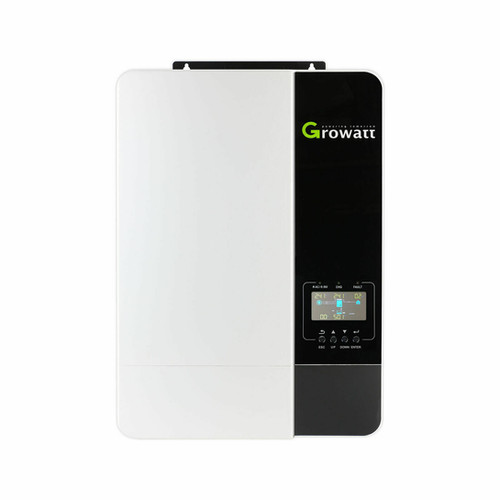
 I have previously written about Growatt issues before, and I am not a fan of the company…at all. I have worked directly with some of their company folks and I don’t like what I see in the way they conduct business and how they react when confronted with problems regarding their products. So here are two more additional problems.

One of those problems is their ethics in how they conduct business, the other problem is dangerous to US customers.

First, let me explain something…when you see most of the YouTube video reviews of solar equipment you are watching a money making machine. Most companies whose products are being reviewed pay to have those products reviewed by the person doing the video…not all, but most. And each time the video is watched the person who made the video is paid as well. I am not opposed to people making money by providing information on products.

However, some companies whose products are reviewed are quite demanding of the reviewers…such as Growatt. They have a very strict and company-friendly contract. In the case of Growatt the contract requires a pro-Growatt outcome of the review as well as extensive control of the content of the video…almost a script approved by Growatt. And do you think that would influence the person producing the review? Yeah, either its a favorable review or you don’t get paid.

The next issue is with the Growatt 5000ES inverter/charger. In simple terms…it is unsafe. There are two version of the 5000ES; 1) is sold in the overseas market, 2) the other is for the US market. Problem is with the different electrical standards between the US and overseas countries…and it is a potentially deadly difference.

The problem revolves around 120vAC vs 230vAC and the potential of the ground in the US version being energized with 120v and possibly 230v. Ah yeah, the ground being energized…and potentially without a person knowing it until they touch it!

So the same exact model label, the same exact model identifier, and the potential to cause serious problems.

For the most part Signature Solar sells the 5000ES that is safe to use in the United States…but I can’t confirm that 100%. The 5000ES overseas version is mostly sold via eBay from what I can tell. Again, I am not 100% sure that all eBay sellers are selling the overseas version here in the US…or that there are not other Growatt dealers selling the overseas version as well.

And here is the biggest problem with this issue…from what I can see Growatt hasn’t done anything to correct the situation. It would be as simple as redesignating the US version as 5000US or 5000ES-US and put the correct label on the box with the corrected manual inside.

Be very, very careful with Growatt products…if they are this negligent with something this obvious and simple…then what other problems are there with their equipment? And if they are so worried about negative reviews that they have to bribe some reviewer…then who else do they bribe and what reviews of their equipment are legitimate?

For you…who are looking to purchase equipment…is it worth the risk to deal with equipment from Growatt when there are lots of companies out their that you don’t have to really worry about?

note: No company pays me to review, comment on, or discuss their products or the company itself.


Related Articles –


 2009 - 2022 Copyright © AHTrimble.com ~ All rights reserved
No reproduction or other use of this content 
without expressed written permission from AHTrimble.com
See Content Use Policy for more information.

TRAP: Solar – Bad Professional Connections

Last month I was contracted to do some work for a local solar company. Part of that work was to salvage parts from old solar installation equipemtn that had been removed. Residential customers had hired this solar company to repair or replace their existing solar systems. The equipment I was salvaging was the stuff that had been removed and replaced with new equipment.

Yes, inside the old equipment had perfectly good bits and pieces that could be used to repair other equipment or sold as “used” for discounted prices. And yes, I love to do salvage work…it is fun to rescue perfectly good equipment pieces vs seeing them put into a scrap pile.

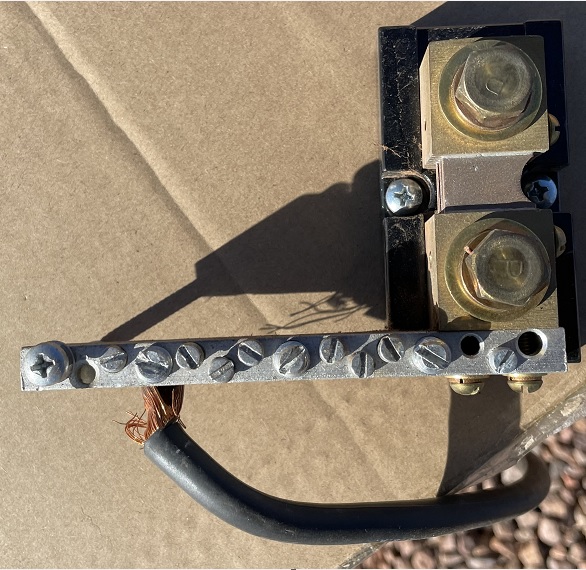
So I was tearing this stuff apart and found this shunt; the shunt was perfectly fine from all appearances, but it would be tested later to ensure that all was fine. But it wasn’t the shunt that caught my attention…it was the negative wire attached to the bus bar that was attached to the shunt. Do you see a problem with the connection? Here, let me give you another view…

Even if you are not an electrician or a professional solar installer you can see the problem. It is a horrible connection. I would estimate that only about 75% of the diameter of the wire is actually in the bus bar hole and even then it is only hanging on at the very end. So only about 10% of the original wire is actually connected to the busbar.

And no, that didn’t happen when I was removing the shunt.

Now, I will say that the screw was tight enough and was holding the wire in place, but that isn’t the point. There are two points;

1) The wire was only hanging on by about the last 1/8th of an inch…the very tip of the wire. It should have been fully inserted the entire width of the bus bar.

2) Only about 75% of the diameter of the wire was actually in the bus bar hole. In this case the wire was 6AWG stranded wire. Based on 6AWG the wire should be able to carry 70amps of current, properly installed. Well, since only about 75% of the wire’s diameter was actually making contact, it was the equivalent of about 10AWG stranded wire. And that means it was only capable of carrying about 30amps of current…had the wire been fully inserted. And since it wasn’t properly/fully inserted who knows for sure how much current the wire was actually capable of safely carrying.

See the problem with that?

Bottom line…

  • If you are doing the work yourself…do high-quality professional work. Don’t get in a rush, do it right, be proud of your install.
  • If you are having a system installed, ask to see inside the “magic boxes” and look them over yourself. You can see if the connections and work looks right and professional. If the installer gets upset or won’t take the time to show you what they are doing…well, that is serious reason for concern! It is your money…you have the right to inspect it all.
  • If you are buying a house that has a solar system, have it inspected by a local quality solar system installation company or a licensed electrician that is familiar with solar. It will be worth the fee.

These kinds of situations occur all of the time…there is some very shoddy workmanship out there by unprofessional and/or ignorant folks. Don’t you do it and don’t tolerate it from others.

Why? Duh, you could find yourself at the losing end of a house fire.


Related Articles –

Donate-3

 2009 - 2022 Copyright © AHTrimble.com ~ All rights reserved
No reproduction or other use of this content 
without expressed written permission from AHTrimble.com
See Content Use Policy for more information.

New Solar Home Page !

I have created a new Solar Home Page to make it a bit easier for folks to find all things solar related.

There is general information, Tips & Traps, our Glamstead project information, and the solar book project that I spoke of a while back.

The new page is a work in progress since I am trying out a few new ideas for page formatting so I am sure it will change…just not sure how as of right now.

So go take a look you might find some interesting information there even if you are all that interested in solar power.

< click here to visit the solar home page >


 2009 - 2022 Copyright © AHTrimble.com ~ All rights reserved
No reproduction or other use of this content 
without expressed written permission from AHTrimble.com
See Content Use Policy for more information.